

After assigning values.reverse() to result, result is None even though values has changed order. I kept digging to see what that result means for the next line of Python.
Before choosing a reversal, identify the object whose order you want to change. First, sort out whether your values are in a Python list or an array object.
Python lists and arrays are different objects
A Python list is a mutable sequence of values, while array.array stores values under a type code and a NumPy ndarray organizes them along one or more axes.
Reversing changes element order without comparing values. The object’s type determines which operation gives you the result you need.
| Object and operation | Reverses input in place? | Result |
|---|---|---|
| List reverse() method | Yes | None |
| List slice with step -1 | No | A new list |
| reversed(list) | No | An iterator |
| array.array reverse() method | Yes | None, same array type |
| NumPy flip() | No | A view with selected axes reversed |
If you are starting with Python’s typed array, see how to initialize an array and these Python array examples. NumPy uses ndarray objects, so its axis argument matters for matrices.
Choose whether to change the original list
An in-place call changes the list object, so aliases see the new order.
- Keep the current list and reorder it with the reverse() method.
- Keep the input unchanged and make another list with a slice step of -1.
- Visit values from the end in a loop with reversed().
Reverse a Python list
A Python list can be reversed in place. Slicing makes a copy, and reversed() lets a loop read values from the end.
1. Change the list in place
The reverse() method swaps the elements in the existing list and returns None. I tried assigning its return value and got None while the list changed, so call the method on its own when you want the same list reordered.
python3 -c 'a=[1,2,3]; r=a.reverse(); print(r); print(a)'
The Python list reference documents reverse() as an in-place operation, so aliases keep pointing to the changed list.
2. Make a reversed copy with slicing
A slice with a step of -1 visits the list from its last index toward its first and builds a new list. The source keeps its original order, which lets the next operation use either version.
python3 -c 'a=[1,2,3]; b=a[::-1]; print(b,a)'
![Python output showing slicing creates [3, 2, 1] while the source remains [1, 2, 3]](https://www.askpython.com/wp-content/uploads/2026/10/list-copy-output.png)
The slice builds a shallow copy, a new outer list that retains references to nested objects. Python’s copy reference describes this rule for compound objects.
3. Iterate backward without building a list
The built-in reversed() function returns an iterator that yields the existing values from last to first. A for loop can consume those values directly, and list(reversed(values)) creates a list when the result needs list operations.
values = [10, 20, 30, 40]
for value in reversed(values):
    print(value)
The reversed() reference describes the iterator protocol. If you need to collect each value into another list, append the values as the loop runs.
4. Reverse rows and items in a nested list
A nested list has an outer order of rows and an inner order of items. Reverse both levels by slicing the outer list and then slicing each row.
matrix = [[1, 2, 3], [4, 5, 6]]
reversed_matrix = [row[::-1] for row in matrix[::-1]]
print(reversed_matrix)
The outer slice changes row order, and row[::-1] changes the order inside each row. For more examples with nested data, see multidimensional arrays in Python.
Reverse array.array and NumPy data
Python’s standard-library array and NumPy’s ndarray use different reversal rules. Keep the type code for array.array, and name a NumPy axis when a matrix should flip in only one direction.
1. Keep an array.array type code
array.array stores values under a type code such as i for integers. Its reverse() method changes the existing array and returns None. Rebuilding the values from reversed() creates a separate typed array.
import array

values = array.array("i", [10, 20, 30, 40])
backwards = array.array(values.typecode, reversed(values))
print("Type code:", backwards.typecode)
print("Original:", values)
print("Reversed:", backwards)
The constructor uses the source typecode, which keeps the reversed values in an array.array object. See Python’s array module reference and how to add elements to an array.
2. Select a NumPy axis
For a two-dimensional ndarray, axis 0 selects rows and axis 1 selects columns. NumPy’s flip() reverses the chosen axis and preserves the array’s shape.
| Call | Effect |
|---|---|
| flip(matrix, axis=0) | Reverses row order |
| flip(matrix, axis=1) | Reverses items inside each row |
| flip(matrix) | Reverses every axis by default |
python3 -c 'import numpy as n;a=n.array([[1,2],[3,4]]);print(n.flip(a,0));print(n.flip(a,1))'
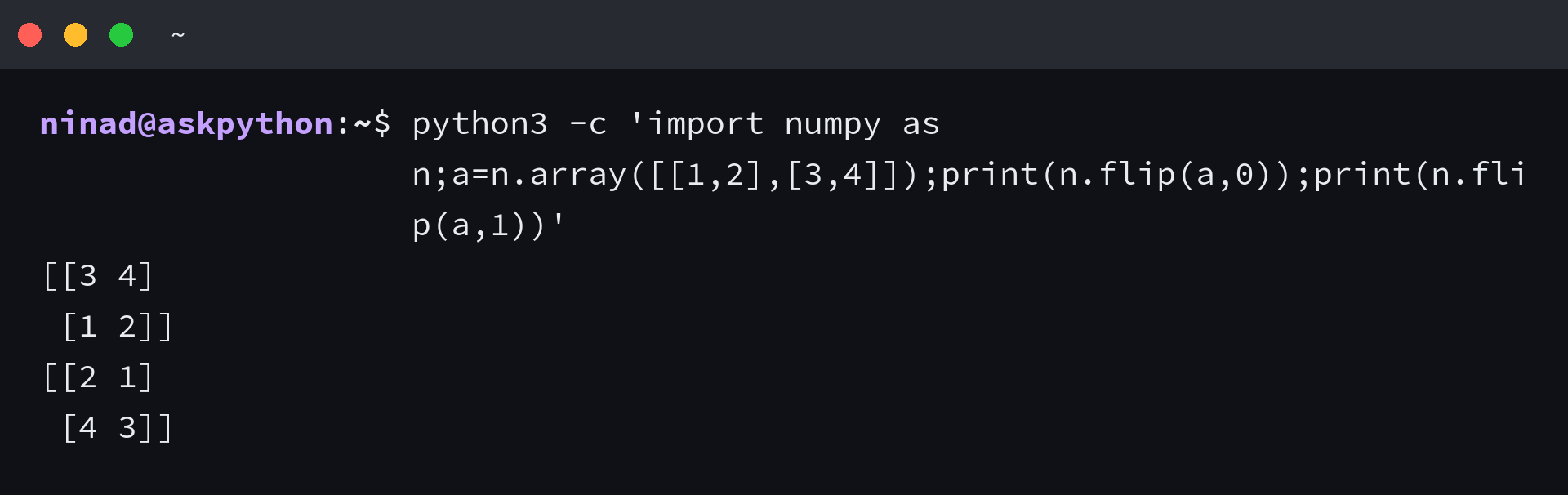
The NumPy flip reference says the result is a view that shares the source buffer, and the default reverses every axis.
I found that specifying an axis for a matrix avoids flipping every dimension by default. A write through flip()’s returned view also changed the source array.
python3 -c 'import numpy as n;a=n.array([1,2,3]);b=n.flip(a);b[0]=9;print(a)'

Because flip() returns a view that shares the source’s buffer, call copy() before editing an independent result. NumPy arange and NumPy linspace can create input values, and array-printing examples help inspect them.
Check return values and NumPy axes
Sorting compares values to produce its chosen order.
- reverse() returns None after changing a list or array.array in place.
- reversed() returns an iterator. Use list() when a list result is required.
- NumPy flip() returns a view. Call copy() before editing an independent result.
- Slicing also handles an empty list or a one-item list without a special case.
For the values [3, 1, 2], reversal yields [2, 1, 3]. Sorting in descending order yields [3, 2, 1] because it compares values.
Choose the operation that matches your next step
Use reverse iteration when you need each original index along with its value. The range starts at the last valid index and stops before -1, so index zero is included.
values = ["a", "b", "c"]
for index in range(len(values) - 1, -1, -1):
    print(index, values[index])
Frequently asked questions
A tuple stores an ordered sequence of values and cannot be changed in place. The same copy-versus-mutation choice applies to a tuple input.
Can I reverse a tuple in Python?
A tuple cannot be changed in place. Build a new reversed tuple with tuple(reversed(values)) or values[::-1].
