


NOLOCK double counting is the bug where three people stand in a lunch line and four lunches go out. Nobody new showed up. One person went through twice.
That’s this week’s episode of SQL in Sixty Seconds. Dex counts lunch tickets for Owen, June and Sam, and the total comes to four. Mia spots the problem in two seconds. Owen got back in line, and Owen’s excuse is that the second lunch is for later.
Watch It First
It’s sixty seconds, and the rest of this post makes more sense after you’ve seen Owen’s face.
Reading this in email or a feed reader where the player didn’t load? Here’s the direct link: NOLOCK Can Count the Same Row Twice, SQL in Sixty Seconds 213.
The Lunch Line Is Your Table
Swap the cafeteria for a table and the story holds up. Three employees, three rows, three IDs. A report counts them with NOLOCK, because somebody added the hint years ago to stop blocking.
SELECT COUNT(*) AS EmployeeCount
FROM dbo.Employees WITH (NOLOCK);
The answer comes back as four. There’s no fourth employee. Nothing was inserted and nothing rolled back. Owen’s row was read twice by the same scan.
How One Row Gets Two Tickets
For some scans, SQL Server reads pages in the order they sit in the file, not in key order. That can be faster when the query doesn’t need sorted output. Meanwhile, other sessions keep writing to the table.
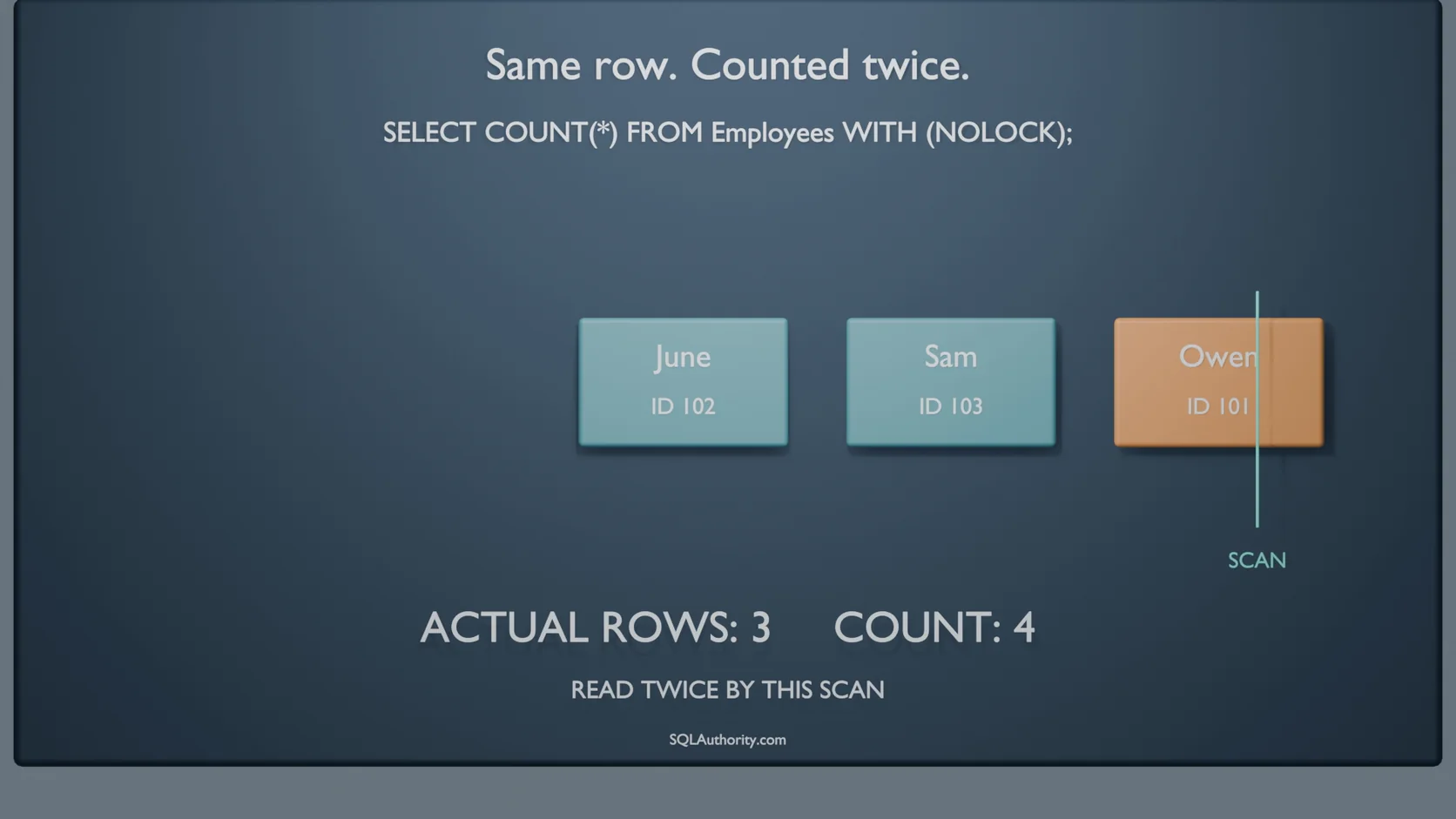
Here’s the move from the video. The scan counts Owen’s row first. Then an update changes the column the index is sorted by. Owen’s row now belongs further along, so it moves ahead of the scan.
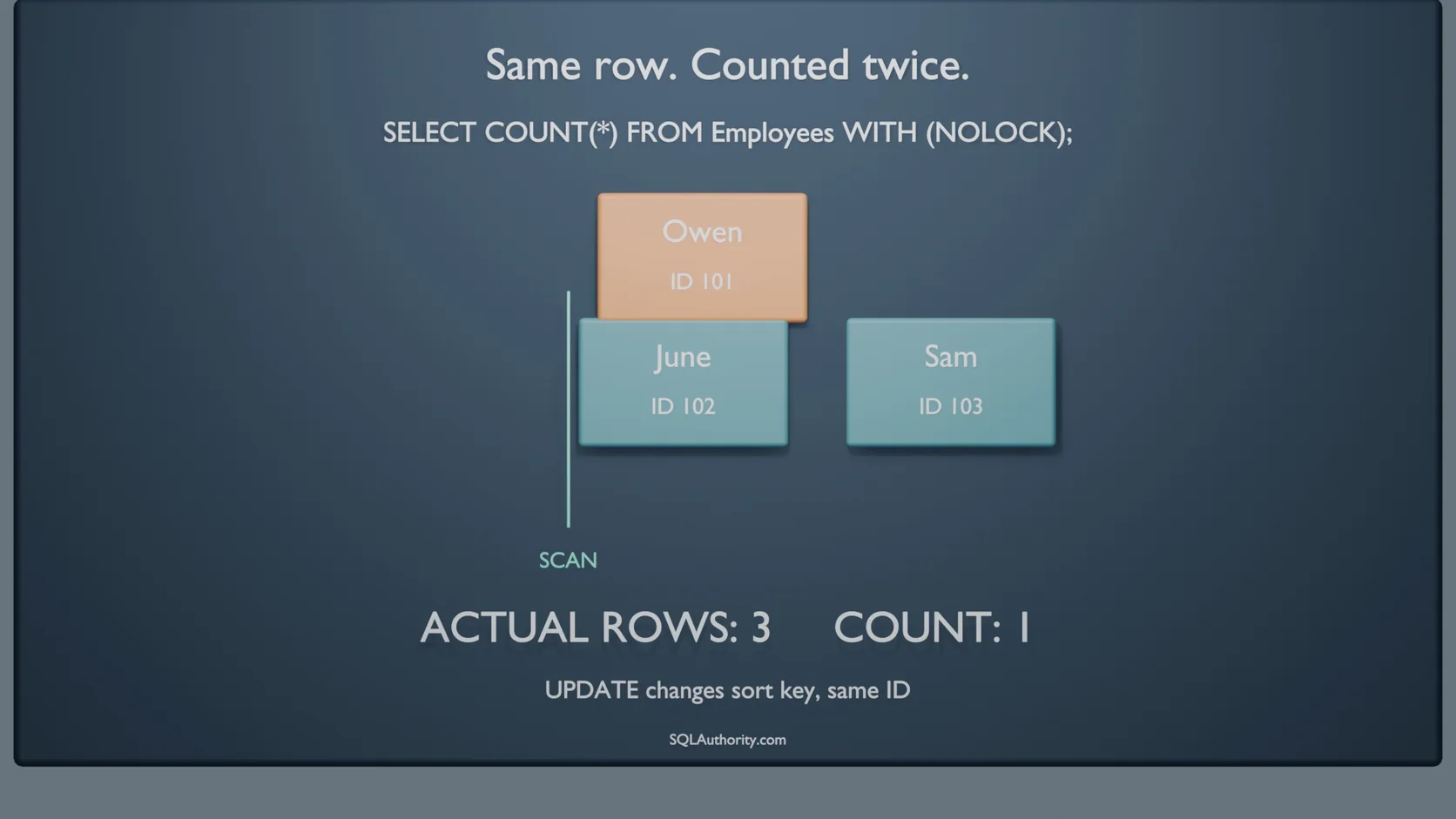
The scan keeps walking. It counts June, then Sam, then finds Owen waiting at the end. Same row, same ID, counted again.
A page split can do the same thing. A row grows, its page runs out of room, and some rows move to a new page. If that page sits ahead of the scan, those rows get counted again. I drew both directions with animations in NOLOCK: Why It Counts Some Rows Twice and Misses Others.
What I Measured This Morning
I didn’t want to lean on a cartoon, so I tested it today on SQL Server 2025 CU8. I built a table of exactly 100,000 employees. Two sessions kept updating rows to force page splits. A third session read the table with NOLOCK, over and over, for 40 seconds.
That reader ran 413 times. 410 reads were correct. Three came back too high: 100,076, then 100,050, then 100,004. None came back short in this run.
Every one of those wrong reads still held exactly 100,000 different employee IDs. The extra rows weren’t new people. They were the same people, read twice. Employee 87076 was one of them, the Owen of my test.
All three happened in the first few seconds, while the pages were splitting hardest. That’s the part I’d remember. Double counting is rare, and it shows up when the table is busiest, which is when nobody has time to check.
Catch Owen on Your Own Table
Copy the IDs out with the same NOLOCK read, then look for any ID that shows up more than once. Run it while the table is busy. On a quiet table it returns nothing and proves nothing.
DROP TABLE IF EXISTS #Seen;

SELECT EmployeeId
INTO #Seen
FROM dbo.Employees WITH (NOLOCK);

SELECT EmployeeId, COUNT(*) AS TimesSeen
FROM #Seen
GROUP BY EmployeeId
HAVING COUNT(*) > 1;
I ran that exact script 314 times against my busy test table. Two runs came back with repeated IDs. The first one caught six employees, each seen twice. Any row it returns is an Owen: one employee, two tickets.
Getting a Count You Can Trust
If a number has to reconcile, don’t read it with NOLOCK. I covered the options in NOLOCK Can Miss Rows: The Order That Was Never Missing. Here’s the short version.
Need a rough number? Read the row counts from sys.dm_db_partition_stats. It reads metadata, not rows, so it doesn’t scan or block. Microsoft calls those counts approximate, so keep them for dashboards.
Need a number that was true at one moment? Use snapshot isolation. Readers see one consistent version of the data without blocking writers. Test it first, because the row versions need space.
Added NOLOCK to stop blocking? Fix the blocking instead. A missing index or a transaction left open will keep hurting, whatever hint the reader uses.
Owen Will Try Again
Owen’s excuse in the video is that the second lunch is for future Owen. SQL Server doesn’t have a future Owen. It has one row, counted twice, inside a total that looks perfectly normal.
I’ll admit I used to defend NOLOCK on reports that only needed a rough idea. A rough idea is fine. A number that was never true at any moment isn’t the same thing. Has a row count ever surprised you? Tell me in the comments.
NOLOCK double counting is not a new row, it is the same row read twice.
Published by Pinal Dave on SQLAuthority. More of my work at pinaldave.com.
