

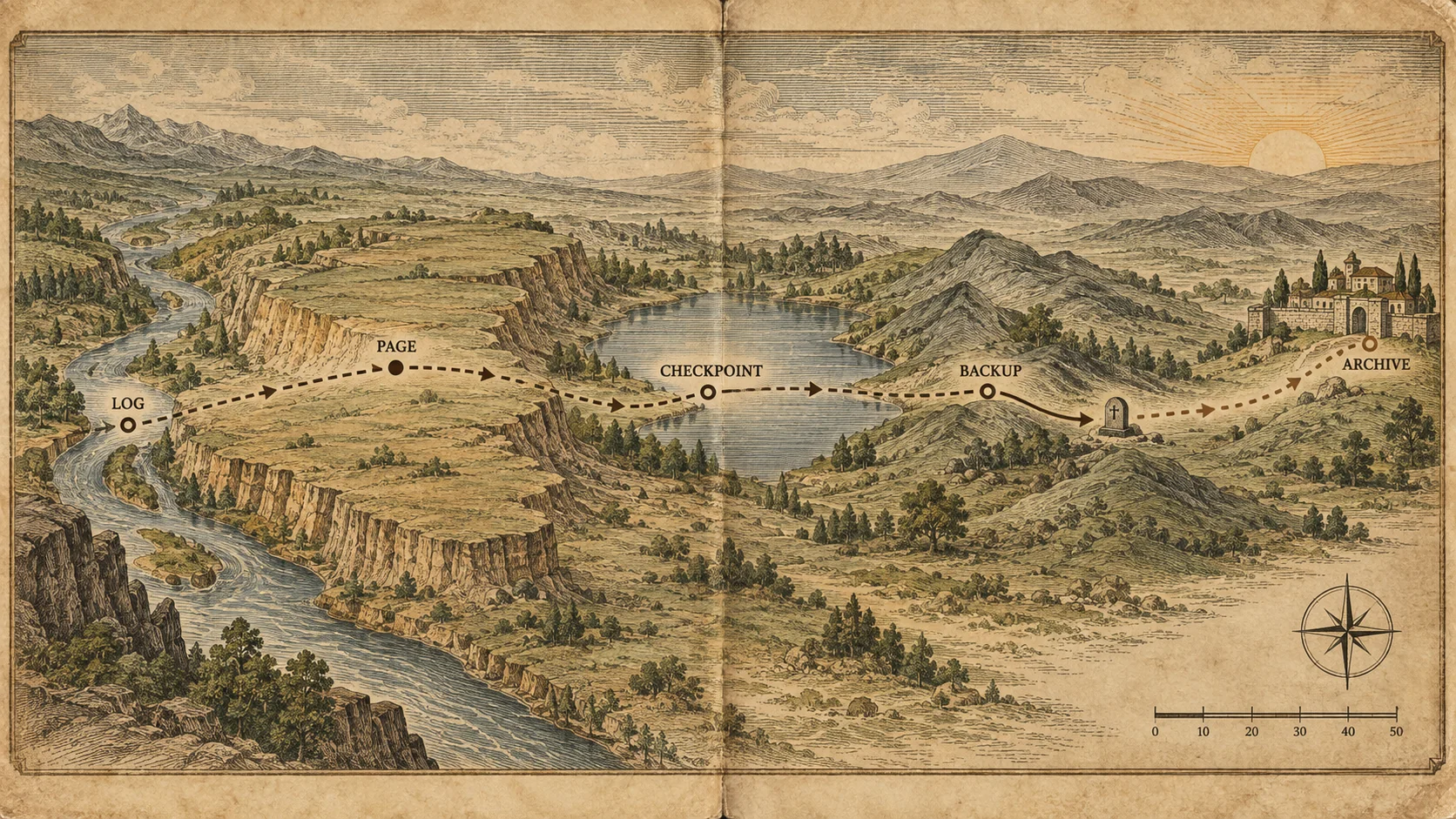
The migration of a row is short in distance and long in consequence. I tagged one on a Sunday evening and followed it to the grave. It is still out there.
The Short Version
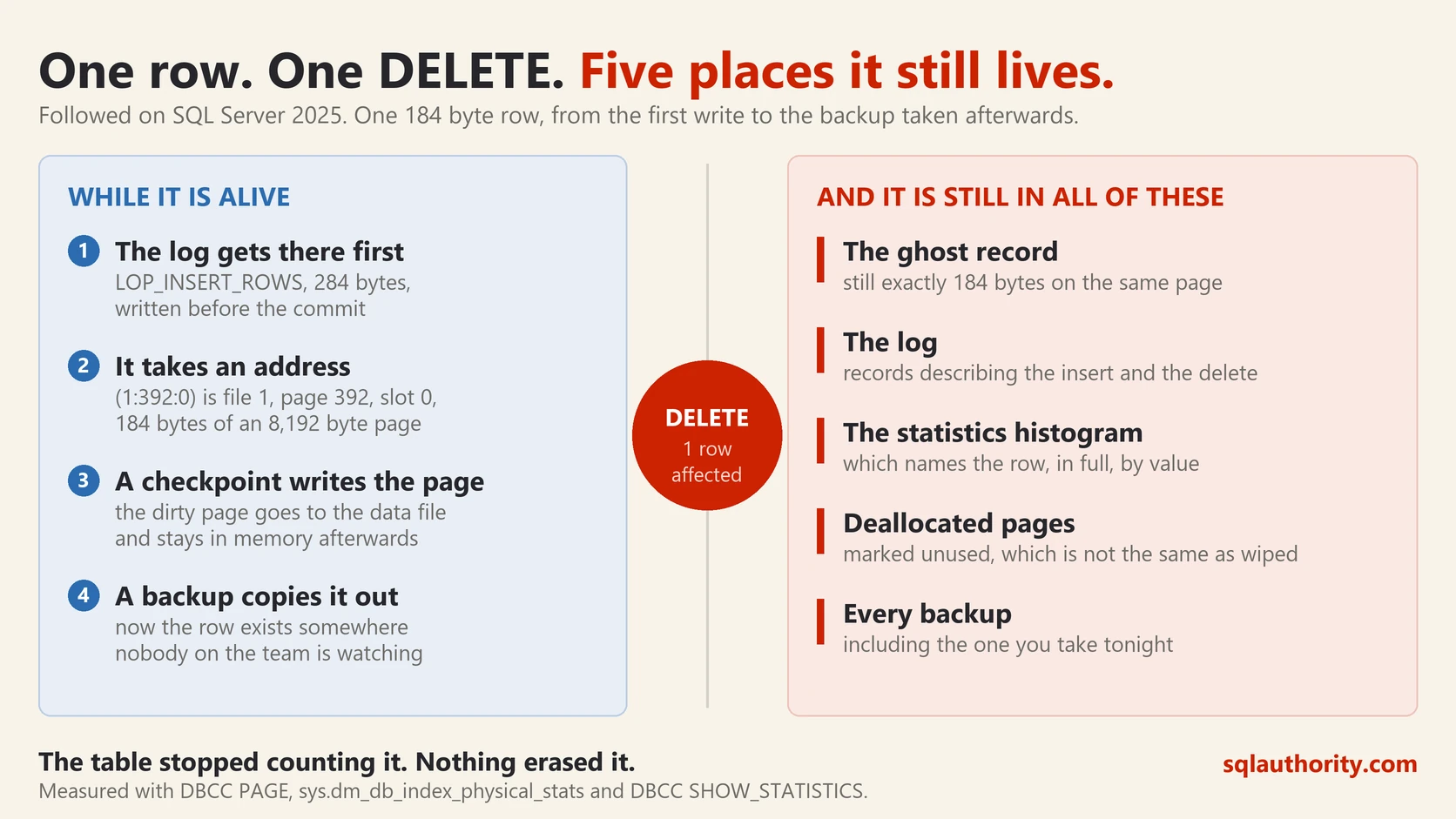
If you read nothing else, read this. I tagged one row, followed it to the grave, and then went looking for the body.
The log gets there first. Before the commit, the insert already exists as a 284 byte log record. The data file hears about it later.
The row has a street address. (1:392:0) is file one, page 392, slot zero. It is 184 bytes on a page of 8,192.
Delete does not erase. The record stays exactly 184 bytes. One flag turns it into a ghost, and the table stops counting it.
Here is the part nobody expects. The table is empty and the ghost has been swept away. The database still knows the traveller’s name, because it is sitting in a statistics histogram.
Why your data is in a histogram at all. Every database guesses before it works. It keeps a cheat sheet of real values, so it can estimate how many rows a query will touch.
You can clear it, almost. One command rewrites that cheat sheet from what is there now, which is nothing. The old pages are marked unused rather than wiped, so the name still rides along in tonight’s backup.
The rest of this is the same story, with the screenshots and the measurements. The queries are all here, so you can run it on your own server.
Into the Field

Field work on a database is easier than field work on a bird. Nothing bites, and the animal cannot leave the building. The trouble is that the animal is invisible. The instruments that see it are not the ones most of us use.
So here is one row, tracked from the first write to the last trace of it. Every number below came off a local SQL Server 2025 instance on a Sunday evening.
The Tagging
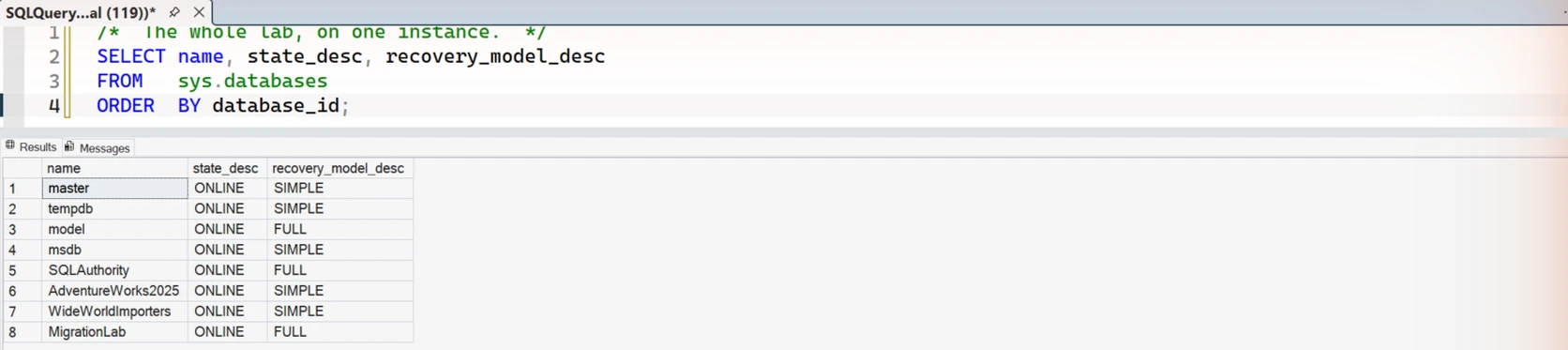
The whole study runs on one instance, in one database built for it.
The habitat is a small table. One clustered index, four columns, nothing exotic.
USE MigrationLab;

CREATE TABLE dbo.Travelers
(
    TravelerID  INT IDENTITY(1,1) NOT NULL PRIMARY KEY CLUSTERED,
    TagCode     NVARCHAR(40) NOT NULL,
    TaggedAt    DATETIME2(3) NOT NULL,
    Notes       CHAR(120) NOT NULL
);
Before the write, the table has no pages in memory at all. The buffer pool has never heard of it.
Then, at 19:29:08.106, the tagging.
BEGIN TRANSACTION MarkTheTraveler;

INSERT dbo.Travelers (TagCode, TaggedAt, Notes)
VALUES (N'TRAVELER-0001-KESTREL', SYSDATETIME(), 'tagged on the first write and followed to the end');
The transaction is still open. Nothing has been committed. Watch what already exists.
The Log Gets There First
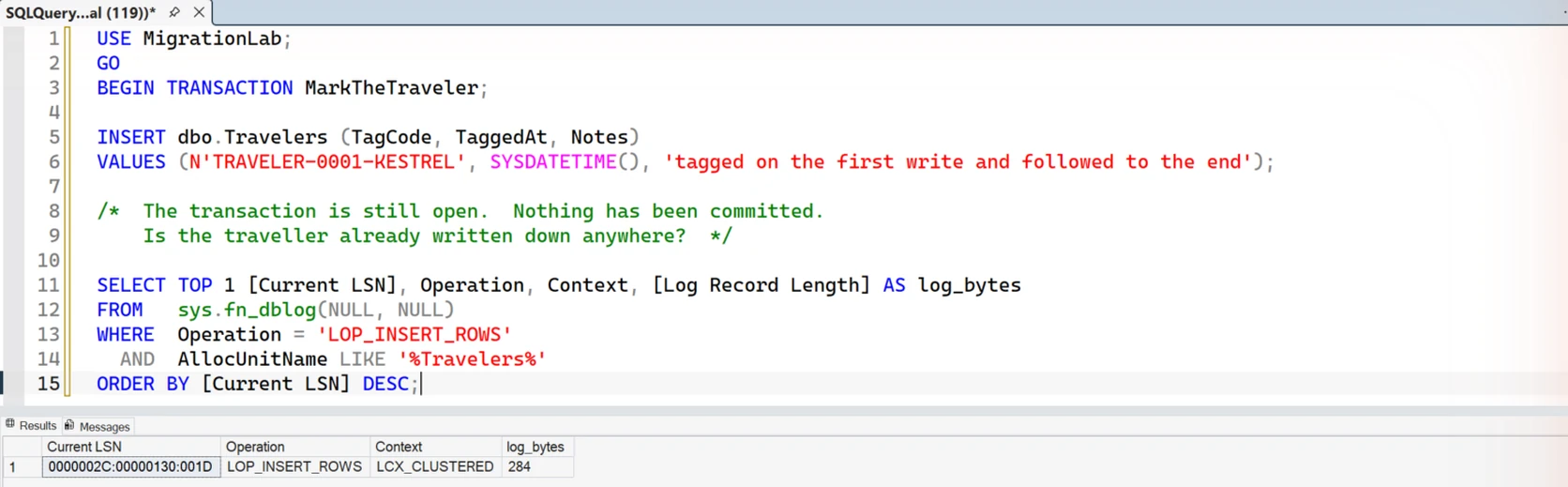
Before the commit, two things are already true. An insert record exists in the log. The row is already sitting on a dirty page in memory.
SELECT TOP 1 [Current LSN], Operation, Context, [Log Record Length]
FROM   sys.fn_dblog(NULL, NULL)
WHERE  Operation = 'LOP_INSERT_ROWS'
  AND  AllocUnitName LIKE '%Travelers%'
ORDER BY [Current LSN] DESC;
One record. LOP_INSERT_ROWS, context LCX_CLUSTERED, 284 bytes, at LSN 0000002C:00000130:001D.
Be precise about what that means. At this instant the log record may still be in the log buffer, in memory.
With fully durable commits, SQL Server gets a transaction’s log records onto durable storage before it reports success.
The rule is the order, and the order never changes. The log record reaches disk before the data page does. Everything a database promises about surviving a power cut rests on that.
The page carries a dirty flag, which means it has changed since it was last written to disk. What the data file holds for that page is not what memory holds.
Its Address
COMMIT TRANSACTION MarkTheTraveler;Now ask the row where it lives.
SELECT TravelerID,
       TagCode,
       TaggedAt,
       sys.fn_PhysLocFormatter(%%physloc%%) AS file_page_slot
FROM   dbo.Travelers;
It answers (1:392:0). File 1, page 392, slot 0. That is a real address, and it holds still until something moves it.
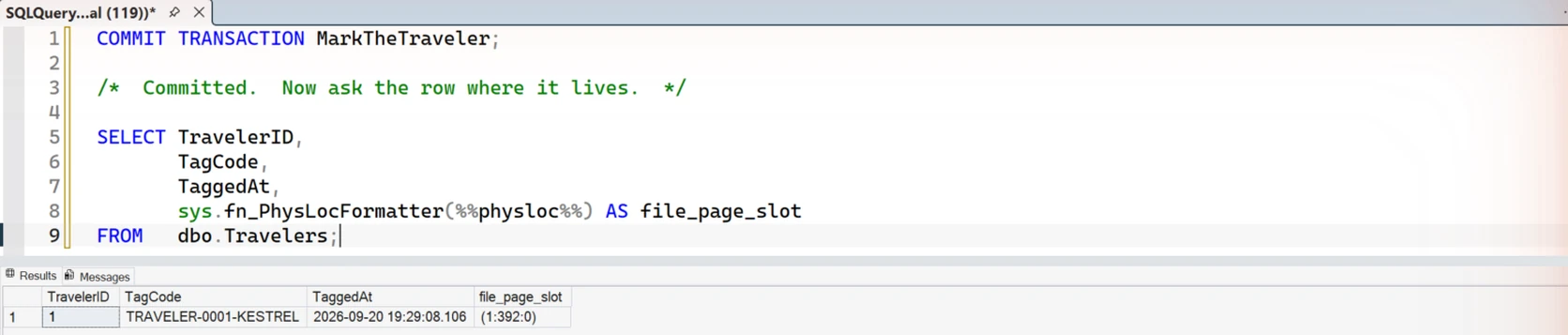
That page number belongs to this run. Yours will land somewhere else, and the query above will tell you where.
Now open the page itself and look at the record.
DBCC TRACEON (3604);
DBCC PAGE (MigrationLab, 1, 392, 1) WITH TABLERESULTS;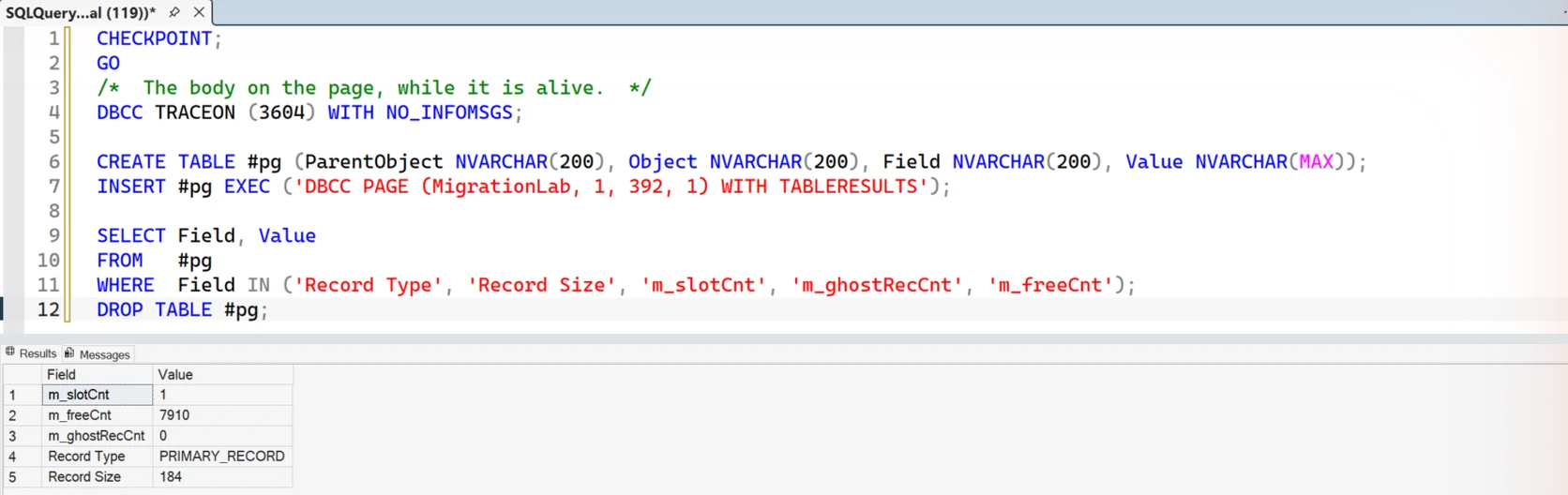
A PRIMARY_RECORD of 184 bytes, on a page of 8,192 bytes, with 7,910 bytes left free. The rest is the page header and the slot array.
The animal is small and its territory is enormous. That is the normal condition of a row.
The Long Rest
The page was still dirty when I checked after the commit. Nothing is wrong. This is the resting phase.
How long it would have rested is not something I measured. In the lab I ran CHECKPOINT myself rather than wait for the engine.
After the checkpoint, the page was clean and still in memory.
That last part matters. Writing a page to disk does not evict it. The row stays in the buffer pool, ready, until memory pressure or a restart sends it away. On a warm system, most of the rows you read never come from a disk at all.
The Herd
One traveler is a story. Ten thousand is a measurement.
I inserted ten thousand rows one at a time, each in its own transaction. It took 3,093 milliseconds and grew the log by 1,049 bytes per row.
That is odd, because the insert record is 284 bytes. Its begin and commit records add about 208 more. Something is charging for the rest.
So I ran the same ten thousand rows again inside one transaction. It took 215 milliseconds and grew the log by 283 bytes per row.
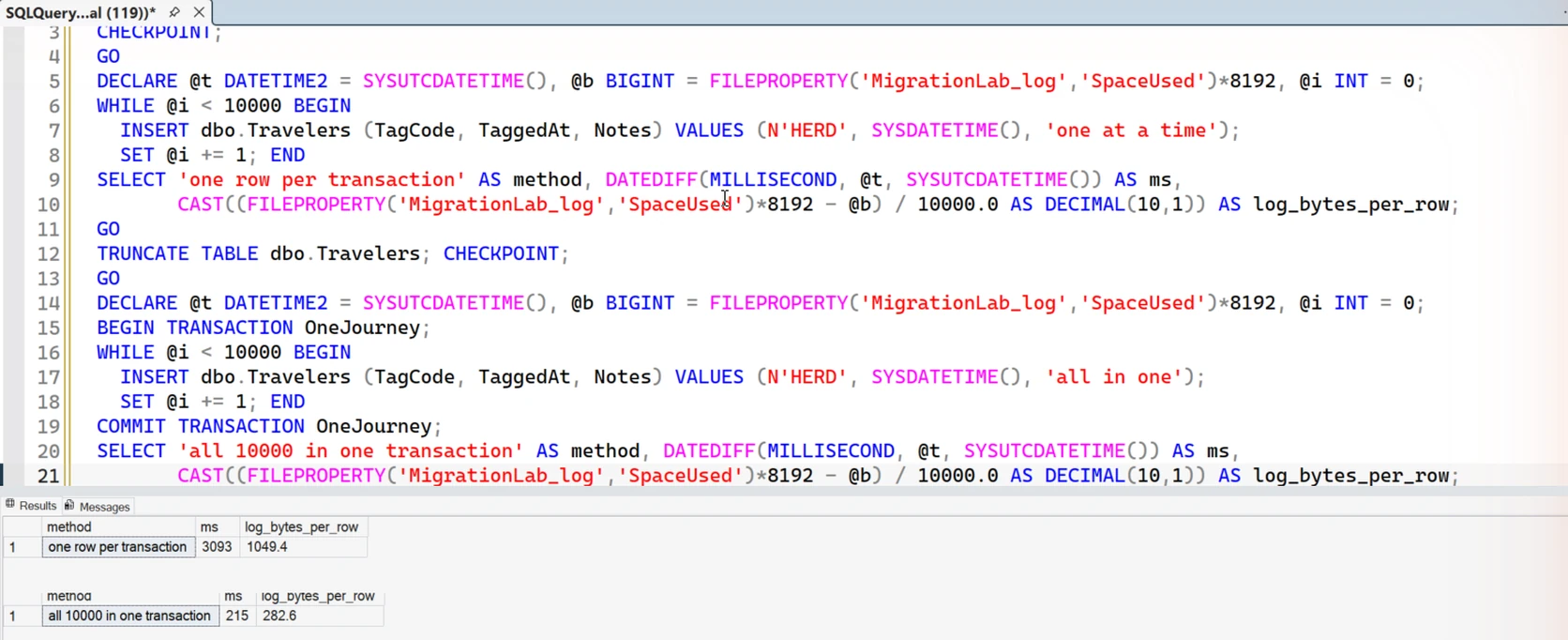
In this run, grouping them was about fourteen times faster and used a quarter of the log space. The row was never the expensive part. The ceremony around each one was.
Treat the milliseconds as this machine and this workload. Other runs of the same loop landed anywhere between 2,017 and 3,826 milliseconds.
Log space growth is also not an exact count of record bytes. Your own numbers will depend on your storage and what else is running.
Into the Archive
The backup is where the migration turns into something people forget to think about.
A full backup runs. A log backup runs and processes seven pages. Copies of the traveler now exist in places nobody is watching.
The schedules are old. The retention windows were set years ago by somebody who has left.
One animal, several territories. From here on, the row exists in more than one place, and only one of those places is the table.
The Death
Every field study ends the same way.
DELETE dbo.Travelers WHERE TagCode = N'TRAVELER-0001-KESTREL';One row deleted. The log writes it down, LOP_DELETE_ROWS, 280 bytes, which is four bytes less than it cost to arrive.
The table now reports zero records. Anybody querying it will tell you the traveler is gone. In every way SQL cares about, they are right.
The Body
Go back to page 392 and look.
DBCC TRACEON (3604);
DBCC PAGE (MigrationLab, 1, 392, 1) WITH TABLERESULTS;
Record Type: GHOST_DATA_RECORD. Record Size: 184 bytes.
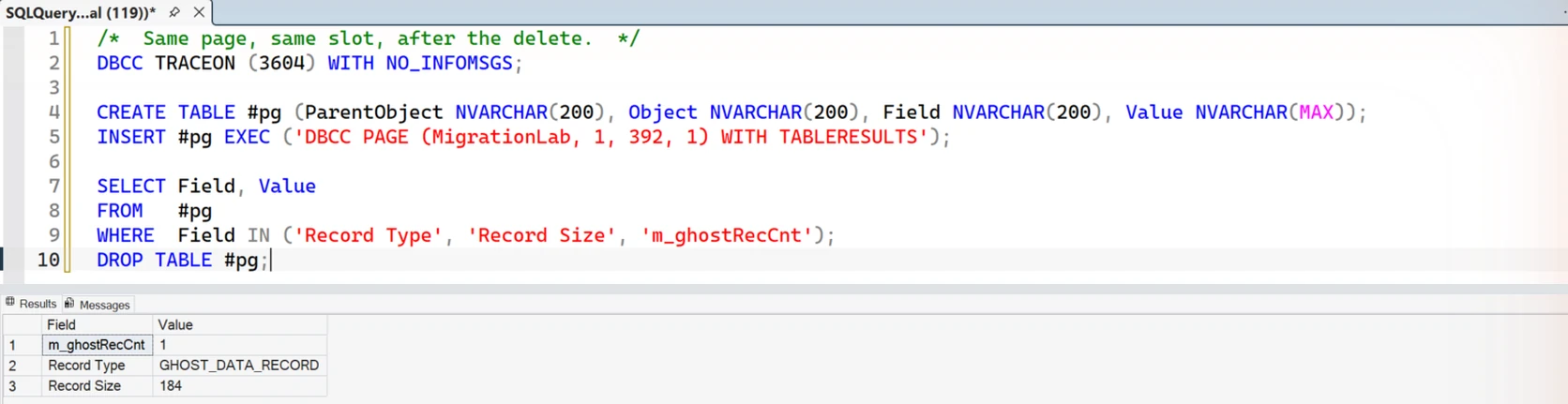

Read that twice. The record is still the same size. The bytes were not wiped and the name was not overwritten.
What changed is the record’s type flag and a counter in the page header. The page is modified and logged, of course. Nothing is compacted, and nothing is erased.
The engine reports it honestly if you ask directly.
SELECT record_count, ghost_record_count, version_ghost_record_count, page_count
FROM   sys.dm_db_index_physical_stats
       (DB_ID('MigrationLab'), OBJECT_ID('dbo.Travelers'), NULL, NULL, 'DETAILED')
WHERE  index_level = 0;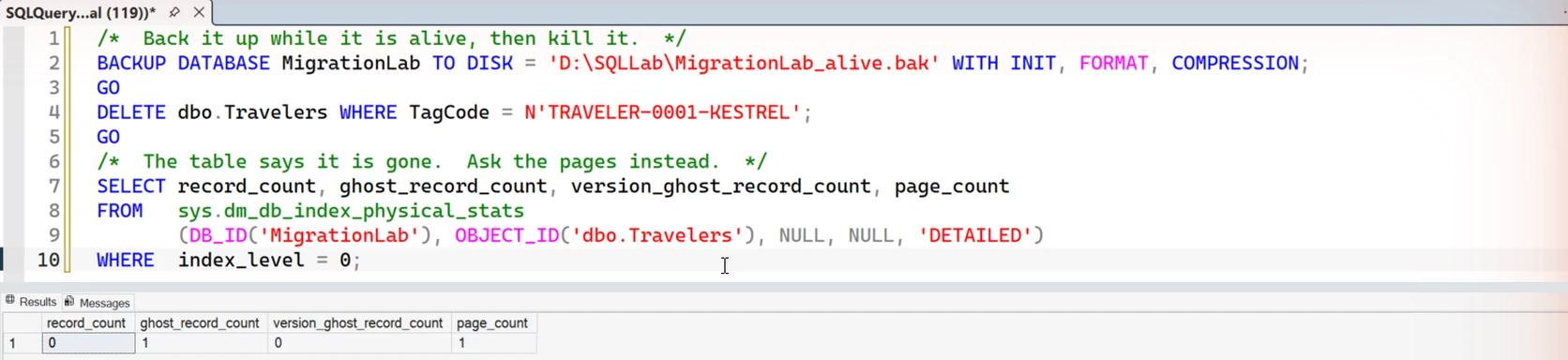
record_count 0. ghost_record_count 1. The body is on the page, waiting for a background task to come and sweep it up.
This is ordinary. It is how SQL Server keeps deletes cheap, and other engines strike their own version of the same bargain. It is not what anybody pictures when they say the word deleted.
The Museum
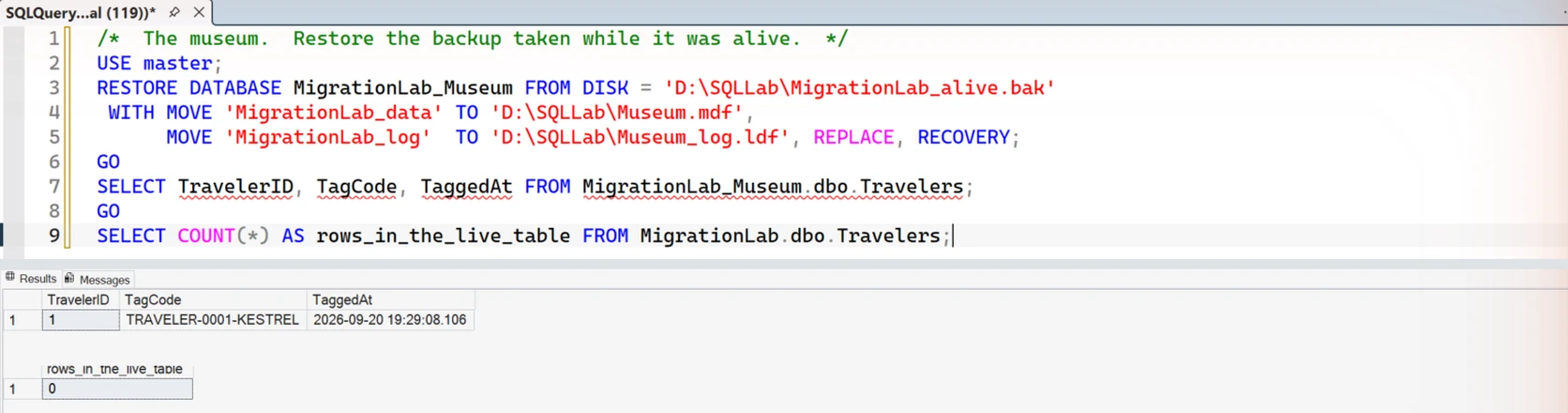
Now restore the backup taken while it was alive.
TravelerID 1. TRAVELER-0001-KESTREL. Tagged at 19:29:08.106. Intact, queryable, as though nothing happened.

Then I went further, because the interesting question is not the old backup. It is the new one.
I took a fresh uncompressed full backup after the delete. Then I searched that file for the traveler’s name as raw bytes. It is in there.
The deleted tag’s bytes are in that file. That is a different thing from restoring a queryable row, and it is the finding that matters.
Not a copy from last month. The one you took tonight.
Which Copy Is Which
Finding a name in a backup is one thing. Knowing what is holding it is another.
So I built a second lab and took the copies away one at a time. A fresh database, one row, one unique name, and an uncompressed backup after every change.
While the row is alive, the name appears in the backup once. After the delete, it appears three times.
Then I rebuilt the index, which clears the ghost, and took another backup. One of the three copies was gone. That one was the body on the page.
Two copies survived. They survived a log backup. They survived eight rounds of twenty thousand inserts and deletes, with a log backup after every round.
Whatever was holding them was not the row, and it was not recyclable log space.
The Name in the Histogram
I restored that backup and walked all 331 of its allocated pages. Each one was asked which object owned it.
The name was on page 29, in sys.sysobjvalues. That is where SQL Server keeps statistics blobs.
So I went back to the first lab, where the table is empty, and asked its statistic the same question.
SELECT COUNT(*) AS rows_in_table FROM dbo.Travelers;

DBCC SHOW_STATISTICS ('dbo.Travelers', '_WA_Sys_00000002_48CFD27E') WITH HISTOGRAM;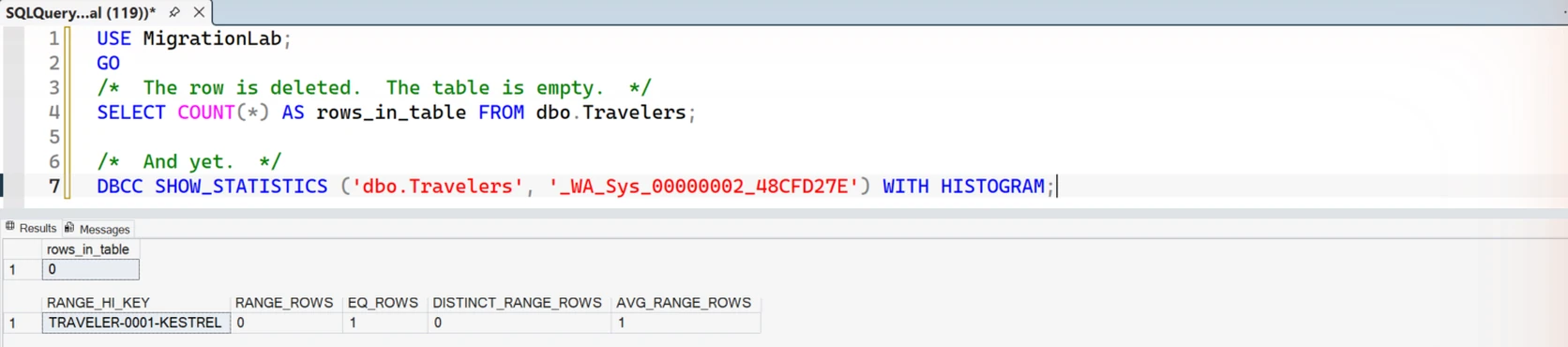
Zero rows in the table. One row in the histogram, and it is the traveller, by name.
Something had filtered on that column once, so SQL Server created a statistic on it. A histogram holds real values, because that is how it estimates.
The table has zero rows. The ghost is gone. The log has been cycled eight times. The histogram still names the animal.
Your statistic will have a different name. Look for the ones beginning _WA_Sys_ on the column you deleted by.
Can You Make It Leave
Partly, and this is the part worth knowing.
UPDATE STATISTICS dbo.Travelers WITH FULLSCAN;

DBCC SHOW_STATISTICS ('dbo.Travelers', '_WA_Sys_00000002_48CFD27E') WITH HISTOGRAM;
Column headers, and nothing under them. The name is out of the statistic.
Then I took another backup and searched it. The name is still in the file, in three places.
Three, not two. A page that was deallocated along the way still held the old bytes, and it came with the backup.
Old statistics pages are deallocated, not scrubbed. The bytes wait there until something reuses the page.
What the Study Is Actually About
Somebody will ask you to delete a customer’s data, and they will mean it.
The DELETE is the easy part, and it is the part that gets reviewed. The traveler is in five other places.
A ghost record on the page until cleanup runs. Log records describing both the insert and the delete. A histogram that names the value until you update the statistic.
A log backup can make inactive log space reusable. It does not wipe the bytes.
Then the deallocated pages holding bytes nobody scrubbed. And every backup, before and after, that carried any of it.
None of that is a bug. All of it is design, and all of it is measurable.
The excerpts above are the main observations. The full lab also did the backups, the restore, the page walk and the byte search.
Run it on your own system before you promise anybody that something is gone.
Checking that promise against what the engine really does is the sort of work I get called in for. You can see how I work with teams on my consulting page.
If you like this sort of patient look at machines, my book of essays AI: Nobody’s in There. But we’re still in here. does the same thing with a different animal. All thirty are free to read online, and the paperback is on Amazon.
A deleted row is not erased, it is a body, a log record, and a name in a histogram.
Published by Pinal Dave on SQLAuthority. More of my work at pinaldave.com.
