

As you split a Python project into packages, you may see a leading dot in an import and wonder which module it names. Python relative imports use those dots to resolve a name from the importing module’s package.
I’ll explain how each dot changes the starting point and show how to run a package module.
TL;DR: A Dot Marks a Package-Relative Import
A leading dot in a Python from import means resolve the following name from the current package, rather than from the top-level import path.
- from . import sibling starts in the current package.
- from .. import shared moves to the parent package.
- Each additional dot moves up one package level.
What Does a Dot Mean in a Python Import?
The dot marks a package-relative import.
I checked the official import reference, which ties this form to the importing module’s package rather than its current working directory.
Regular packages have an __init__.py file for initialization. Python loads parent packages before a nested module. Namespace packages can gather portions from multiple locations without one shared initialization file.
| Term | Meaning in this example |
|---|---|
| Module | A Python source file such as daily.py. |
| Package | The qualified container app.reports that holds the module. |
| Import root | The directory from which app can be named in an import. |
| Current package | The package containing the module that has the import statement. |
A dot inside a qualified package name separates nested names, as in shop.catalog. This is different from a leading dot that appears at the beginning of an import statement.
The absolute form names the package from its import root.
from .formats import REPORT_NAME
from ..common import APP_NAME
The Python import statement searches for a module and binds it to a local name. That name determines how later code refers to the imported result.
Relative syntax belongs in a from import statement. It is not valid after a bare import keyword.
| Import form | Name made available |
|---|---|
| import app.reports.formats | The top-level app name, with nested modules reachable through its attributes. |
| from app.reports import formats | The formats module name. |
| from app.reports.formats import REPORT_NAME | The selected REPORT_NAME value. |
| from .formats import REPORT_NAME | The selected name from a sibling module. |
The standard from-package form can import a named module as well as a name already exposed by the package. Python also looks for a matching submodule, which is why formats can be imported from reports even when its __init__.py does not re-export it.
The import cache is sys.modules, indexed by module name. A later import under the same name reuses that object. Top-level initialization statements run when a module is first imported, so keep setup light and put deliberate work in a function.
Python asks meta path finders to locate a module name. The standard path-based finder searches sys.path for top-level packages and a package’s __path__ for submodules. A loader creates and initializes a match, while a failed search raises ModuleNotFoundError.
Use an absolute path when tracing a dependency from the import root is clearer for this package.
How to Read Relative Import Dots Step by Step
Use the package tree as a map. First locate the importing module, then follow its branch to the target module.
Imagine this regular package tree, where each directory shown has an __init__.py file:
app/
    __init__.py
    common.py
    reports/
        __init__.py
        daily.py
        formats.py
Inside app.reports.daily, the current package is app.reports. The examples below show how the reference changes as the dot count changes.
| Import form in daily.py | Resolution from app.reports.daily |
|---|---|
| from . import formats | app.reports.formats |
| from .. import common | app.common |
| from ..common import helper | helper from app.common |
To see why deeper packages can use more dots, imagine a module under app.reports.formats. Its package has two parent levels above formats, so three dots can reach app. The daily module above is only one package below app, making that same depth invalid there.
Keep the target module after the from keyword and the imported function or constant after import.
Step 1: Identify the importing module’s package
Write down the full package name of the file containing the statement. For app/reports/daily.py, that name is app.reports.daily when imported as part of the package, so its containing package is app.reports.
Identifying the qualified name prevents counting from the wrong directory level.
Step 2: Count the levels you need to move
Use the table to map the source name before writing the import. The sibling module belongs to reports, while common sits directly under app.
Step 3: Run the module through its package
Run the package module with the same command I ran in this workspace. Its two imports use a sibling reference and a parent-package reference.
python3 -m app.reports.daily
The output combines values from the parent package and sibling module. I ran this exact module command successfully, confirming both relative imports resolve in this layout. The -m option locates a module by its qualified name and supplies package identity, unlike direct file execution.
Module execution sets __name__ to __main__, so a reusable file can protect command-line startup with the usual main guard. Its package identity remains available separately.
Step 4: Check the package boundary
I checked the package identity by running this module from the package root.
python3 -m app.reports.package_info
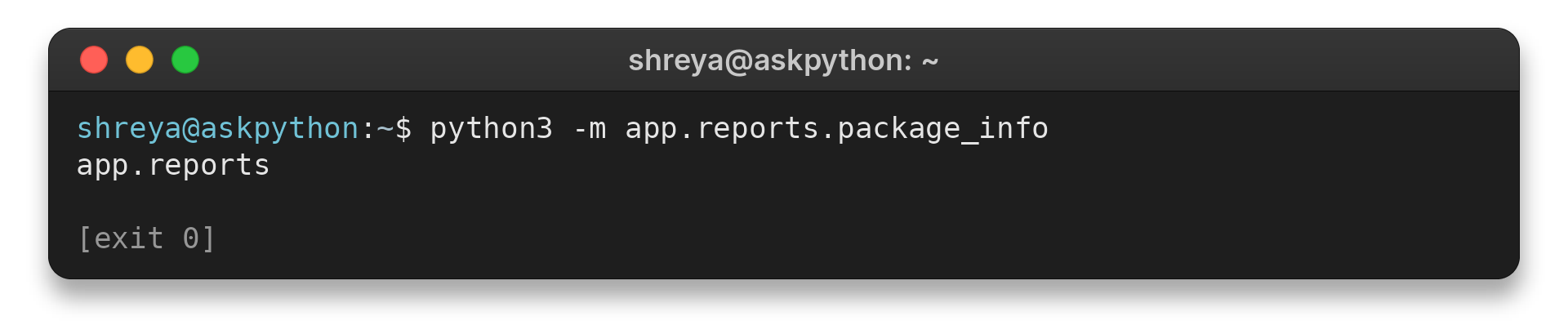
The printed app.reports value is the module’s __package__, a package identity used when resolving relative statements.
Avoid wildcard imports in package modules because the imported names become hard to identify and can overwrite existing names.
Packages define the names that dots can traverse
A package is the importable container in a qualified module name. In app.reports.daily, app is the top-level package, reports is a child package, and daily is the module. A relative import counts from the package containing the module, so a dot in daily.py starts at app.reports rather than at the directory where the shell happens to be.
A regular package commonly has an __init__.py file in each package directory. Python executes package initialization as it imports the package, which means importing app.reports.daily can first execute app/__init__.py and app/reports/__init__.py. Keep those files focused on package setup, because importing a submodule may trigger them before the submodule’s own code runs.
Namespace packages can combine package portions from multiple locations without one __init__.py shared by those locations. Their relative imports still follow the module’s package identity. A regular package with explicit package files can make name resolution more straightforward while learning the layout.
Use a fully qualified name to show a dependency’s package relationship. A single leading dot selects a sibling module, while a second dot reaches the parent package. This makes dependencies clearer when the project moves as a unit.
The package boundary also explains the limit on dot count. A relative import can move from the current package toward its parents, but it cannot move above the top-level package. In app.reports.daily, one dot starts in app.reports and two dots move to app, so another parent level does not exist.
Count from the package, not from the filename. The final component of app.reports.daily names the module, while the package anchor is app.reports. That is why the sibling format belongs after one dot and the top-level common module belongs after two.
Consider a module nested several package levels below its root. Its containing package is the immediate anchor for a relative import. Each additional leading dot moves one package level toward the root.
The name after from can be a module, while the name after import can be an attribute provided by that module or package. A relative form can ask for a named member of the current package. Python can load a matching submodule as that member even when the package initializer did not bind it explicitly.
This distinction matters when a package initializer defines a name that has the same spelling as a child module. An import can then refer to the package attribute or the matching submodule according to the import form and names already bound. When the source matters, name the defining module explicitly and check the package initializer for re-exports.
Absolute imports start from the import root
An absolute import names its destination from a top-level import root. The form from app.reports.formats import REPORT_NAME spells out the path from app, while a relative form expresses that destination from the importing package. Both can resolve to the same module when app is importable.
Choose an absolute import when the full package path makes a cross-package dependency clear. Choose a relative import for a close dependency within a package when moving or renaming the top-level package should not require rewriting every internal reference. Teams often choose one convention and apply it consistently so the import tree is predictable.
Neither spelling repairs an incorrect project layout. If an absolute import cannot find the top-level package, inspect the import root and how the program is launched. If a relative import reports that there is no known parent package, inspect whether the file is being executed as a package module or as a standalone script.
Python searches for packages and modules by name
Python’s import system resolves names through finders and loaders. A finder locates a module specification, and a loader creates the module and runs its initialization. The standard path-based finder uses sys.path for top-level packages and a package’s __path__ for child modules.
This explains why the working directory can matter without being the meaning of the dot. When app is not importable from the active import path, Python cannot resolve app.reports.daily, even if the source folders are visible somewhere else on disk. Run the command from the project root or arrange the import path through the normal environment for that project.
Imported modules are cached by their qualified names in sys.modules. Re-importing the same name during one process normally reuses the loaded module rather than executing a fresh copy. This is useful when reasoning about package startup: an import can run initialization once, and later code receives the cached module object.
A package initialization file can expose selected names as a stable public interface. A package facade is a deliberate API choice, not a requirement for every submodule. Import directly from the defining module when you want the source explicit.
Diagnose a confusing import by checking the qualified name Python is loading and identifying the importing module’s package. Check whether its top-level package is on the import path. These checks separate an incorrect relative level from a missing package.
Why Relative Imports Fail
Because the message points to different failure layers, I compare its wording with this table before changing the import.
| Symptom | Cause | What to check |
|---|---|---|
| attempted relative import with no known parent package | The file was run as a top-level script, so it has no package anchor. | Run it with python3 -m app.reports.daily from the import root, or use an appropriate absolute import. |
| attempted relative import beyond top-level package | The dots move above the top-level package. | Recount from the containing package and remove excess dots. |
| ModuleNotFoundError | The resolved module is absent or the top-level package is not on Python’s import path. | Check spelling, package layout and the command’s import root. |
| Import resolves to an unexpected module | The import name or package layout differs from the assumed tree. | Check the module’s qualified package name and avoid ambiguous local names. |
A missing-module message needs a different check. Confirm the top-level package is on Python’s import path. Check spelling and capitalization in each module name.
Circular imports occur when modules depend on each other while one is still initializing. Reduce cross-imports or move shared definitions into a lower-level module if the dependency graph becomes hard to follow.
AskPython’s separate guide to importing other Python files covers the adjacent-file case. Its absolute versus relative imports article compares the two naming styles.
Conclusion: Count Dots from the Current Package
Choose an import style that matches the package layout and keep that convention consistent. Use the official Python references below when you need the full import-resolution rules.
For the formal syntax and edge cases, read Python’s package-relative import reference and the tutorial’s section on intra-package references.
FAQ
These quick answers cover the dot-count questions that come up when reading a package import.
What does one dot mean in a Python import?
One leading dot starts the lookup in the current package of the importing module.
What do two dots mean in a relative import?
Two leading dots move up one level from the current package, then resolve the name that follows.
Can I use a relative import in a script?
A relative import needs package context. Running a package module with python -m from its import root usually provides that context.
