

A Python vector database is useful when you need semantic retrieval, but not every retrieval job needs a server, collections, filters, and operational ownership. turbovec is a local Rust-backed vector index with Python bindings that lets you add embeddings, search them, and persist the index to a file. Its API reference documents the available index types and persistence methods.
Use turbovec for local, privacy-sensitive search. Use a full database when your application needs service-level operations, and measure retrieval quality on your own corpus instead of relying on a headline benchmark.
When a local vector index fits
Use a process-local index when your application owns a bounded embedding corpus and needs nearest-neighbor search inside a Python job, desktop tool, or small service. turbovec offers a positional TurboQuantIndex and an IdMapIndex for stable unsigned integer IDs, both exposed through Python bindings.
This is not a substitute for a database that must coordinate writers, apply metadata filters across a service boundary, replicate data, or offer multi-tenant operations. If those are part of the job, use a vector database and treat compression as one component of the broader system.
Install turbovec and NumPy
Create a fresh virtual environment so the experiment stays separate from application dependencies. turbovec on PyPI currently requires Python 3.9 or later and declares NumPy as a dependency.
python3 -m venv venv
source venv/bin/activate
python -m pip install turbovec numpy
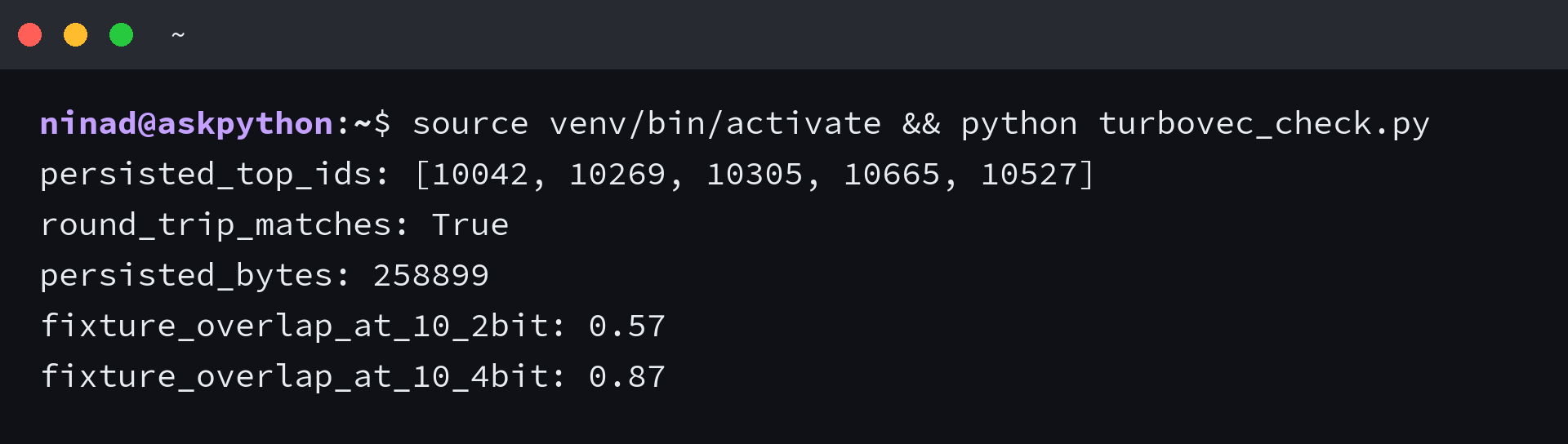
The script creates a deterministic sample corpus, attaches durable IDs, writes the index to disk, reloads it, and compares approximate top-10 retrieval against an exact dot-product baseline. It checks fixture behavior, not document-search quality.
Build, persist, and reload an ID-based index
Save the following file as turbovec_check.py.
from pathlib import Path

import numpy as np
from turbovec import IdMapIndex, TurboQuantIndex

rng = np.random.default_rng(17)
corpus = rng.normal(size=(1024, 128)).astype(np.float32)
query = corpus[[42]]
ids = np.arange(10_000, 11_024, dtype=np.uint64)

persistent = IdMapIndex(dim=128, bit_width=4)
persistent.add_with_ids(corpus, ids)
scores, found_ids = persistent.search(query, k=5)

path = Path("local-index.tvim")
persistent.write(str(path))
reloaded = IdMapIndex.load(str(path))
_, reloaded_ids = reloaded.search(query, k=5)
assert np.array_equal(found_ids, reloaded_ids)


def exact_top_k(vectors, vector, k):
    return np.argsort(vectors @ vector)[-k:][::-1]


def overlap_at_10(bit_width):
    index = TurboQuantIndex(dim=128, bit_width=bit_width)
    index.add(corpus)
    sample_queries = corpus[[3, 150, 777]] + rng.normal(
        scale=0.03, size=(3, 128)
    ).astype(np.float32)
    _, approximate = index.search(sample_queries, k=10)
    overlaps = []

    for row, vector in enumerate(sample_queries):
        exact = set(exact_top_k(corpus, vector, 10).tolist())
        found = set(approximate[row].tolist())
        overlaps.append(len(exact & found) / 10)

    return float(np.mean(overlaps))


print("persisted_top_ids:", found_ids[0].tolist())
print("round_trip_matches:", True)
print("persisted_bytes:", path.stat().st_size)
print("fixture_overlap_at_10_2bit:", round(overlap_at_10(2), 2))
print("fixture_overlap_at_10_4bit:", round(overlap_at_10(4), 2))
Run it from the directory that contains the file.
source venv/bin/activate && python turbovec_check.py
The IdMapIndex keeps the IDs supplied at insertion time, which matters when the embedding belongs to a document, chunk, or record outside the index. The documented persistence methods take a string path, so the example converts the Path before write and load.
The same result IDs appear before and after reload. The script also reports overlap for two bit widths on the sample vectors, so you can compare a more compact index against exact results.
Choose bit width from your retrieval task
TurboQuantIndex accepts 2-bit, 3-bit, or 4-bit quantization settings. Lower bit widths reduce the stored representation, but the value of that reduction depends on whether your own queries still return enough of the documents that matter.
Start with 4-bit retrieval and record an evaluation set of queries that represent your application. Compare the result IDs against an exact baseline, then inspect the misses with the people who use the search results.
Move to a smaller bit width only when the space reduction changes a deployment constraint and the misses remain acceptable. A corpus of documentation snippets, support tickets, and source-code chunks can fail in different ways, even when its embedding dimensions match.
Do not confuse an index with a vector database
The phrase Python vector database has a broader search audience than turbovec itself. A local index solves a narrower problem, which is often a strength when your workload stays inside one application process.
Choose turbovec when you need an embeddable local index, stable IDs, a file you can load again, and a measured compression tradeoff. Choose a vector database when your search layer needs service-level filtering, distributed availability, concurrent application access, or operational features beyond nearest-neighbor retrieval.
The TurboQuant paper describes low-bit vector quantization as an approximate-nearest-neighbor technique, but a paper and a repository cannot decide your recall threshold for you. Keep the evaluation script with the corpus, then rerun it when you change embedding models, chunking, or bit width.
Add it to a retrieval application
An index belongs after embedding generation and before the part of your application that reads the retrieved records. Store the external document IDs with IdMapIndex, search with the query embedding, then use those IDs to fetch text and metadata from your own storage.
If you are assembling retrieval-augmented generation, pair this step with building RAG applications with Python. That article covers the application layer, while this one keeps the local retrieval decision focused on index behavior.
FAQ
A local index stores and searches vectors. Your application still owns document metadata, access controls, and persistence decisions.
