

Your Python code needs a value saved in a JSON file, but the file’s contents are still text. The json module parses that text into Python values your code can work with.
This article explains how to read a file with json.load() and navigate its contents. It also shows how to use parsing errors to locate malformed JSON.
TL;DR
Read a JSON file with Python’s standard-library json.load() function, passing it an open text file.
- Open the path with Path.open(encoding=”utf-8″).
- Pass the file object to json.load() inside a with block.
- Use dictionary keys and list indexes to reach nested values.
What Is a JSON File in Python?
JSON is a text format for storing structured data and exchanging it between programs. Python’s built-in json module parses that text into ordinary Python values so your code can inspect it.
A JSON object uses curly braces and string keys, much like a Python dictionary. A JSON array uses square brackets and keeps an ordered sequence, like a Python list. The format also has strings, numbers, Boolean values, and null.
| JSON value | Python value after loading |
|---|---|
| Object | dict |
| Array | list |
| String | str |
| Number | int or float |
| true or false | True or False |
| null | None |
The Python result follows the top-level JSON value: an object becomes a dictionary, an array becomes a list, and a scalar becomes its corresponding Python value. I put the type mapping here because the next step depends on which access operation the decoded value supports.
For instance, this document has one top-level object with an orders array. Each order contains another object and a list, which gives the example below both keys and indexes to follow.
{
  "orders": [
    {
      "customer": {"name": "Asha"},
      "items": [{"name": "Notebook"}, {"name": "Cable"}],
      "paid": true
    },
    {
      "customer": {"name": "Ravi"},
      "items": [{"name": "Mouse"}],
      "paid": false
    }
  ]
}
JSON and Python dictionaries look alike, but JSON is the stored text and a dictionary is one possible Python result. In JSON, Boolean and null literals are lowercase. Python uses True, False, and None after decoding.
An object value can itself be another object or an array, so the decoded value can have several layers. Follow one key or list position at a time and keep the JSON shape in view as you read it.
How to Read a JSON File in Python
Open the file in text mode, decode it once with json.load(), then use normal Python indexing to select the values your program needs. The examples use a file named orders.json in the current working directory.
Step 1: Put the file where Python can find it
A relative path such as orders.json is resolved from the process’s current working directory, which can differ from the folder that contains your script. Put the sample beside the script when running this example, or give Path an absolute or project-relative path that matches your layout.
Keep the file as valid JSON: use double quotes around strings and keys, separate members with commas, and do not leave a comma after the final member. JSON does not support comments. The supplied sample has one object, an orders list, and nested values that the program will read.
Step 2: Open the file and call json.load()
The with statement closes the file when the block ends, including when parsing raises an exception. I chose an explicit UTF-8 encoding so the text decoding does not depend on the operating system’s default. The json.load() call receives the open file object.
import json
from pathlib import Path

with Path("orders.json").open(encoding="utf-8") as file:
    data = json.load(file)

first_order = data["orders"][0]
print(first_order["customer"]["name"])
print(first_order["items"][1]["name"])
print(first_order["paid"])
Run the program from the folder containing both files:
python3 read_json_file.py
The captured command prints:
The first line comes from an object key, the second follows an array index and then another key, and the last is the decoded Boolean value. The exact command and output are in the terminal capture.
Step 3: Follow the decoded structure
Use square brackets with a string key for a dictionary and an integer index for a list. In the example, data[“orders”] selects the list, [0] selects its first order, and [“customer”][“name”] follows nested object keys to the name.
Indexing assumes that each key and list position exists. If an order can omit customer, check for that key before reading it, or handle KeyError at the point where the program can make a useful decision. If the value is optional, avoid replacing a missing value with an invented default that could change the meaning of your data.
The function names differ by input type: json.load() reads a file object, while json.loads() parses JSON text already held in a Python string. Passing a path string to json.loads() makes the decoder parse those characters as data instead of opening a file.
Step 4: Iterate when the file contains a collection
A JSON array represents a collection of values, and an object can contain an array such as the orders field in the sample. Decide whether the program needs one selected item or every item before choosing an index or iterating through the list.
When processing every order, loop over the decoded orders list and read each object’s fields inside that loop. If an array contains different value types or optional fields, check those shapes before using them. Iterating after json.load() does not make the file decoder stream one record at a time: the document has already been decoded into a Python value.
Parsing checks JSON syntax, not your application’s data rules. If each order needs an identifier or a quantity above zero, validate that condition after decoding and before using the record. This keeps malformed text separate from a valid document whose values do not suit the task.
What Can Go Wrong When Reading JSON?
Use the exception to identify whether Python failed while opening the path, decoding text, parsing JSON, or looking up a field.
| Symptom | What it means | What to check |
|---|---|---|
| FileNotFoundError | Python cannot open the named path | Check the current working directory, spelling, and file location |
| JSONDecodeError | Malformed JSON syntax at the reported location | Inspect the line and column for a missing comma, unmatched bracket, single-quoted string, comment, or trailing comma |
| UnicodeDecodeError | Bytes do not decode with the selected text encoding | Check how the file was saved and select that encoding |
| Extra data | A second JSON value follows the first document | Store records in one array, or parse a line-oriented file one value per line |
| KeyError or IndexError | The expected key or list position is absent | Inspect the top-level type and the object or list before indexing |
FileNotFoundError points to path resolution. JSONDecodeError points to text at the reported location.
For example, a second comma is a syntax error. I ran a small handler against a file containing that mistake so the diagnostic below comes from the decoder rather than a guessed message.
import json
from pathlib import Path

try:
    with Path("broken.json").open(encoding="utf-8") as file:
        json.load(file)
except json.JSONDecodeError as error:
    print(f"{error.msg} at line {error.lineno}, column {error.colno}")
Running python3 read_json_error.py on the malformed sample produced this exact line:
Expecting property name enclosed in double quotes at line 1, column 33
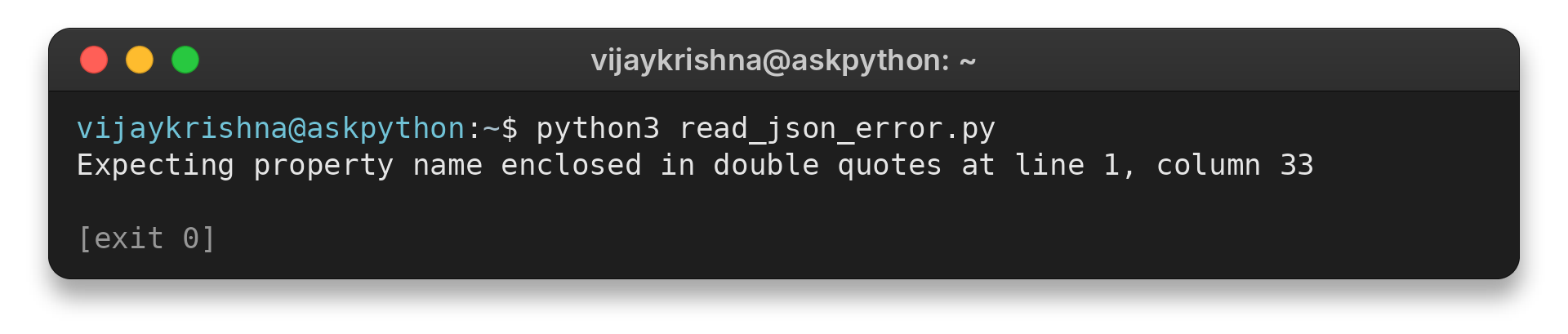
The shown output locates a syntax problem in the source text. A JSONDecodeError handler keeps that response separate from file-opening and text-decoding errors.
An Extra data error means a second top-level value follows the first. A regular JSON document contains one top-level value, so store several records in an array or use newline-delimited JSON, which keeps one JSON value on each line. Do not delete arbitrary substrings to silence the error because braces can appear inside quoted strings.
Choose a format that fits the file
A single large JSON document and line-oriented records need different parsing choices. json.load() decodes the full document into a Python value, while newline-delimited JSON stores a separate value on each line.
| Input shape | Decision |
|---|---|
| One JSON document larger than the task can hold in memory | Choose a streaming parser that supports the document’s JSON structure |
| One JSON value per line | Read and parse records line by line using the format’s framing |
Memory use depends on the document and resulting Python structure. Check the parser’s supported input and behavior before adopting it.
Conclusion: Use json.load() for a File
Open the JSON file with a known path and encoding, pass its file object to json.load(), then navigate the Python value according to its actual shape. When parsing fails, use the exception and its location to check the right layer instead of guessing at the cause.
For the broader module API, see AskPython’s Python json module guide. To write JSON or convert between JSON text and Python data, continue with Serialize and Deserialize JSON to objects in Python. The official Python json reference documents the decoder and its exceptions.
FAQ
These answers cover two related questions that help when choosing an input file or interpreting a parsed result.
Do I need to install Python’s json module?
No. The json module is part of Python’s standard library, so you can import it without installing a package.
Does json.load() always return a dictionary?
No. The return value follows the top-level JSON value. An object becomes a dictionary, an array becomes a list, and a scalar becomes its corresponding Python value.
