

Saving Python list values for another program means putting them in a format it can read. JSON is a text format for values, and Python’s json module encodes a list as an array.
This article shows how to write the encoded list to a file and read it back as Python data.
TL;DR: Convert a Python list to JSON
For a JSON string, pass a JSON-compatible Python list to json.dumps(). I use it in the tested example because the returned text can be inspected before the file is written.
- Import the standard-library json module. No extra package is needed.
- Choose whether the result is meant for a person to inspect or for a program to consume.
- Use UTF-8 when writing readable Unicode text to a file.
json_text = json.dumps(records, ensure_ascii=False)
What does converting a list to JSON mean?
JSON is a text format for representing values, and serialization is the process of encoding Python data into that text. A Python list maps to a JSON array, while a dictionary maps to a JSON object.
I use a compact nested example because it places common data fields in one small payload. That lets you compare the original Python values with the serialized text and the values read back from the file.
| Python value | JSON value | Example effect |
|---|---|---|
| list or tuple | array | Elements stay in order |
| dict | object | Keys are represented as strings |
| str | string | JSON uses double quotes |
| int or float | number | Numeric values remain numbers |
| True or False | true or false | JSON boolean words are lowercase |
| None | null | Python’s empty value is JSON null |
An empty Python list becomes an empty JSON array. That is valid output when there are no records, though a receiving service may handle an empty array differently from an object with empty fields.
Once encoded, the text can be sent as a request body or stored in a .json file.
The encoder escapes quotation marks and newline characters inside strings so they do not break JSON syntax. When the document is parsed, those escapes resolve to the original string characters.
How to convert a list to JSON step by step
Start with values that describe the data you want to exchange, encode the complete list, then choose whether the JSON string should stay in memory or be written to a file. The example uses nested dictionaries and arrays to show a sample record.
Step 1: Choose JSON-compatible list values
Keep keys and value types consistent across records so code validating or iterating over the list can apply the same rules to each item.
| Input shape | JSON shape | When to use it |
|---|---|---|
| [“red”, “blue”] | One array of strings | A simple sequence of values |
| [[1, 2], [3, 4]] | An array containing arrays | Rows or grouped values |
| [{“name”: “Zoë”}] | An array containing an object | Records with named fields |
Step 2: Encode the list and write the JSON file
The program encodes two records as one JSON string, writes them to people.json, then reads the file back. Save it as list_to_json_demo.py and run it from that folder. Its relative path points to the command’s current directory, and write mode replaces an existing file with that name.
import json
from pathlib import Path

records = [
    {
        "name": "Zoë",
        "active": True,
        "scores": [8, 9],
        "note": None,
    },
    {
        "name": "Mina",
        "active": False,
        "scores": [7, 10],
        "note": "review",
    },
]

json_text = json.dumps(records, ensure_ascii=False)
print(type(json_text).__name__)
print(json_text)

output_path = Path("people.json")
with output_path.open("w", encoding="utf-8") as output_file:
    json.dump(records, output_file, ensure_ascii=False, indent=2)

with output_path.open(encoding="utf-8") as input_file:
    restored_records = json.load(input_file)

print("Round trip matches:", restored_records == records)
Run the source file with this command:
python3 list_to_json_demo.py
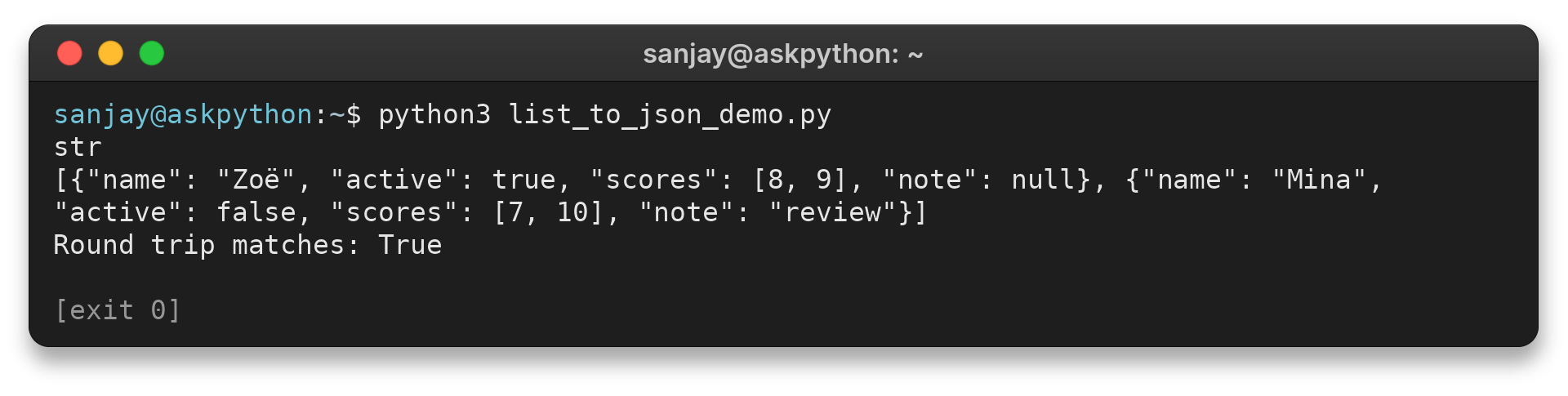
I ran python3 list_to_json_demo.py with these records. The first output line confirms json.dumps() returned a Python string, and the next line displays its JSON text. The file is then read back, and the equality result confirms that this built-in sample survived the round trip.
sanjay@askpython:~$ python3 list_to_json_demo.py
str
[{"name": "Zoë", "active": true, "scores": [8, 9], "note": null}, {"name": "Mina", "active": false, "scores": [7, 10], "note": "review"}]
Round trip matches: True

[exit 0]
print() displays the JSON text without Python string delimiters, while repr() shows Python’s quoted string notation rather than additional characters in the JSON document.
Each array entry remains one record with its own name, active flag, scores and note. The first note is JSON null, which is different from leaving that key out. Use the form the receiving system defines for an empty or unavailable value.
I included Zoë in the sample and set ensure_ascii=False because I wanted to check how readable Unicode appears in the resulting text. The screenshot shows the accented character intact. Without that option, the encoder escapes non-ASCII characters, which remains valid JSON and decodes to the same value but is less convenient to inspect by eye.
Step 3: Pick the string or file function
After encoding, the next decision is how to consume JSON or where to store it. These related functions take either a text value or a file object.
| Function | Input destination | Result |
|---|---|---|
| json.dumps(value) | None | Returns JSON text as a Python string |
| json.dump(value, file) | An open text file | Writes JSON text to that file |
| json.loads(text) | A JSON string | Returns the corresponding Python value |
| json.load(file) | An open text file | Reads JSON and returns a Python value |
The example opens the file in UTF-8 mode and uses with statements to close it after reading and writing. I used indent=2 for a readable file, while separators can remove optional spaces. For a large list, json.dump() writes encoded chunks without first building a complete JSON string, but the input list still occupies memory.
What should you check before encoding a list?
I grouped these checks here because the example uses standard JSON values, while other Python types need a separate representation decision.
| Case | What happens | What to do |
|---|---|---|
| Nested lists and dictionaries | Supported values are encoded recursively | Pass the outer list as one value |
| Tuple inside a list | It becomes a JSON array | Use a tuple only when array semantics fit |
| Set, function, or custom instance | Default encoding raises TypeError | Convert it to supported values or define an explicit default conversion |
| Dictionary with non-string keys | Supported numeric, boolean, and null-like keys become strings | Use string keys when round-trip key identity matters |
| Non-ASCII text | Default ensure_ascii=True escapes characters | Set ensure_ascii=False when readable Unicode text is wanted |
| NaN or infinity | Allowed by Python’s default encoder but outside strict JSON | Set allow_nan=False to reject them |
| Circular container reference | The default circular-reference check raises ValueError | Remove the cycle or convert the data to a finite structure |
| Parallel lists of fields and values | They hold separate sequences | Make records first when matching positions belong together |
If encoding raises TypeError, check which value falls outside the encoder’s supported mapping. A conversion function or custom JSONEncoder can define a representation for repeated custom types. Avoid stringifying every unknown object, since the receiving program cannot recover its original type from plain text.
A circular reference occurs when a container points to itself directly or through another container. JSON has no reference notation for that loop, so remove the cycle or replace the relationship with an identifier before encoding.
For dates and timestamps, choose a documented representation such as an ISO 8601 string with a timezone or an epoch value, and convert a set to an array only if element order and duplicates do not matter. The decoder returns a timestamp as text, so both programs need parsing rules. A naive datetime has no timezone, so do not label it UTC by assumption.
For application objects, build a dictionary of the fields the recipient needs instead of trying to serialize every internal attribute. This keeps methods and cached state out of the JSON payload.
An account number, phone number or postal code is an identifier, not a quantity. Store it as a string before encoding if leading zeros matter, since some consumers also lose precision on very large JSON numbers.
When parsing fails with JSONDecodeError, inspect the input for single-quoted strings, a trailing comma, or a missing bracket. Those are common signs that Python display syntax was mistaken for JSON. The exception reports a line and column, which helps locate the invalid token or delimiter.
A tuple encodes as a JSON array because JSON has no tuple type. Parsing that array returns a Python list, so rebuild a tuple only if the receiving code depends on it.
JSON object keys are strings, so converting non-string keys can make integer key 1 ambiguous with string key “1”. Normalize keys before encoding when their identity matters.
Set allow_nan=False when strict JSON is required, because the default encoder otherwise emits NaN or infinity that an external validator may reject.
The Python documentation cautions that parsing untrusted JSON can consume substantial CPU and memory. Apply input-size and nesting limits when accepting text from outside your program.
Match the service’s documented root and field types because a list becomes an array while wrapping it in a dictionary produces an object.
For existing JSON text, parse it with loads() before reusing it. Encoding the text itself adds an outer JSON string, so an HTTP client’s JSON parameter should receive the original Python list when that is the documented interface.
Calling dump() repeatedly on one file concatenates top-level values without a separator, so write one outer list or choose a format with explicit record boundaries.
Conclusion: use json.dumps() for a string
The sample’s nested records retain their fields and array values through both encoding and file reading. Its output also confirms that Unicode text can remain readable with the selected encoder option.
For a file-reading example, continue with Read JSON File in Python. For the other functions and encoder options, see AskPython’s Python json module guide.
FAQ
These answers cover common follow-up questions about turning Python lists into JSON.
How do I convert a Python list to a JSON string?
Import json and call json.dumps(your_list). The function returns a Python string containing JSON text.
Can json.dumps() convert a nested list or a list of dictionaries?
Yes. The standard encoder handles supported lists and dictionaries recursively, so nested lists and objects keep their structure in the JSON array.
What is the difference between json.dump() and json.dumps()?
json.dumps() returns JSON text as a string. json.dump() writes JSON text to an open text file.
How do I convert a JSON string back to a Python list?
Pass the JSON string to json.loads(). It parses the text and returns the corresponding Python value, which is a list when the JSON top level is an array.
