


A matrix of feature rows can produce one output from `np.linalg.norm(matrix)`, even when the next step needs a length for each row. I was curious that `axis=1` can preserve that row-by-row view without changing the matrix.
A norm reports size rather than replacing the data it measures. The meaning of its default result starts with the input’s shape.
What np.linalg.norm returns
It returns a vector or matrix magnitude. By default, a vector gets Euclidean length and a two-dimensional array gets a Frobenius norm scalar, while axis can return one value per selected slice.
Normalization uses a separate division by a selected norm.
| Input | Default result | Returned shape |
|---|---|---|
| One-dimensional vector | Euclidean length | Scalar |
| Two-dimensional matrix | Frobenius norm | Scalar |
| Matrix with an integer axis | Vector norm for each slice | One value per row or column |
The default matrix result includes every entry and equals the square root of the sum of squared absolute values, so it answers a different question from the length of a single row.
Set up NumPy for the examples
Use a virtual environment so these examples keep their NumPy package separate from other Python projects. From an empty project directory, create the environment and install NumPy without pinning a release.
python3 -m venv .venv
source .venv/bin/activate
python -m pip install numpy
The examples use NumPy arrays because their shape makes each reduction explicit. These calls also accept array-like input, but an array makes row and column results visible at a glance.
Calculate vector, matrix, and per-axis norms
Put one vector and a small matrix side by side so their default results and axis-wise output are clear. The matrix has rows with lengths 5 and 12.
Compare the vector and matrix defaults
Save this sample as norm_examples.py. Its vector call returns 5, while the default matrix call combines all four entries into one Frobenius norm.
import numpy as np

vector = np.array([3, 4])
matrix = np.array([[3, 4], [0, 12]])

print("vector:", np.linalg.norm(vector))
print("matrix:", np.linalg.norm(matrix))
print("row norms:", np.linalg.norm(matrix, axis=1))
print("column norms:", np.linalg.norm(matrix, axis=0))
print("row norm shape:", np.linalg.norm(matrix, axis=1, keepdims=True).shape)

rotation = np.array([[0, -1], [1, 0]])
print("rotation Frobenius norm:", np.linalg.norm(rotation))
print("rotation matrix 2-norm:", np.linalg.norm(rotation, ord=2))
Run the saved file from the activated environment.
source .venv/bin/activate && python norm_examples.py
I saw 13.0 from the default matrix call. Setting axis=1 reduces across rows and axis=0 reduces down columns, while keepdims=True keeps row norms shaped as a column, which means NumPy can broadcast each norm over its row.
The rotation example separates two matrix definitions. Its Frobenius norm is the square root of the sum of squared entries, while its matrix 2-norm is the largest singular value, which is 1 for this rotation.
The NumPy reference for np.linalg.norm lists the supported ord values and explains how axis and keepdims change the returned shape.
Use values entered at the prompt
If the matrix comes from typed values, enter each row on one line with spaces between values and semicolons between rows. Axis 1 gives each row’s norm, while axis 0 gives each column’s norm.
import numpy as np

row_text = input("Rows, values separated by spaces and rows by semicolons: ")
rows = [[float(value) for value in row.split()] for row in row_text.split(";")]
matrix = np.array(rows)
axis = int(input("Axis (0 for columns, 1 for rows): "))
if axis not in (0, 1):
    raise ValueError("Choose axis 0 or 1")
print("norms:", np.linalg.norm(matrix, axis=axis))
When you run this file, enter 4 7 10;13 16 19;22 25 28 for the rows and 1 for the axis. The returned values are the Euclidean lengths of those three rows.
Rows, values separated by spaces and rows by semicolons: 4 7 10;13 16 19;22 25 28
Axis (0 for columns, 1 for rows): 1
norms: [12.84523258 28.03569154 43.50861984]
Choose ord and handle zero norms
The ord argument selects a formula, and an order can mean a different calculation for a matrix than for a vector.
| ord | Vector | Matrix |
|---|---|---|
| 1 | Sum of absolute values | Largest absolute column sum |
| 2 | Euclidean length | Largest singular value |
| Infinity | Largest absolute entry | Largest absolute row sum |
| fro | Not defined for vectors | Frobenius norm |
| 0 | Count of nonzero entries | Not defined as a matrix norm |
A vector’s default 2-norm is Euclidean length, while a matrix default is Frobenius and its explicit ord=2 returns the largest singular value.
import numpy as np

vector = np.array([-3, 4])
matrix = np.array([[3, 4], [0, 12]])

for order in (1, 2, np.inf):
    print(f"vector ord={order}:", np.linalg.norm(vector, ord=order))

print("matrix ord=1:", np.linalg.norm(matrix, ord=1))
print("matrix ord=2:", np.linalg.norm(matrix, ord=2))
print("matrix ord=np.inf:", np.linalg.norm(matrix, ord=np.inf))
print("matrix ord='fro':", np.linalg.norm(matrix, ord="fro"))
Save the sample as ord_examples.py, then run it from the activated environment. For a matrix 1-norm, NumPy sums absolute values down each column and returns the larger column total.
source .venv/bin/activate && python ord_examples.py
vector ord=1: 7.0
vector ord=2: 5.0
vector ord=inf: 4.0
matrix ord=1: 16.0
matrix ord=2: 12.686516249028065
matrix ord=np.inf: 12.0
matrix ord='fro': 13.0
NumPy accepts vector ord=0 to count nonzero entries, although that result does not meet the mathematical norm definition. For a matrix, the same order raises a ValueError because NumPy does not define ord=0 as a matrix norm.
import numpy as np

matrix = np.array([[3, 4], [0, 12]])
try:
    np.linalg.norm(matrix, ord=0)
except ValueError as exc:
    print(type(exc).__name__ + ":", exc)
When you run ord_boundary.py from the activated environment, NumPy raises the matrix-order ValueError shown below.
source .venv/bin/activate && python ord_boundary.py

Choose an ord listed for the matrix shape in the table above.
Normalize by dividing by the norm
Normalize each nonzero row by dividing it by its norm. With keepdims=True, each row norm stays in a one-value column, so NumPy broadcasts it across that row.
A zero row has norm zero, so the code preserves it instead of dividing by zero.
import numpy as np

matrix = np.array([[3.0, 4.0], [0.0, 0.0]])
row_norms = np.linalg.norm(matrix, axis=1, keepdims=True)
unit_rows = np.divide(
    matrix,
    row_norms,
    out=np.zeros_like(matrix),
    where=row_norms != 0,
)

print("row norms:", row_norms.ravel())
print("unit rows:", unit_rows)
print("resulting row norms:", np.linalg.norm(unit_rows, axis=1))
The output contains row norms [1., 0.], which confirms that the nonzero row reached unit length and the zero row stayed zero under this policy.
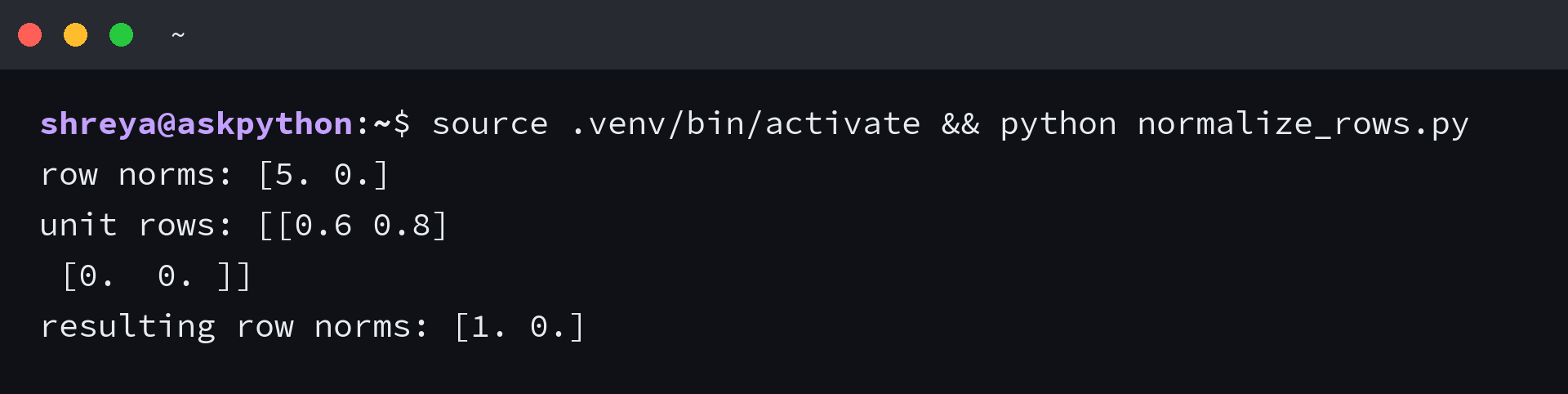
When the rows are normalized, their measured norms tell you whether the division did what you intended. Keep that check beside any preprocessing step that depends on unit-length rows.
Frequently asked questions
The API name appears in several closely related questions. These answers keep the default behavior and the explicit normalization step separate.
What does np.linalg.norm do?
It computes a vector or matrix norm and returns a scalar or an array of norms. The ord and axis arguments select the norm and the slices to measure.
Is np.linalg.norm an L1 or L2 norm?
For a vector, the default is the L2 norm. For a matrix, the default is the Frobenius norm. Set ord to choose another supported definition.
How do I get the norm of each row?
Pass axis=1 to np.linalg.norm. The result contains one vector norm per row.
Does np.linalg.norm normalize an array?
It measures a norm. To normalize a nonzero vector or row, divide it by that norm and decide how your code should handle zero rows.
