

On Stack Overflow, a learner asks, “I am trying to calculate the mean average of columns from a list of arrays.” I ran np.mean with axis=0 and axis=1 on a 2×3 array.
What np.mean reduces
NumPy’s np.mean calculates the arithmetic mean of an array. With axis=None, it combines every element into one scalar, and my integer example returned float64 by default.
When you pass an axis, NumPy combines values along that dimension and removes it by default, so axis=0 leaves one result per column in a 2D array. The NumPy mean reference documents the axis, keepdims, dtype, and where parameters.
Install NumPy and prepare numeric data
Run the install command in the virtual environment that will run your script. NumPy’s installation guide recommends pip for a standard Python setup, and np.stack(rows) forms the 2×3 input when each row has three values.
python -m pip install numpy
import numpy as np

rows = [np.array([8, 6, 7]), np.array([9, 5, 8])]
scores = np.stack(rows)
Choose the axis that matches your result
The same array can produce one overall mean or one mean for each row or column. Choose the axis that leaves the values you plan to use, then verify the result shape.
Calculate one mean for the whole array
A one-dimensional array returns one mean without an axis argument. In two dimensions, the same call combines every value, so the six scores sum to 43 and their mean is 43 divided by 6.
daily = np.array([8, 6, 7])
print(np.mean(daily))
print(np.mean(scores))
Use axis=0 for columns and axis=1 for rows
When the input is a list of arrays, use np.stack to build the two-dimensional array first. NumPy requires each array to have the same shape, as the np.stack reference specifies.
For this array, axis=0 combines row values to leave one mean per column, while axis=1 combines column values to leave one mean per row. Check the output shape against the dimension you meant to keep.
by_column = np.mean(scores, axis=0)
by_row = np.mean(scores, axis=1)
print("columns:", by_column, by_column.shape)
print("rows:", by_row, by_row.shape)
| Call | Values combined | Result shape | Result |
|---|---|---|---|
| np.mean(scores) | All six entries | scalar | One overall mean |
| np.mean(scores, axis=0) | Rows | (3,) | One mean per column |
| np.mean(scores, axis=1) | Columns | (2,) | One mean per row |
The shape tuple (2, 3) records two rows followed by three columns. Reducing axis=0 removes the first size and leaves (3,), while reducing axis=1 removes the second and leaves (2,), so the tuple shows which dimension survived.
Keep the axis when the next operation needs it
A row mean has shape (2,) while the input has shape (2, 3), so it will not broadcast across the original rows as is. With keepdims=True, the mean has shape (2, 1), which broadcasts across the columns when you subtract it from each row.
row_means = np.mean(scores, axis=1, keepdims=True)
centered = scores - row_means
print(row_means.shape)
print(centered)
Decide which values enter the mean
Edge cases depend on what each stored value means. Keep measured zeros, treat NaNs as missing only when they mark missing data, and use weights only when observations contribute unequally.
Use nanmean when NaN means missing data
np.mean propagates NaN, so one missing value can make the result NaN. Use np.nanmean when NaN represents a missing measurement.
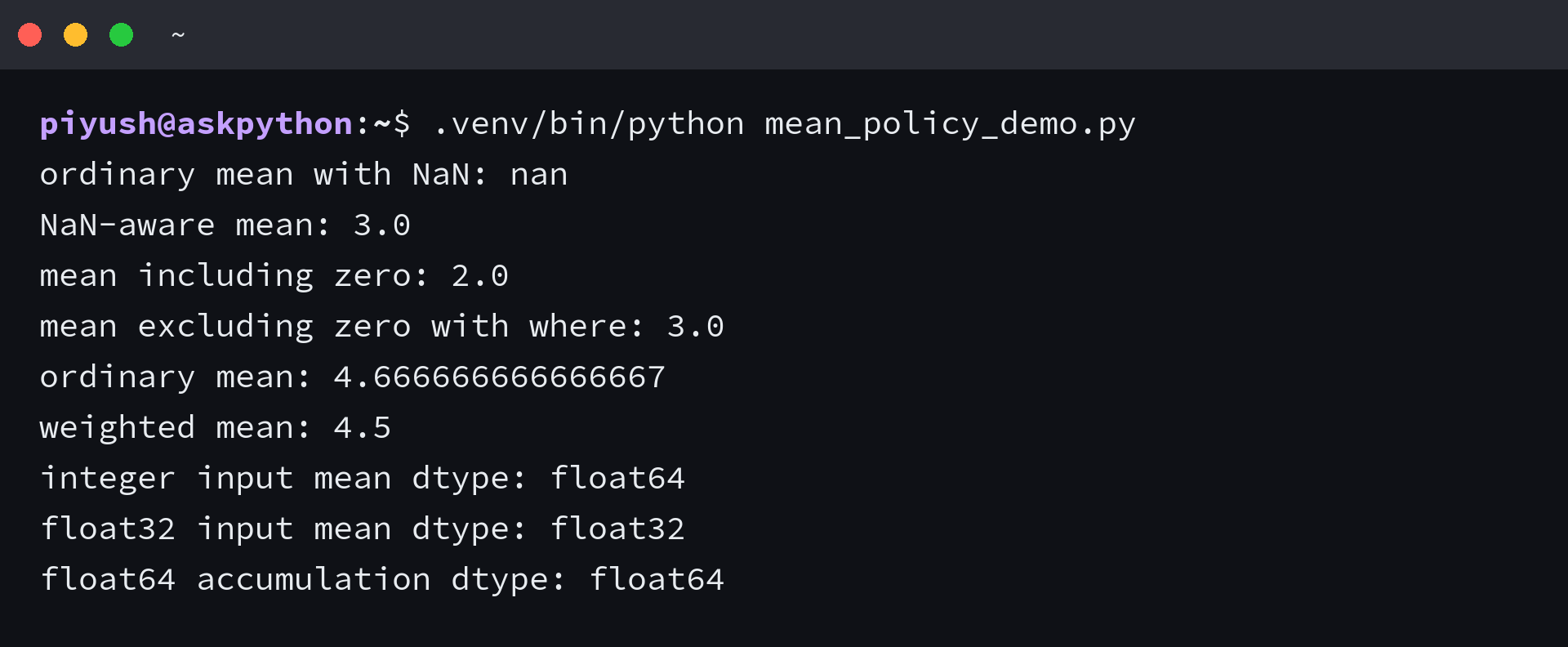
I tested an all-NaN slice, and np.nanmean still returned NaN with RuntimeWarning, which means a slice with no valid values needs a separate rule. The NumPy nanmean reference documents that boundary.
Exclude zeros only when zero means no measurement
np.mean includes zero because zero is a numeric value. A learner’s question asks how to “find mean of 2 numpy arrays without using the 0 values.”
Use a where mask only if zero is a missing-value marker in your data. For valid zero measurements, keep them in the mean.
np.mean(where=…) includes elements that match its condition. np.where is a separate operation that selects values or positions.
Use average when values have weights
np.mean gives every value equal weight, while np.average(weights=…) handles observations the data says contribute unequally. Here, (1×1 + 4×2 + 9×1) divided by the total weight of 4 returns 4.5.
I compared equal and weighted means for the same values, and they were 4.666666666666667 and 4.5. The NumPy average reference requires compatible weights and rejects a zero sum, so use unequal weights only when the data assigns them.
Check the dtype for long floating-point sums
Integer inputs use float64 for the mean by default, while floating-point inputs normally keep their precision for accumulation and output. For a large float32 array, dtype=np.float64 uses a wider accumulator, which can reduce accumulation error when the extra arithmetic cost is acceptable.
measurements = np.array([2.0, np.nan, 4.0])
print(np.mean(measurements))
print(np.nanmean(measurements))

counts = np.array([0.0, 2.0, 4.0])
print(np.mean(counts))
print(np.mean(counts, where=counts != 0))

values = np.array([1.0, 4.0, 9.0])
weights = np.array([1.0, 2.0, 1.0])
print(np.mean(values))
print(np.average(values, weights=weights))

float_values = np.array([1.2, 1.3], dtype=np.float32)
print(np.mean(float_values).dtype)
print(np.mean(float_values, dtype=np.float64).dtype)
Check the output shape before the next operation
Before using a reduction in another expression, compare its shape with the dimension you need to keep. For row-wise centering, the mean needs shape (2, 1) so it broadcasts across the three columns.
assert np.mean(scores, axis=1, keepdims=True).shape == (2, 1)
NumPy mean FAQs
What does axis=0 mean in np.mean?
For a two-dimensional array, np.mean combines values from each row and returns one mean for each column.
How do I calculate the mean for each column?
Pass axis=0 to np.mean for a two-dimensional array. The output has one value for each column.
Does np.mean ignore NaN or zero values?
No. np.mean propagates NaN and includes zero. Use np.nanmean only when NaN marks missing data, and use a where mask only when your data rule excludes a value.
When should I use np.average instead of np.mean?
Use np.average with weights when observations contribute unequally. The weights must have a nonzero sum and be compatible with the values.
