

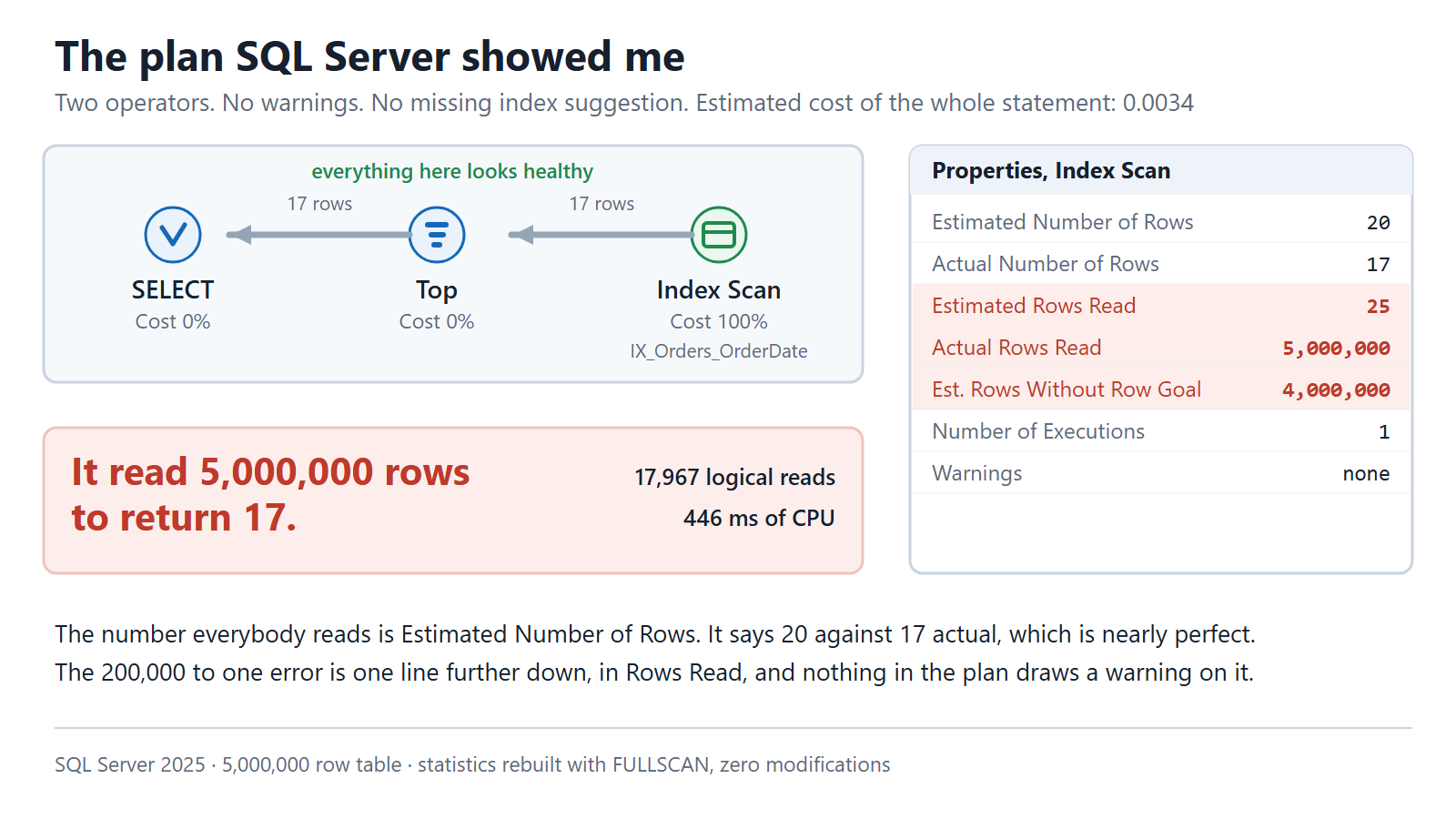
I did not hand it a plan with a spill in it. Everybody can find a spill. I handed it a plan with no warnings at all, where every number on the screen looked healthy, and the query underneath was reading five million rows to return seventeen.
None of the mechanics here are new, and I have written about the two pieces this turns on before: SQL SERVER – Row Goal and Performance, which is why a TOP changes what the optimizer aims for, and SQL SERVER – Number of Rows Read, which is the plan property that gives it away. What is new here is that I said neither of those words to the AI, and I wanted to see how far it got on its own.
The Problem I Handed Over
Here is the exact thing I typed, before any plan, any context or any hint.
One stored procedure. One server. Statistics rebuilt this morning.
Customer A has four million orders. Their screen loads instantly.
Customer B has seventeen orders. Their screen is slow, every single time.
The customer with fewer rows is the slow one. Why?
That is the whole ticket, and it is why nobody believed it for two weeks. It sounds like nonsense. More rows should mean more work.
This is the procedure. There is nothing clever in it.
CREATE PROCEDURE dbo.LatestOrders
    @CustomerID int
AS
    SELECT TOP (20) OrderID, OrderDate, Amount
    FROM dbo.Orders
    WHERE CustomerID = @CustomerID
    ORDER BY OrderDate DESC;
Twenty rows. One customer. An index on the date column, an index on the customer column, and statistics rebuilt with FULLSCAN so nothing is out of date.
What the Plan Looked Like
Two operators. No warnings, no missing index suggestion, nothing red or yellow anywhere.
Look at the number people actually read. Estimated twenty rows, seventeen came back. That is as close to correct as an estimate gets in real life.
SQL Server also priced this query at 0.0034. If you go looking for your expensive queries by cost, this one never appears on the list.
The damage is one line further down the properties panel, in a row called Rows Read. It expected to look at 25 rows. It looked at 5,000,000.
Why the Small Customer Is the Slow One
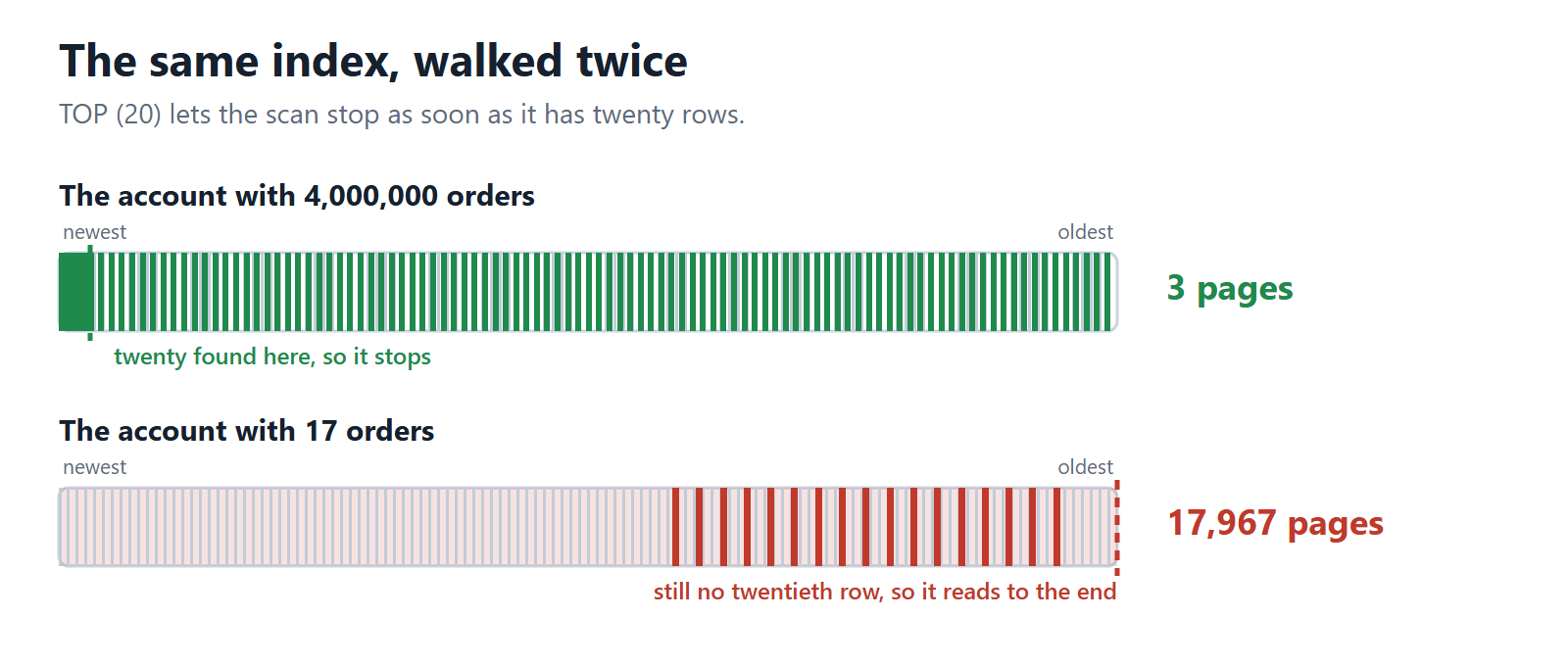
One thing before the picture. There is one index here, not two. Every order from every customer sits in it together, newest first, and the picture just colours in where one account’s rows land inside that shared list.
The answer is the word TOP.
Because you asked for twenty rows, SQL Server gives itself permission to stop as soon as it has twenty. So it walks the date index from newest order backward and grabs anything belonging to your customer, expecting to be finished in a few rows.
For the customer with four million orders, that works beautifully. Their orders are everywhere. Twenty of them turn up straight away and it stops. Three pages read, and the screen is instant.
Then that same saved plan gets handed to a customer with seventeen orders.
Here is the part that makes it click. A small customer is usually a quiet customer. Seventeen orders in total, and the last one was placed nearly three years ago. That is not me rigging the example. That is what a dormant account looks like, and your database has hundreds of them.
So all seventeen of their rows sit right down at the old end of that shared index, buried under three years of everybody else’s orders.
Now the same strategy has to walk past everybody else’s orders just to reach the first one. Then it keeps walking, all the way to the end of the index, because the only way to prove there is no twentieth order is to run out of table.
17,967 pages read and 446 milliseconds of CPU, to return seventeen rows.
Same procedure. Same statistics. The plan was built for the big customer and then reused for the small one.
The plan says so outright, if you go looking. ParameterCompiledValue is 4417 and ParameterRuntimeValue is 10007, sitting side by side in the XML.
The First Time I Asked
I gave it the plan and one sentence. This query is slow, tell me why.
It got the main thing right, and quickly. It spotted the gap between rows expected and rows actually read.
Then it explained the cause. The TOP was letting the optimizer assume an early exit, so the estimate of twenty is not a mistake but a side effect. That chain took me about two years to learn to see.
Then, in exactly the same confident voice, it told me three things that were not true.
It told me to update statistics. They had been rebuilt with FULLSCAN that morning.
It told me to create an index on the customer column. That index already existed.
It described a key lookup that was costing me most of the runtime. There is no lookup in this plan. There are two operators and neither of them is one.
Nothing marked those three as guesses. Same tone, same structure, same helpful bolded heading as the finding that was correct.
The Second Time I Asked
Same plan, but this time I also gave it the row counts, the index definitions, and the version of SQL Server.
The three invented findings disappeared. Not softened. Gone.
So the lesson is not that it is unreliable. It is that a plan on its own does not carry enough to interpret it, and a model with a gap will fill the gap instead of telling you there is one.
Which, if I am honest, is also true of a certain kind of consultant.
The Fix, and Why I Did Not Use It
Both times, it recommended the fix you already know. Add OPTION (RECOMPILE) so one customer’s plan stops being handed to another.
That was the right answer for about fifteen years.
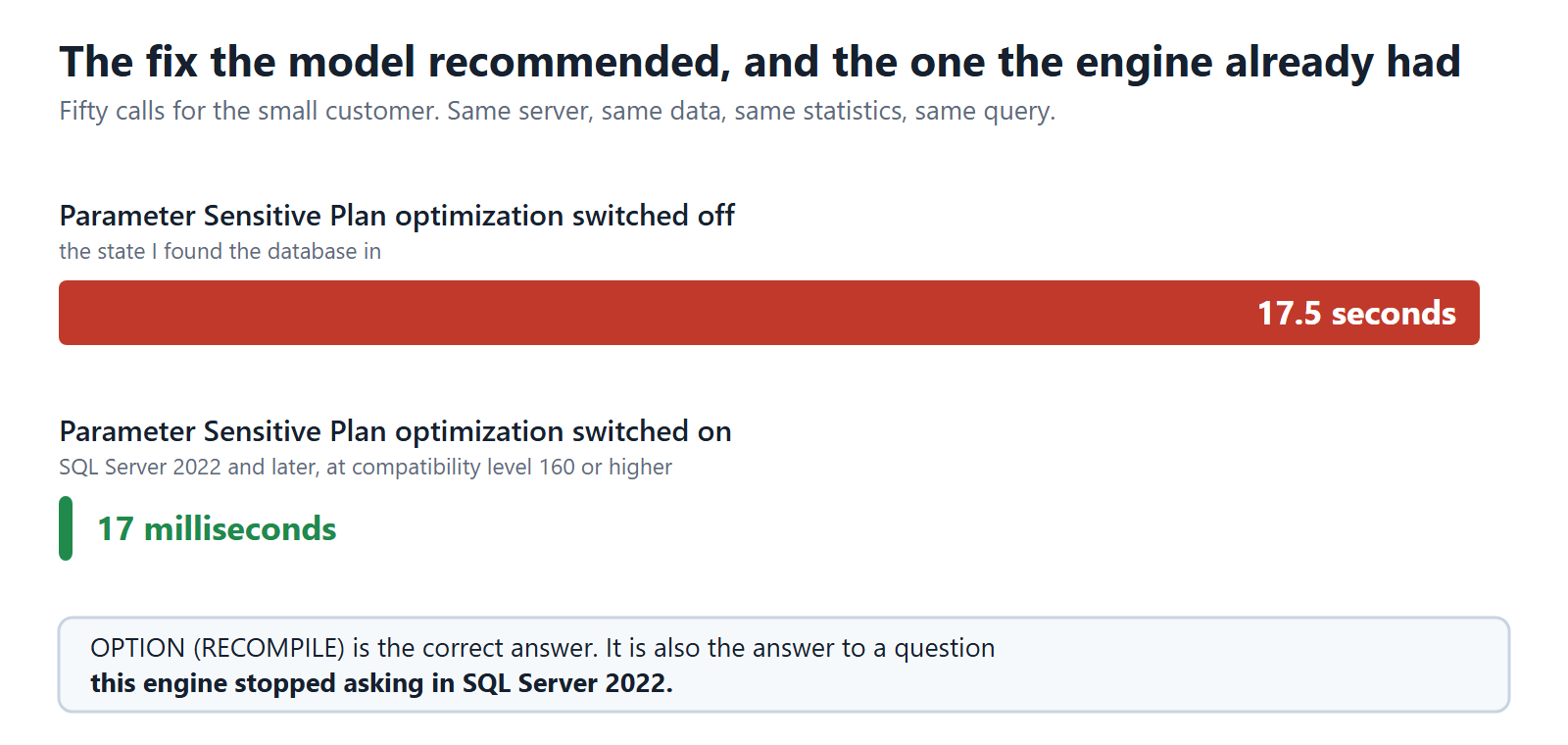
SQL Server 2022 introduced a feature that does this by itself. It notices one customer is enormous and the rest are small, and it keeps more than one plan for the same query instead of forcing everybody to share. Somebody had switched that feature off on this database years earlier, and nobody could remember why.
Fifty calls for the small customer took 17.5 seconds with it off, and 17 milliseconds with it back on. Same data, same statistics, same query.
So the hint works. It is also a hint for a problem this server stopped having in SQL Server 2022, and applying it would have papered over the actual cause.
One important caveat, and please read this one. I am not telling you to switch this feature on everywhere.
Several people I respect have written about turning it off and getting a calmer, more predictable server for it. It can pick the wrong plan for a particular query. It can add compilations you did not ask for. Whoever disabled it here may well have had a good afternoon’s reason.
So take my result as one measurement on one workload, not as advice for yours. The point is smaller and more annoying than a recommendation. The right answer depended on the build number and the shape of the data.
Here is the part I got wrong when I first wrote this up. The build number is in the plan. It sits in the very first tag of the XML, in an attribute called Build, and mine says 17.0.4065.4. I have never once watched anybody read it, myself included. What is genuinely not in there is the shape of the data, or whether this database had the 2022 behavior switched on at all.
How I Use It Now
As a fast, tireless first reader that occasionally makes things up.
I give it everything. The plan, the schema, the row counts, and the build number every time, because that package is what moved its answer from a hint to a root cause. I did not feed them in one at a time, so I cannot honestly tell you which one did the work, and I am not going to pretend otherwise in a post about pretending otherwise.
Then I check every finding against the plan myself. That takes ten minutes and it is not optional, because the invented findings look exactly like the real ones and there is no tell.
Try It Yourself
Everything above came off my own instance, and you can have the same afternoon.
This builds the table, the lopsided customer, the indexes and the procedure, then runs the three tests. On SQL Server 2022 or later it switches the new behavior off so you can watch the old problem happen, then switches it back on so you can watch it go away.
/*  The top twenty query that is fast for a big customer
    and slow for a small one.

    SQL Server 2016 SP1 and later, because of CREATE OR ALTER.
    Builds about 750 MB of table and indexes, so leave a
    couple of GB free.
    It will not touch an existing PlanLab database.
    Drop it yourself at the end.  */

USE master;
GO
IF DB_ID('PlanLab') IS NOT NULL
BEGIN
    PRINT '>>> A database called PlanLab already exists on this server.';
    PRINT '>>> Nothing has been changed. Drop it yourself, or rename it';
    PRINT '>>> throughout this script, then run this again.';
    SET NOEXEC ON;
END
GO
CREATE DATABASE PlanLab;
ALTER DATABASE PlanLab SET RECOVERY SIMPLE;
GO

/*  Parameter Sensitive Plan optimization needs compatibility level 160 or
    higher, and a new database inherits its level from model. Raise it if it
    is too low, and never lower it if it is already above.  */
IF CONVERT(int, PARSENAME(
       CONVERT(varchar(32), SERVERPROPERTY('ProductVersion')), 4)) >= 16
   AND (SELECT compatibility_level
          FROM sys.databases WHERE name="PlanLab") < 160
    EXEC('ALTER DATABASE PlanLab SET COMPATIBILITY_LEVEL = 160');
GO
USE PlanLab;
GO

CREATE TABLE dbo.Orders
(
    OrderID    int IDENTITY(1,1) NOT NULL,
    CustomerID int           NOT NULL,
    OrderDate  datetime2(0)  NOT NULL,
    Amount     decimal(10,2) NOT NULL,
    Notes      char(60)      NOT NULL,
    CONSTRAINT PK_Orders PRIMARY KEY CLUSTERED (OrderID)
);
GO

/*  Five million orders. Customer 4417 owns four million of them.
    Sixty thousand other customers own about seventeen each.  */
WITH E1(n) AS (SELECT 1 FROM
         (VALUES (1),(1),(1),(1),(1),(1),(1),(1),(1),(1)) AS t(n)),
     E2(n) AS (SELECT 1 FROM E1 a CROSS JOIN E1 b),
     E4(n) AS (SELECT 1 FROM E2 a CROSS JOIN E2 b),
     E8(n) AS (SELECT 1 FROM E4 a CROSS JOIN E4 b),
     Nums  AS (SELECT TOP (5000000)
                      ROW_NUMBER() OVER (ORDER BY (SELECT NULL)) AS v FROM E8)
INSERT dbo.Orders WITH (TABLOCK) (CustomerID, OrderDate, Amount, Notes)
SELECT CASE WHEN v <= 4000000 THEN 4417
            ELSE 10000 + CONVERT(int, (v - 4000000) % 60000) END,
       DATEADD(minute, -CONVERT(int, v % 2600000), '2026-09-01T00:00:00'),
       CONVERT(decimal(10,2), 12.00 + (v % 98700) / 100.0),
       'order line detail'
FROM Nums;
GO

/*  The reporting index somebody added years ago, and the obvious one.  */
CREATE NONCLUSTERED INDEX IX_Orders_OrderDate
    ON dbo.Orders (OrderDate DESC) INCLUDE (CustomerID, Amount);
CREATE NONCLUSTERED INDEX IX_Orders_CustomerID
    ON dbo.Orders (CustomerID);
GO

/*  Statistics as good as they get. This is not a stale statistics story.  */
UPDATE STATISTICS dbo.Orders WITH FULLSCAN;
GO

/*  The whole story depends on one plan being sniffed and reused, which is
    the default. Set it anyway so the demo does not depend on your server.  */
ALTER DATABASE SCOPED CONFIGURATION SET PARAMETER_SNIFFING = ON;
GO

CREATE OR ALTER PROCEDURE dbo.LatestOrders
    @CustomerID int
AS
BEGIN
    SET NOCOUNT ON;
    SELECT TOP (20) OrderID, OrderDate, Amount
    FROM dbo.Orders
    WHERE CustomerID = @CustomerID
    ORDER BY OrderDate DESC;
END
GO

/*  On SQL Server 2022 and later, at compatibility level 160 or higher, this
    query is eligible for Parameter Sensitive Plan optimization and usually
    never shows the problem. Switch it off to see what
    earlier versions do.  */
IF CONVERT(int, PARSENAME(
       CONVERT(varchar(32), SERVERPROPERTY('ProductVersion')), 4)) >= 16
    EXEC('ALTER DATABASE SCOPED CONFIGURATION
          SET PARAMETER_SENSITIVE_PLAN_OPTIMIZATION = OFF');
GO

/*  ---- The test. Turn on Include Actual Execution Plan first. ----  */
ALTER DATABASE SCOPED CONFIGURATION CLEAR PROCEDURE_CACHE;
GO
/*  1. The big customer runs first, so the saved plan is built for them.  */
SET STATISTICS IO ON;
EXEC dbo.LatestOrders @CustomerID = 4417;      -- 3 reads
SET STATISTICS IO OFF;
GO
/*  2. A customer with seventeen orders, reusing that same plan.
       Click the Index Scan, open Properties, and read Rows Read.  */
SET STATISTICS IO ON;
EXEC dbo.LatestOrders @CustomerID = 10007;     -- about 17,900 reads
SET STATISTICS IO OFF;
GO
/*  3. Put the 2022 behavior back and run the small customer again.  */
IF CONVERT(int, PARSENAME(
       CONVERT(varchar(32), SERVERPROPERTY('ProductVersion')), 4)) >= 16
    EXEC('ALTER DATABASE SCOPED CONFIGURATION
          SET PARAMETER_SENSITIVE_PLAN_OPTIMIZATION = ON');
GO
ALTER DATABASE SCOPED CONFIGURATION CLEAR PROCEDURE_CACHE;
GO
EXEC dbo.LatestOrders @CustomerID = 4417;
GO
SET STATISTICS IO ON;
EXEC dbo.LatestOrders @CustomerID = 10007;     -- 54 reads
SET STATISTICS IO OFF;
GO
SET NOEXEC OFF;
GO
If your numbers come out different, I would genuinely like to hear it. That is the useful kind of email.
The problem was never that it gets things wrong, it is that being right and making things up arrive in the same handwriting, and only one of you in that conversation can tell them apart.
Published by Pinal Dave on SQLAuthority. More of my work at pinaldave.com.
