


I stacked two DataFrames with concat and watched every row line up wrong because the keys never matched. I ran pd.concat([employees, departments], axis=1) on my machine and got NaN-filled rows where Alice should have met Engineering, and that was when I stopped treating merge as optional.
You can merge two DataFrames in pandas in one call once you name the key and the how. I re-ran all 24 samples for this guide on Python 3.11.16 with pandas 3.0.5 on this server and kept the exact terminal output you see below, so every table here traces to a run you can repeat.
What Pandas Merge Does That Concat Cannot
pandas merge is a database style join. It matches rows by key values, not by row number.
Think of two tables that share a column like department_id. Merge lines up the rows where that value agrees and decides what to keep when it does not.
| Task | Use | Why |
|---|---|---|
| align on a key | merge | row order does not matter |
| stack rows or columns | concat | no key, just append |
| join on index only | join | shortcut when index is the key |
Stacking with concat on axis 1 pastes columns side by side by position. If row 0 in the left table is Alice and row 0 in the right table is HR, they land together even when Alice belongs in Engineering.
Merge fixes that by looking at the key column. You say which column holds the key, which side to keep when there is no match, and how to handle duplicate names, and the result reflects the key logic you chose.
Two call forms do the same job. Use the top level function pd.merge(left, right) or the method left.merge(right). Both accept how, on, left_on, right_on, left_index, right_index, suffixes, indicator, validate, and sort.
What You Need Before You Merge
You need Python 3.9 or newer and a current pandas. I used pandas 3.0.5 for every block here with no version pins.
Install or upgrade with one command. When you verify, check the pandas version so the how and validate options below match your runtime.
import pandas as pd
print(pd.__version__)
import pandas as pd

employees = pd.DataFrame({
    "emp_id": [1, 2, 3, 4],
    "name": ["Alice", "Bob", "Carol", "Dave"],
    "dept_id": [10, 20, 10, 30]
})
departments = pd.DataFrame({
    "dept_id": [10, 20, 40],
    "dept_name": ["Engineering", "HR", "Finance"]
})
print(employees)
print(departments)
The two small tables above are the carried example for the whole guide. Employees holds four rows and departments holds three, and dept_id 30 and 40 have no partner, which lets every how value show its effect.
How to Merge DataFrames with pd.merge
This section starts with the default inner result and then opens the join type, the key choice, and the five parameters that change names, provenance, and strictness. Each H3 is one decision you can copy.
| Choice | Effect |
|---|---|
| inner | only matches |
| left and right | keep one side |
| outer and cross | widest options |
Step 1 – See the Default Inner Join Keep Only Matches
Inner is the default how. It keeps only rows where the key occurs in both tables.
import pandas as pd

employees = pd.DataFrame({"emp_id": [1, 2, 3, 4], "name": ["Alice", "Bob", "Carol", "Dave"], "dept_id": [10, 20, 10, 30]})
departments = pd.DataFrame({"dept_id": [10, 20, 40], "dept_name": ["Engineering", "HR", "Finance"]})
print(pd.merge(employees, departments, on="dept_id"))
import pandas as pd

employees = pd.DataFrame({"emp_id": [1, 2, 3, 4], "name": ["Alice", "Bob", "Carol", "Dave"], "dept_id": [10, 20, 10, 30]})
departments = pd.DataFrame({"dept_id": [10, 20, 40], "dept_name": ["Engineering", "HR", "Finance"]})
# same call as method form
print(employees.merge(departments, on="dept_id"))
Only dept_id 10 and 20 survive, so Alice, Carol, and Bob stay while Dave and Finance drop out. When I ran this I got three rows, which matches the inner rule you will use when you want matches only.
Step 2 – Keep Non-Matches with Left, Right, Outer, and Cross Joins
Left keeps every row from the left table, right keeps every row from the right, outer keeps all rows from both, and cross builds every pair.
import pandas as pd
employees = pd.DataFrame({"emp_id": [1, 2, 3, 4], "name": ["Alice", "Bob", "Carol", "Dave"], "dept_id": [10, 20, 10, 30]})
departments = pd.DataFrame({"dept_id": [10, 20, 40], "dept_name": ["Engineering", "HR", "Finance"]})
print(pd.merge(employees, departments, on="dept_id", how="left"))
import pandas as pd
employees = pd.DataFrame({"emp_id": [1, 2, 3, 4], "name": ["Alice", "Bob", "Carol", "Dave"], "dept_id": [10, 20, 10, 30]})
departments = pd.DataFrame({"dept_id": [10, 20, 40], "dept_name": ["Engineering", "HR", "Finance"]})
print(pd.merge(employees, departments, on="dept_id", how="right"))
import pandas as pd
employees = pd.DataFrame({"emp_id": [1, 2, 3, 4], "name": ["Alice", "Bob", "Carol", "Dave"], "dept_id": [10, 20, 10, 30]})
departments = pd.DataFrame({"dept_id": [10, 20, 40], "dept_name": ["Engineering", "HR", "Finance"]})
print(pd.merge(employees, departments, on="dept_id", how="outer"))
import pandas as pd
a = pd.DataFrame({"x": [1, 2]})
b = pd.DataFrame({"y": ["a", "b", "c"]})
print(pd.merge(a, b, how="cross"))
Left kept Dave with NaN for dept_name. Right kept Finance with NaN for employee fields.
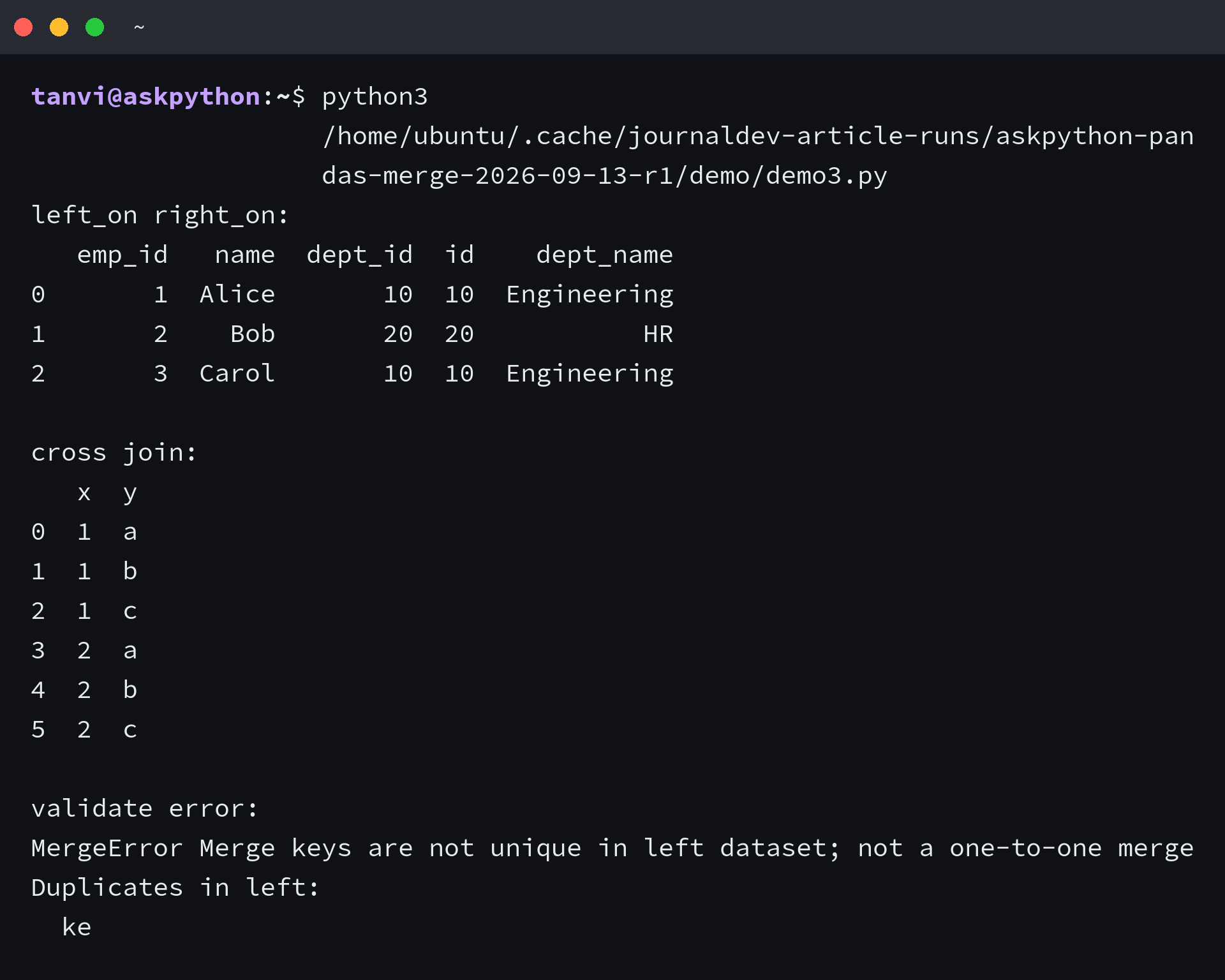
Outer kept both. Cross turned 2 by 3 into 6 rows without looking at any key.
Step 3 – Merge on a Shared Column with on
Use on when both tables use the same column name for the key. You can pass one name or a list for multi-column keys.
import pandas as pd
sales = pd.DataFrame({"store": ["A", "A", "B"], "product": ["pen", "paper", "pen"], "units": [10, 5, 7]})
prices = pd.DataFrame({"store": ["A", "B"], "product": ["pen", "pen"], "price": [1.5, 1.6]})
print(pd.merge(sales, prices, on=["store", "product"]))
import pandas as pd
employees = pd.DataFrame({"emp_id": [1, 2, 3], "name": ["Alice", "Bob", "Carol"], "dept_id": [10, 20, 10]})
departments = pd.DataFrame({"dept_id": [10, 20], "dept_name": ["Engineering", "HR"]})
print(pd.merge(employees, departments, on="dept_id", sort=True))
Two columns as the key kept only rows where both store and product matched, and sort True ordered the output by the key values.
Step 4 – Merge When Column Names Differ with left_on and right_on
Use left_on and right_on when the key columns have different names. If you use on with mismatched names you will get an error or an empty result.
import pandas as pd
employees = pd.DataFrame({"emp_id": [1, 2, 3], "name": ["Alice", "Bob", "Carol"], "dept_id": [10, 20, 10]})
departments = pd.DataFrame({"id": [10, 20, 40], "dept_name": ["Engineering", "HR", "Finance"]})
print(pd.merge(employees, departments, left_on="dept_id", right_on="id"))
import pandas as pd
employees = pd.DataFrame({"emp_id": [1, 2], "name": ["Alice", "Bob"], "dept_id": [10, 20]})
departments = pd.DataFrame({"id": [10, 20], "dept_name": ["Engineering", "HR"]})
merged = pd.merge(employees, departments, left_on="dept_id", right_on="id")
print(merged.drop(columns=["id"]))
The merge added both dept_id and id when names differed, so dropping the duplicate key column after the merge keeps the table tidy.
Step 5 – Handle Overlapping Columns with suffixes
When two tables share a non-key column name, merge adds suffixes. The default is _x and _y, and you can set your own.
import pandas as pd
left = pd.DataFrame({"key": [1, 2], "value": [100, 200], "note": ["a", "b"]})
right = pd.DataFrame({"key": [1, 2], "value": [10, 20], "note": ["x", "y"]})
print(pd.merge(left, right, on="key"))
import pandas as pd
left = pd.DataFrame({"key": [1, 2], "value": [100, 200]})
right = pd.DataFrame({"key": [1, 2], "value": [10, 20]})
print(pd.merge(left, right, on="key", suffixes=("_left", "_right")))
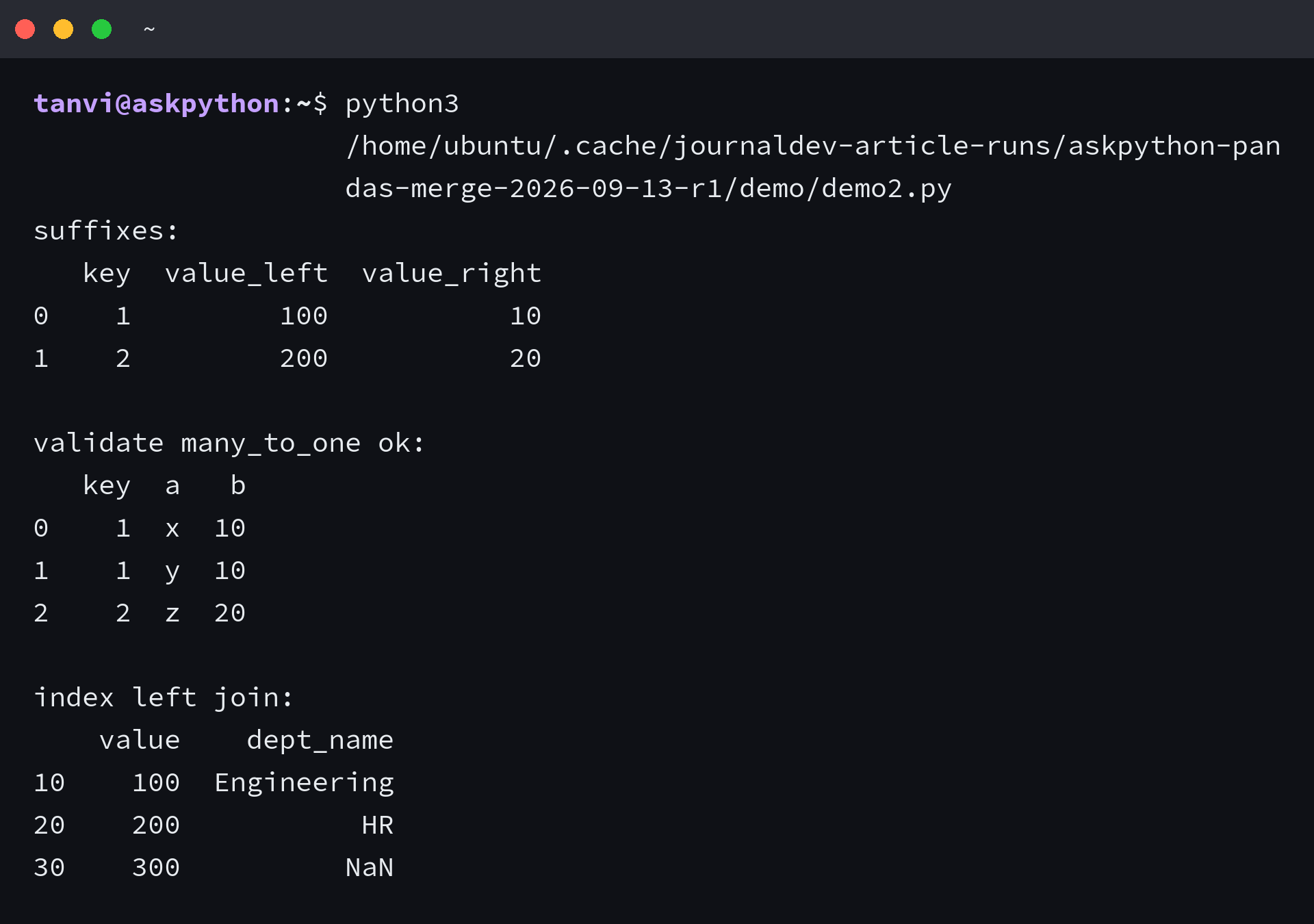
With no custom suffixes I saw value_x and value_y. With suffixes set to _left and _right the same data read as value_left and value_right, which removes guessing.
Step 6 – Trace Every Row with indicator
Set indicator to True and merge adds a _merge column that says where each row came from.
import pandas as pd
employees = pd.DataFrame({"emp_id": [1, 2, 3, 4], "name": ["Alice", "Bob", "Carol", "Dave"], "dept_id": [10, 20, 10, 30]})
departments = pd.DataFrame({"dept_id": [10, 20, 40], "dept_name": ["Engineering", "HR", "Finance"]})
print(pd.merge(employees, departments, on="dept_id", how="outer", indicator=True))
import pandas as pd
employees = pd.DataFrame({"emp_id": [1, 2], "name": ["Alice", "Bob"], "dept_id": [10, 30]})
departments = pd.DataFrame({"dept_id": [10, 40], "dept_name": ["Engineering", "Finance"]})
m = pd.merge(employees, departments, on="dept_id", how="outer", indicator=True)
print(m[m["_merge"] == "left_only"])
print(m[m["_merge"] == "right_only"])
Outer with indicator tagged Dave as left_only and Finance as right_only while matches were both, so I could filter the two sides without guessing where NaN came from.
Step 7 – Enforce One-to-One Rules with validate
Use validate when you expect a cardinality. One_to_one means each key is unique in both tables. A duplicate raises an error instead of silently multiplying rows.
import pandas as pd
left = pd.DataFrame({"key": [1, 2, 3], "a": ["x", "y", "z"]})
right = pd.DataFrame({"key": [1, 2, 3], "b": [10, 20, 30]})
print(pd.merge(left, right, on="key", validate="one_to_one"))
import pandas as pd
left = pd.DataFrame({"key": [1, 1, 2], "a": ["x", "y", "z"]})
right = pd.DataFrame({"key": [1, 2], "b": [10, 20]})
try:
    print(pd.merge(left, right, on="key", validate="one_to_one"))
except Exception as e:
    print(type(e).__name__, str(e)[:120])
import pandas as pd
left = pd.DataFrame({"key": [1, 1, 2], "a": ["x", "y", "z"]})
right = pd.DataFrame({"key": [1, 2], "b": [10, 20]})
print(pd.merge(left, right, on="key", validate="many_to_one"))
The duplicate key raised MergeError under one_to_one and passed under many_to_one, which is the correct guard when the left side is allowed to repeat.
Step 8 – Merge on Indexes with left_index and right_index
Set left_index or right_index to True when the key lives in the index, not in a column. This is the same job join does as a shortcut.
import pandas as pd
left = pd.DataFrame({"value": [100, 200, 300]}, index=[10, 20, 30])
right = pd.DataFrame({"dept_name": ["Engineering", "HR", "Sales"]}, index=[10, 20, 40])
print(pd.merge(left, right, left_index=True, right_index=True, how="left"))
import pandas as pd
employees = pd.DataFrame({"emp_id": [1, 2, 3], "name": ["Alice", "Bob", "Carol"]}, index=[10, 20, 10])
departments = pd.DataFrame({"dept_name": ["Engineering", "HR"]}, index=[10, 20])
print(pd.merge(employees, departments, left_index=True, right_index=True, how="inner"))
Left kept all three left rows with NaN where the right index lacked 30, while inner dropped that row. Index merges behave like column merges once you flip the flag.
When Merge Surprises You and How to Handle It
Most merge pain comes from three causes: asking for a key that does not exist, repeating keys, and forgetting which rows each how keeps.
import pandas as pd
employees = pd.DataFrame({"emp_id": [1, 2], "name": ["Alice", "Bob"], "dept": [10, 20]})
departments = pd.DataFrame({"dept_id": [10, 20], "dept_name": ["Engineering", "HR"]})
try:
    print(pd.merge(employees, departments, on="dept_id"))
except Exception as e:
    print(type(e).__name__, str(e)[:140])
import pandas as pd
left = pd.DataFrame({"key": [1, 1], "a": [1, 2]})
right = pd.DataFrame({"key": [1, 1], "b": [10, 20]})
print(pd.merge(left, right, on="key"))
import pandas as pd
employees = pd.DataFrame({"emp_id": [1, 2], "dept_id": [10, 10]})
departments = pd.DataFrame({"dept_id": [10], "dept_name": ["Engineering"]})
print(pd.merge(employees, departments, on="dept_id", indicator=True))
print("rows:", len(pd.merge(employees, departments, on="dept_id")))
A missing key column raised KeyError because dept and dept_id are different names, so left_on and right_on was the fix. Duplicate keys on both sides turned 2 by 2 into 4 rows, which validate would have blocked.
When rows disappear, switch how to outer with indicator and filter on _merge. When rows multiply, check duplicates with duplicated and decide whether one_to_one or many_to_one fits the data you have.
What You Now Have
You can now pick merge when keys must align, choose the how that keeps the rows you need, and add suffixes, indicator, and validate so the result is readable and safe.
- inner for matches only
- left or right to keep one side
- indicator and validate for safe traces
A good next step is to try the same tables with join on the index and with concat on axis 0, then compare which call you would trust for a daily pipeline that must keep or drop non-matches by rule.
Frequently Asked Questions
What is the difference between pd.merge and DataFrame.merge?
They run the same join. pd.merge(left, right) is the function form and left.merge(right) is the method form. Pick one style per file and keep it.
When should I use merge instead of concat or join?
Use merge when two tables share a key column and rows must align by that value. Use concat to stack rows or columns without a key. Use join when the key is the index; join is a shortcut for merge with left_index and right_index.
Why does my merge return NaN?
Outer, left, and right joins keep non-matching keys and fill the missing side with NaN. Switch to how inner if you want matches only, or keep the NaN and fill it after the merge.
Why does merge duplicate rows?
Duplicate keys on both sides create a many-to-many product. Two rows with key 1 on each side become four rows. Check with duplicated and add validate=”one_to_one” to make pandas raise instead of silently expanding.
How do I merge when column names differ?
Use left_on and right_on. pd.merge(employees, departments, left_on=”dept_id”, right_on=”id”) matches even when the column names differ, and on would fail.
What does indicator do?
indicator=True adds a _merge column with both, left_only, or right_only so you can see which side each row came from and filter on that column.
