

No, this is not the SQL Server Developer Edition. This is something new (as of the time of writing). Well, it’s like the Developer Edition that you’ve all been familiar with in all the SQL Server versions. This Developer edition is for the cloud-only, PaaS Azure SQL Database. And, yeah, we would like to thank Microsoft for this!
The idea behind Azure SQL Developer is for anyone to build, iterate, and test locally at no cost. This means NO Azure subscription to deal with and NO credit card required! Everything will work seamlessly when you deploy your application to an Azure SQL Database backend!
It’s exactly like the SQL Server Developer Edition that we all love. As of this writing, it’s in Private Preview. And I got the chance to get into the preview program.
I’d like to build something on top of Azure SQL Developer. But for now, let’s set it up on my dev environment:
Laptop: Macbook Pro M5 Pro
Code Editor: Zed 1.11.3
Terminal: iTerm2
Container App: OrbStack (my preferred container app on mac)
Database: Local Azure SQL Developer container
AI Coding Agent: Claude Code Max 5x
By the way, same steps should apply to Windows.
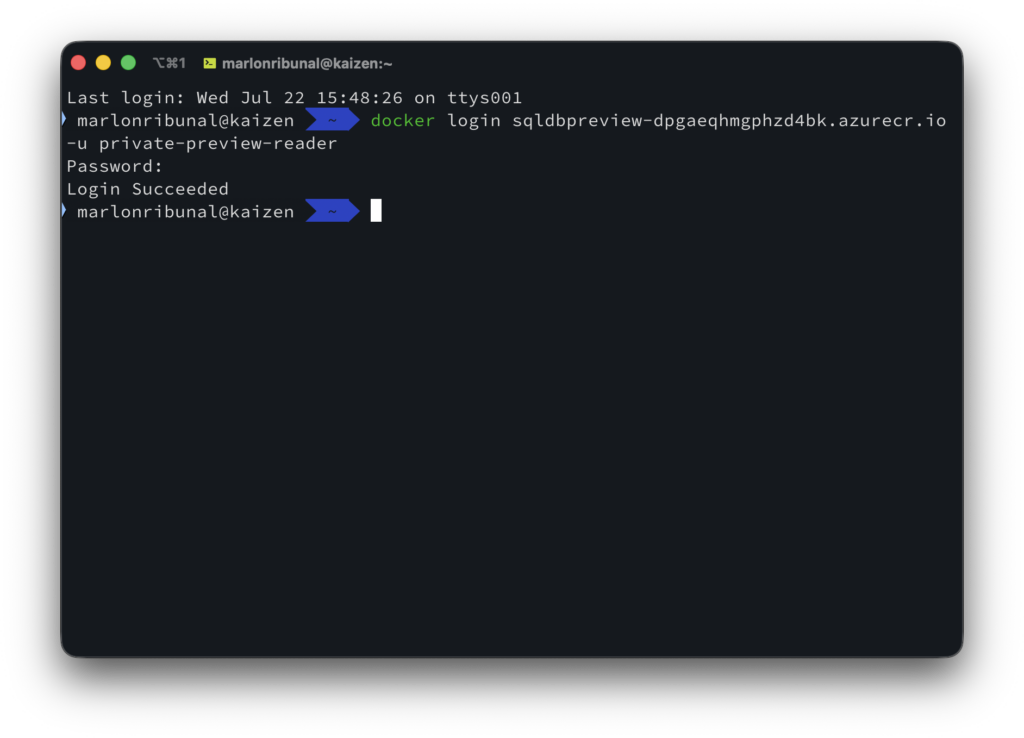
Authenticate to the Preview Registry
Like I said, Azure SQL Developer is currently in Private Preview. I was given a user and password to authenticate to the registry to pull the latest image.
docker login sqldbpreview-dpgaeqhmgphzd4bk.azurecr.io -u private-preview-readerInput the password that was sent to you when you get admitted to the private preview. Hopefully, pulling the image would be much more convenient when this goes public.
You should get a Login Succeeded message.
Pull the Azure SQL Developer image and deploy container
Let’s pull the image and deploy the Azure SQL Developer container to OrbStack.
docker run --platform linux/amd64 -e ACCEPT_EULA=Y -e MSSQL_SA_PASSWORD='YourStrongPassword' -p 1433:1433 --name azuresqldb --hostname azuresqldb -d sqldbpreview-dpgaeqhmgphzd4bk.azurecr.io/azure-sql/db-dev:latestNormally, I would pull the image first then deploy. But you can also directly deploy and docker should be able to pull the image first (duh).

Test connection to our local Azure Database Developer
Let’s send a query to the database to make sure we can establish a connection to it.
docker exec azuresqldb /opt/mssql-tools18/bin/sqlcmd -S localhost -U sa -P 'YourStrongPassword' -C -Q 'SELECT @@VERSION;'And if you’ve followed the steps correctly, you should now be able to connect to the local version of Azure SQL Database.
As of this writing, as you can see in the screenshot below, the current version of Azure SQL Database Developer is 12.0.2000.8, July 12, 2026

Enjoy! I’ll build something on top of this. Come back for that later!
