

A customer was trying to compare two tables and capture a state as a performance metric. In this case, they were wanting to use Redgate Monitor and custom metrics, but since the tables were in a Memory-Optimized table, they couldn’t as Redgate Monitor runs inside a transaction.
Note, there are workarounds, but they’re clunky.
Fortunately, I had a quick solution, which involved SQL Server User Settable Objects. This post looks at how this works.
The Scenario
Let’s take the transaction out of the equation by using my own metric. SQL Server includes a few procedures that fall into a pattern. They are named with numerics as shown:
- sp_user_counter1
- sp_user_counter2
- sp_user_counter3
- …
- sp_user_counter10
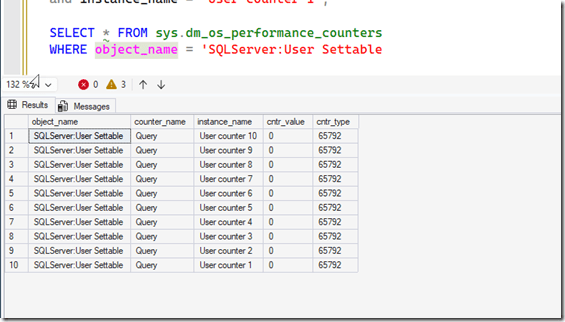
Each of these corresponds to a value that is captured in a perfmon counter. The counters are in the objects called “SQLServer:User Settable”. The counter name is “query” and the instance is “User Counter n” where n is the number corresponding to the stored procedure.
By default, these are 0, and you can see them here:
You can also see them in Perfmon

I’ll stick with SQL Server.
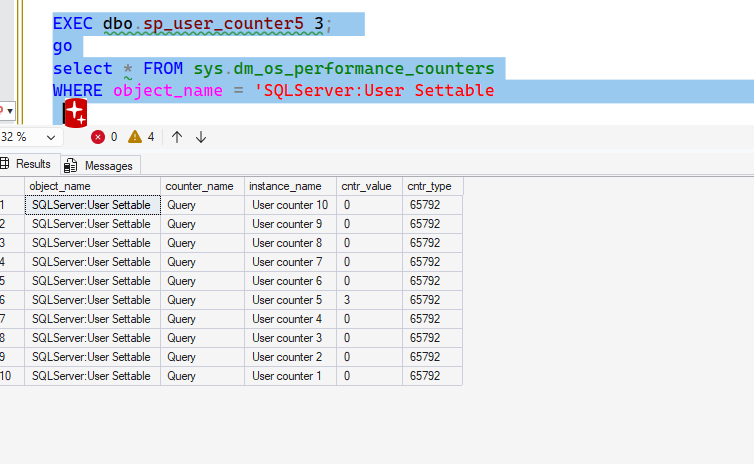
If I want to alter a value, I call the appropriate procedure. I can do something like call the proc for 5 and set a value. I’ll then query the counters from T-SQL. You can see this below as the value for counter 5 is set to 3.
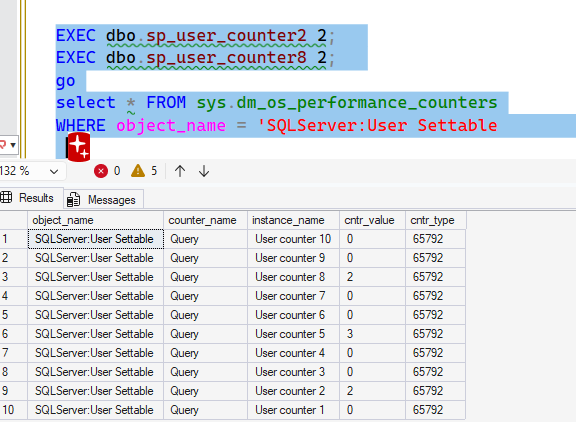
This value remains set. I’ll set counters 2 and 8 to 2, and then query again. Note that 5 is still set.
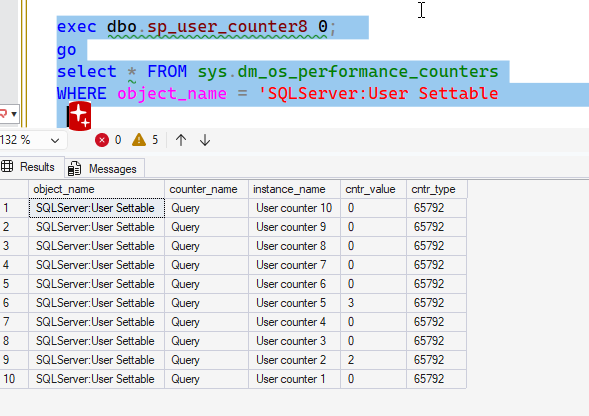
If I want the value set to 0, I need to set it. I’ll do that for counter 8.
These are metrics, so I need to pick an integer. I can’t set a decimal (or other type) and have it work. If the implicit conversion works, it works, but the value is a decimal.
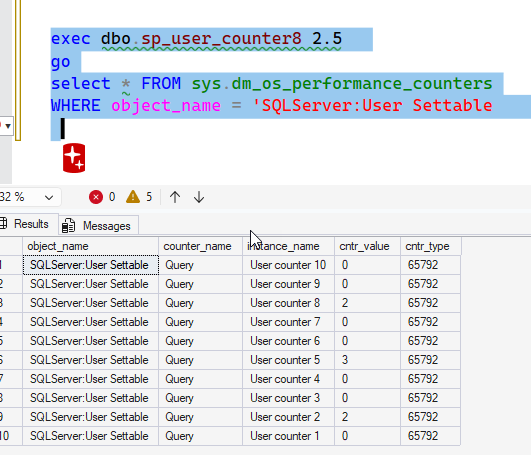
If I make this a string, it fails with an error as ‘2.5’ doesn’t convert to an int. Same for a date. Using an int, like ‘5’, works.
Solving the Issue
In this case, for the customer, we solved the issue with a proc that performed their query The result of this query (and int) is sent to a counter value like this:
CREATE or alter proc My_Checker
AS
BEGIN
    declare @i int
    select @i = count(*)
     from dbo.Customer a
     INNER JOIN dbo.Candidates b
     on a.CustomerName  = b.PersonName
     select @i = @i + 1
    EXEC dbo.sp_user_counter1 @1;
END
This can run from an Agent job on their schedule, updating the counter as appropriate.
For their alerting, they can query this metric and set the boundaries that matter to them. In this case, whenever this is greater than 0, they want an alert.
The user settable values aren’t that useful, especially as there are 10, but I’ve used them in a few places when I wanted to get instrumentation for an application. This allows me to easily capture values and watch them from any monitoring system.
Worth knowing about and using if you need random things captured.
SQL New Blogger
This post took me around 15 minutes to write, though I spent about 10 minutes mocking this for our customer based on their system and then stripping out a few items that are specific to them.
This is a post that shows how I can use features of SQL Server to solve a problem, which is something every employer wants. An AI would make this code easier, but I have to know to guide an AI in this direction and evalaute if this works. I’d certainly need to check if other apps were using these counters, which isn’t something an AI might think to do, especially as there could be lots of repos to scan.
You can write something like this, showing how you’re use this features. Bonus points if you use an AI to help you (and disclose how).
The post Capturing My Own Metrics: #SQLNewBlogger appeared first on SQLServerCentral.
