

Angular 22 stabilized the Signal Forms API, and with it comes the need to debounce user inputs.
What’s debouncing?
The most common use case for debouncing is form inputs that require an HTTP request for some input validation or data request (an auto-complete dropdown, for instance). The idea is that instead of triggering an HTTP request every time the user changes the input value, we wait a bit to see if the user will type another character.
That way, we avoid making multiple useless HTTP requests to the server by delaying them. Here is an example of a debounced input:
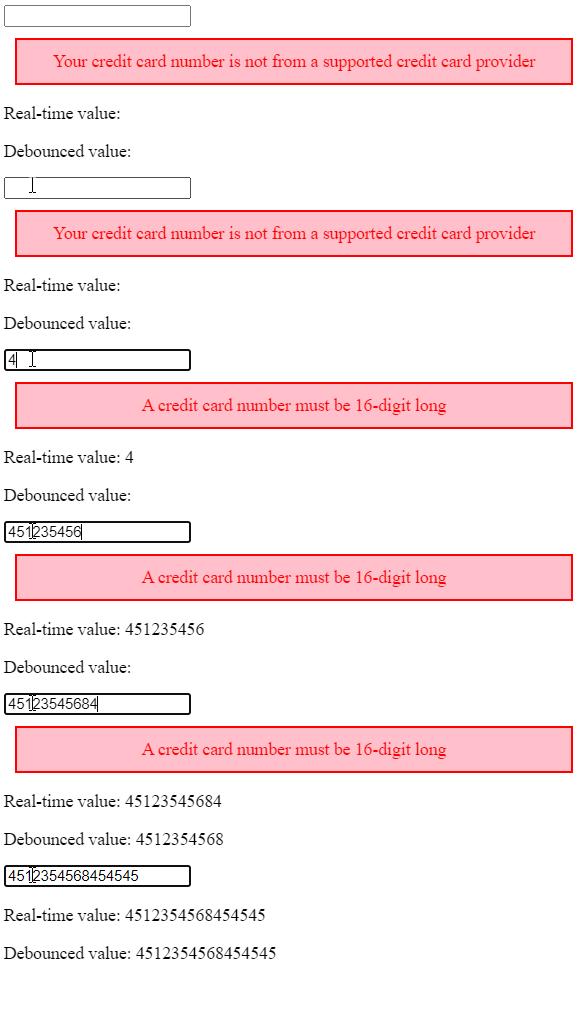
We can see that the real-time value of the input matches what the user types, whereas the debounced value is updated only a short time after the user stops typing.
This kind of debouncing is easy to implement with RxJS thanks to the debounceTime operator.

Debouncing Signals
Angular 22 introduces an experimental debounced function that takes a Signal as a parameter, a delay in milliseconds, and returns a debounced Signal that gets updated after the given delay:
import {debounced, signal} from '@angular/core';
@Component({
 // ...
})
export class Search {
  query = signal('');
  // Debounced signal by 300 ms
  debouncedQuery = debounced(this.query, 300);
}
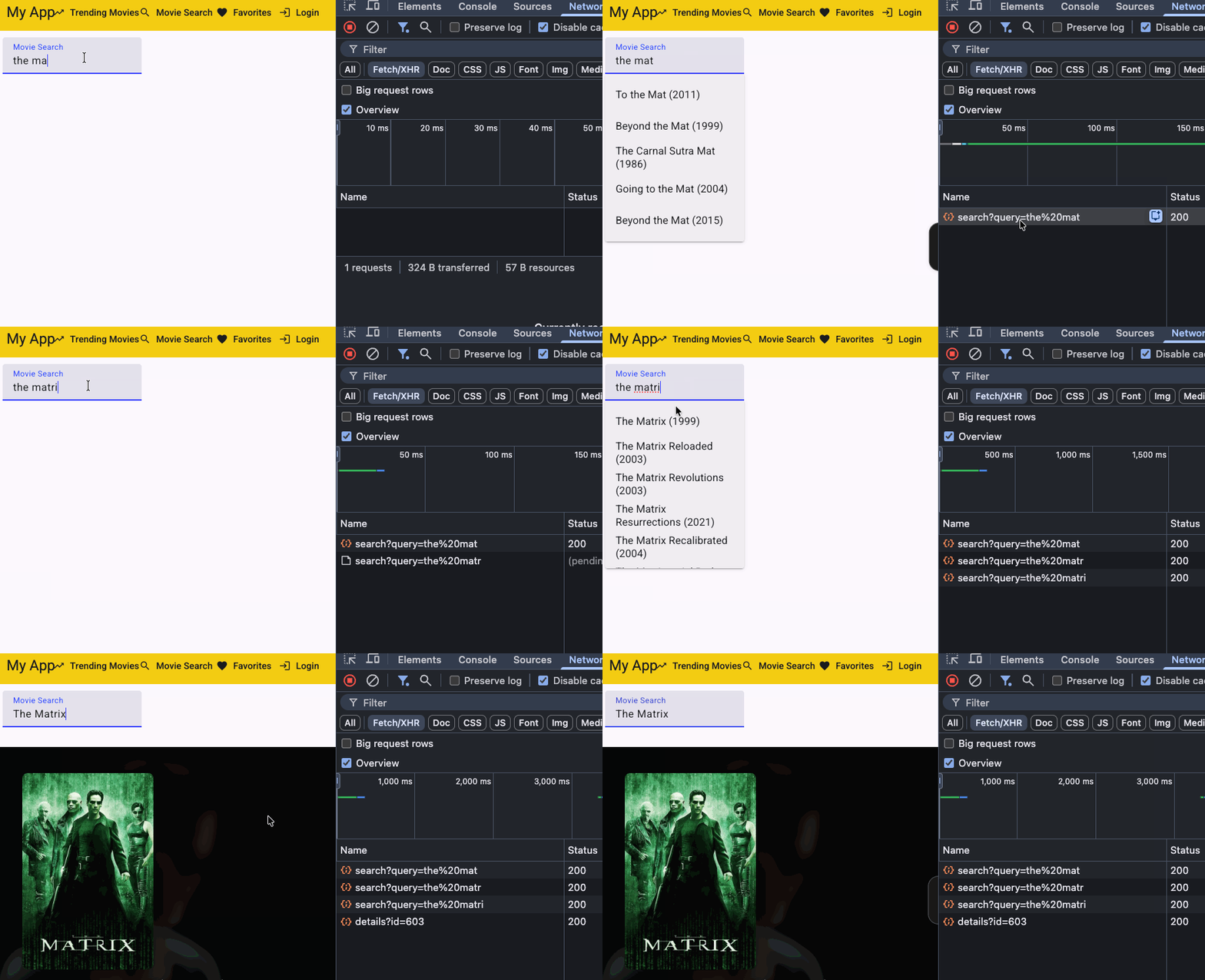
When combined with an HTTP resource (stable since Angular 22), a debounced Signal will re-run HTTP requests with an automatic “wait for new keystrokes” to avoid sending too many API requests:
private readonly searchQuery = signal<string>("");
private readonly queryDebounced = debounced(this.searchQuery, 300);
readonly movieSearchResult = httpResource<SearchResponse>(
  () => ({url: `http://localhost:3000/search?query=${this.queryDebounced.value()}`}),
);
The above example results in the following experience, having just the right number of HTTP requests to look for that movie:
If you want to implement a dynamic debounce time, you can use a custom wait function rather than a number. Such a function must return a Promise as shown here:
debouncedQuery = debounced(query, (value, lastSnapshot) => {
  // Short queries get a longer delay—the user is likely still typing.
  const ms = value.length < 3 ? 500 : 200;
  return new Promise<void>((resolve) => setTimeout(resolve, ms));
});
Debouncing Signal Forms
While our previous example is useful for API calls, another use case for debouncing is to delay form value updates, which in turn delays validation and, as a result, any visual feedback to the user.
Such a debouncing configuration gets defined when creating a Signal Form using the debounce function:
import {Component, signal} from '@angular/core';
import {form, FormField, debounce} from '@angular/forms/signals';
@Component({
  selector: 'app-search',
  imports: [FormField],
  template: `
    <label>
      Search
      <input [formField]="searchForm.query" />
    </label>
  `,
})
export class Search {
  searchModel = signal({
    query: '',
  });
searchForm = form(this.searchModel, (schemaPath) => {
    // The "query" field will be debounced by 300ms
    debounce(schemaPath.query, 300);
  });
}
What’s even more powerful with Signal Forms debouncing is that we can use a ‘blur’ option instead of a number or a custom debounce function:
searchForm = form(this.searchModel, (schemaPath) => {
    // The "query" field will be debounced on blur
    debounce(schemaPath.query, "blur");
  });
That way, there is no need to guess a debounce time. The form’s model value is updated only when the user removes focus from the form input. Of course, this isn’t always suitable, especially for an autocomplete feature, but it is still an interesting (and already stable) addition to the framework.
My name is Alain Chautard. I am a Google Developer Expert in Angular and a consultant and trainer at Angular Training, where I help development teams learn and become proficient with Angular / React / JavaScript.
If you need any help learning web technologies, feel free to get in touch!
If you enjoyed this article, please clap for it or share it. Your help is always appreciated. You can also subscribe to my articles and YouTube video page.
How to Debounce Angular Signals? was originally published in Angular Training on Medium, where people are continuing the conversation by highlighting and responding to this story.
