


I remember when I first heard the term CRUD. It sounded fancy, but honestly it’s just an acronym for four basic operations: Create, Retrieve, Update, and Delete. Any time you build an app that manages data, you’re doing these four things one way or another.
Let me break it down quickly. Create puts new records into your database. Retrieve pulls data out. Update modifies existing records. Delete removes them. That’s it. Every blog, every user management system, every inventory tracker works this way.
TLDR
- Flask-SQLAlchemy lets you define database models as Python classes
- The app uses @app.before_first_request to initialize the database before handling any traffic
- GET renders forms, POST processes form submissions and persists data
- Jinja2 templates loop through employee records with simple {% for %} syntax
- Each CRUD operation has its own dedicated route and HTTP method combination
Setting Up the Database Model
The first thing I always do is set up my data structure. For this employee management app, I need a model that holds id, employee_id, name, age, and position fields.
Install Flask-SQLAlchemy first:
pip install flask_sqlalchemy
Then my models.py looks like this:
from flask_sqlalchemy import SQLAlchemy

db = SQLAlchemy()

class EmployeeModel(db.Model):
    __tablename__ = "table"

    id = db.Column(db.Integer, primary_key=True)
    employee_id = db.Column(db.Integer(), unique=True)
    name = db.Column(db.String())
    age = db.Column(db.Integer())
    position = db.Column(db.String(80))

    def __init__(self, employee_id, name, age, position):
        self.employee_id = employee_id
        self.name = name
        self.age = age
        self.position = position

    def __repr__(self):
        return f"{self.name}:{self.employee_id}"
SQLAlchemy maps this class directly to a database table. Pretty clean right? The __tablename__ tells SQLAlchemy what to call the table, and each db.Column maps to a column in that table.
Building the Flask Application
Now let me put together the main application. I start with a basic Flask setup and add the database configuration:
from flask import Flask

app = Flask(__name__)
app.config['SQLALCHEMY_DATABASE_URI'] = 'sqlite:///data.db'
app.config['SQLALCHEMY_TRACK_MODIFICATIONS'] = False
db.init_app(app)
One thing I always remember: you need to create the tables before your app can use them. I use the @app.before_first_request decorator for this:
@app.before_first_request
def create_table():
    db.create_all()
This runs db.create_all() before the first request hits your app. All the tables defined in your models get created at that point.
Creating Records
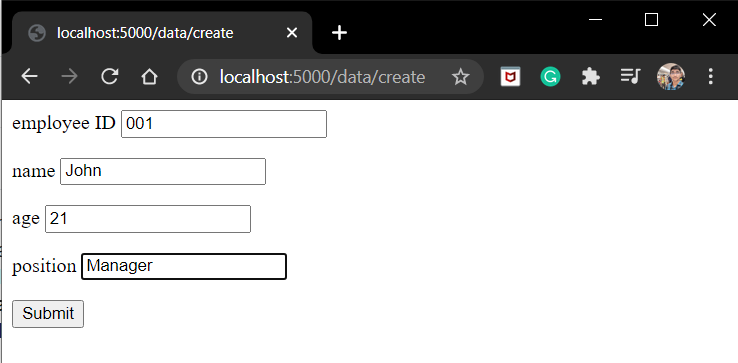
The create route handles both showing the form and processing the submitted data. GET shows the form, POST saves the new employee:
@app.route('/data/create', methods=['GET', 'POST'])
def create():
    if request.method == 'GET':
        return render_template('createpage.html')

    if request.method == 'POST':
        employee_id = request.form['employee_id']
        name = request.form['name']
        age = request.form['age']
        position = request.form['position']
        employee = EmployeeModel(employee_id=employee_id, name=name, age=age, position=position)
        db.session.add(employee)
        db.session.commit()
        return redirect('/data')
db.session.add() stages the new record and db.session.commit() actually saves it to the database.
The createpage.html template has a simple form:
Retrieving Data
I need two retrieve routes. One shows all employees, the other shows a single record by employee_id.
To list everyone:
@app.route('/data')
def RetrieveDataList():
    employees = EmployeeModel.query.all()
    return render_template('datalist.html', employees=employees)
EmployeeModel.query.all() pulls every record from the table. Then I pass it to the template:
{% for employee in employees %}
{{employee}}

{% endfor %}

To fetch one specific employee:
@app.route('/data/')
def RetrieveSingleEmployee(id):
    employee = EmployeeModel.query.filter_by(employee_id=id).first()
    if employee:
        return render_template('data.html', employee=employee)
    return f"Employee with id ={id} Does not exist"
filter_by(employee_id=id).first() finds the first matching record or returns None if nothing matches. The template then displays the fields:
Id
{{employee.employee_id}}

Name
{{employee.name}}

Age
{{employee.age}}

Position
{{employee.position}}

Updating Records
For updates, my approach is straightforward: find the record, delete it, create a new one with the updated values. Not the only way to do it, but it’s simple to follow:
@app.route('/data//update', methods=['GET', 'POST'])
def update(id):
    employee = EmployeeModel.query.filter_by(employee_id=id).first()
    if request.method == 'POST':
        if employee:
            db.session.delete(employee)
            db.session.commit()

            name = request.form['name']
            age = request.form['age']
            position = request.form['position']
            employee = EmployeeModel(employee_id=id, name=name, age=age, position=position)

            db.session.add(employee)
            db.session.commit()
            return redirect(f'/data/{id}')
        return f"Employee with id = {id} Does not exist"

    return render_template('update.html', employee=employee)
The update.html template shows pre-filled form fields:

Deleting Records
Delete is the simplest operation. Find the record and remove it:
@app.route('/data//delete', methods=['GET', 'POST'])
def delete(id):
    employee = EmployeeModel.query.filter_by(employee_id=id).first()
    if request.method == 'POST':
        if employee:
            db.session.delete(employee)
            db.session.commit()
            return redirect('/data')
        abort(404)

    return render_template('delete.html')
The delete.html template asks for confirmation before removing anything:

Putting It All Together
Here’s the complete application file with all routes working together:
from flask import Flask, render_template, request, redirect, abort
from models import db, EmployeeModel

app = Flask(__name__)

app.config['SQLALCHEMY_DATABASE_URI'] = 'sqlite:///data.db'
app.config['SQLALCHEMY_TRACK_MODIFICATIONS'] = False
db.init_app(app)

@app.before_first_request
def create_table():
    db.create_all()

@app.route('/data/create', methods=['GET', 'POST'])
def create():
    if request.method == 'GET':
        return render_template('createpage.html')

    if request.method == 'POST':
        employee_id = request.form['employee_id']
        name = request.form['name']
        age = request.form['age']
        position = request.form['position']
        employee = EmployeeModel(employee_id=employee_id, name=name, age=age, position=position)
        db.session.add(employee)
        db.session.commit()
        return redirect('/data')


@app.route('/data')
def RetrieveList():
    employees = EmployeeModel.query.all()
    return render_template('datalist.html', employees=employees)


@app.route('/data/')
def RetrieveEmployee(id):
    employee = EmployeeModel.query.filter_by(employee_id=id).first()
    if employee:
        return render_template('data.html', employee=employee)
    return f"Employee with id ={id} Does not exist"


@app.route('/data//update', methods=['GET', 'POST'])
def update(id):
    employee = EmployeeModel.query.filter_by(employee_id=id).first()
    if request.method == 'POST':
        if employee:
            db.session.delete(employee)
            db.session.commit()
            name = request.form['name']
            age = request.form['age']
            position = request.form['position']
            employee = EmployeeModel(employee_id=id, name=name, age=age, position=position)
            db.session.add(employee)
            db.session.commit()
            return redirect(f'/data/{id}')
        return f"Employee with id = {id} Does not exist"

    return render_template('update.html', employee=employee)


@app.route('/data//delete', methods=['GET', 'POST'])
def delete(id):
    employee = EmployeeModel.query.filter_by(employee_id=id).first()
    if request.method == 'POST':
        if employee:
            db.session.delete(employee)
            db.session.commit()
            return redirect('/data')
        abort(404)

    return render_template('delete.html')

app.run(host='localhost', port=5000)
FAQ
What does CRUD stand for?
CRUD represents the four core database operations: Create, Retrieve, Update, and Delete. These operations form the basis of most data management systems.
Which database is used in this Flask application?
SQLite is used as the database backend. Flask-SQLAlchemy handles all database interactions through an ORM layer.
What is Flask-SQLAlchemy?
Flask-SQLAlchemy is an extension that provides SQLAlchemy ORM functionality for Flask applications. It simplifies database operations by mapping Python classes to database tables.
How is the database initialized?
The @app.before_first_request decorator ensures that db.create_all() runs before the first incoming request, creating all defined tables automatically.
Can the update operation be implemented differently?
Yes, records can be updated directly using db.session.commit() without deleting and recreating them. The delete-and-recreate approach is used here for simplicity.
Wrapping Up
Flask makes building CRUD applications pretty straightforward. The combination of Flask-SQLAlchemy for database handling and Jinja2 for templates gives you everything needed to create data-driven apps quickly.
The patterns I covered here apply to pretty much any Flask project. Once these concepts click, building more complex applications becomes much easier. Definitely worth spending time understanding routes, models, and templates working together.
