

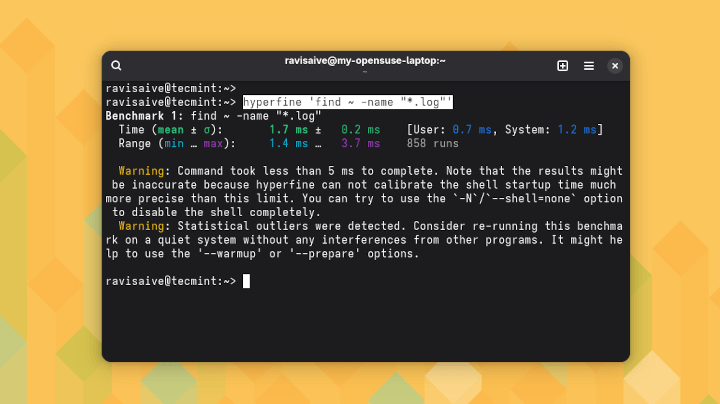
hyperfine is a command-line benchmarking tool that runs your commands repeatedly, collects timing data across multiple runs, and gives you statistically reliable results with mean, min, max, and standard deviation, making it far more accurate than a one-shot time measurement.
You’ve been timing commands with time for years, and it’s been lying to you, not because time is broken, but because a single run captures one data point that can spike or dip based on cache state, CPU load, or kernel scheduling.
If you’re choosing between two scripts, two compression tools, or two database queries, you need the average across dozens of runs, not a single lucky measurement.
hyperfine fixes this by running each command a configurable number of times, throwing out warmup runs, and giving you a proper statistical summary.
The hyperfine tool is tested on Ubuntu and Rocky Linux, but the tool works on any modern Linux distribution that can install from a package manager or a GitHub release binary.
Install hyperfine in Linux
To install hyperfine on Linux, use the following appropriate command for your specific Linux distribution.
sudo apt install hyperfine         [On Debian, Ubuntu and Mint]
sudo dnf install hyperfine         [On RHEL/CentOS/Fedora and Rocky/AlmaLinux]
sudo apk add hyperfine             [On Alpine Linux]
sudo pacman -S hyperfine           [On Arch Linux]
sudo zypper install hyperfine      [On OpenSUSE]
sudo pkg install hyperfine         [On FreeBSD]
On other Linux distributions, if the package isn’t in the default repos, so you pull the latest release binary from GitHub:
wget https://github.com/sharkdp/hyperfine/releases/download/v1.20.0/hyperfine-v1.20.0-x86_64-unknown-linux-musl.tar.gz
tar xzf hyperfine-v1.20.0-x86_64-unknown-linux-musl.tar.gz
sudo mv hyperfine-v1.20.0-x86_64-unknown-linux-musl/hyperfine /usr/local/bin/
Verify the install on all distros with:
hyperfine --version
The simplest form puts your command in quotes after hyperfine:
hyperfine 'command to benchmark'
By default, hyperfine runs at least 10 timed iterations and 3 warmup runs before counting results. The warmup runs let the filesystem cache settle so cold-cache anomalies don’t contaminate your numbers.
Example 1: Benchmark a Single Command
Time how long find command takes to scan your home directory for .log files.
hyperfine 'find ~ -name "*.log"'
Output:
Benchmark 1: find ~ -name "*.log"
  Time (mean ± σ):     143.2 ms ±   8.4 ms    [User: 62.1 ms, Sys: 80.7 ms]
  Range (min … max):   133.5 ms … 161.3 ms    10 runs
The output gives you mean time (143.2ms), standard deviation (σ = 8.4ms, which tells you how consistent the runs were), and the full range. A high σ relative to the mean means something external is interfering with your runs, which is itself a useful signal.
Example 2: Compare Two Commands Side by Side
This is where hyperfine earns its place, it can compare grep command against ripgrep searching for a string across a directory full of log files.
hyperfine 'grep -r "error" /var/log/' 'rg "error" /var/log/'
Output:
Benchmark 1: grep -r "error" /var/log/
  Time (mean ± σ):      1.243 s ±  0.051 s    [User: 0.891 s, Sys: 0.351 s]
  Range (min … max):    1.181 s …  1.334 s    10 runs

Benchmark 2: rg "error" /var/log/
  Time (mean ± σ):     189.4 ms ±  12.3 ms    [User: 312.1 ms, Sys: 98.7 ms]
  Range (min … max):   173.2 ms … 217.6 ms    10 runs

Summary
  rg "error" /var/log/ ran 6.56 ± 0.58 times faster than grep -r "error" /var/log/
The Summary line at the bottom does the ratio math for you. That 6.56x difference is a number you can actually put in a team discussion or a pull request.
Example 3: Control Run Count with –runs
For slow commands like database dumps or large file compressions, 10 runs is overkill, so use --runs to set a lower count.
hyperfine --runs 5 'tar -czf /tmp/backup.tar.gz /var/www/html'
Output:
Benchmark 1: tar -czf /tmp/backup.tar.gz /var/www/html
  Time (mean ± σ):      4.312 s ±  0.198 s    [User: 3.891 s, Sys: 0.421 s]
  Range (min … max):    4.073 s …  4.591 s    5 runs
For very fast commands that finish in milliseconds, go the other direction and increase runs to 50 or 100 so the statistics stabilize. A single millisecond of noise matters a lot when your mean is 5ms.
Example 4: Warmup Runs with –warmup
If your command reads from disk and you want to benchmark the hot-cache performance (how fast it runs after the OS has cached the data), increase the warmup count.
hyperfine --warmup 5 'wc -l /var/log/syslog'
Output:
Benchmark 1: wc -l /var/log/syslog
  Time (mean ± σ):       4.7 ms ±   0.6 ms    [User: 2.1 ms, Sys: 2.5 ms]
  Range (min … max):     3.8 ms …   5.9 ms    10 runs
If you’re benchmarking cold-cache performance instead, the opposite approach applies, run:
sync && echo 3 | sudo tee /proc/sys/vm/drop_caches
before each benchmark to clear the OS file cache. That’s a more realistic picture of what happens on a fresh boot or on a server that hasn’t touched that file recently.
Example 5: Export Results to JSON
When you’re comparing multiple tools across a script or a CI pipeline, plain terminal output isn’t enough, so export results as JSON with --export-json and feed them downstream.
hyperfine --export-json results.json 'gzip -k testfile.bin' 'zstd -k testfile.bin'
Output:
Benchmark 1: gzip -k testfile.bin
  Time (mean ± σ):     621.4 ms ±  18.3 ms    [User: 611.2 ms, Sys: 9.9 ms]
  Range (min … max):   598.3 ms … 651.7 ms    10 runs

Benchmark 2: zstd -k testfile.bin
  Time (mean ± σ):      87.6 ms ±   4.1 ms    [User: 77.3 ms, Sys: 10.1 ms]
  Range (min … max):    81.2 ms …  95.4 ms    10 runs
The results.json file holds every individual run time alongside the summary stats, which means you can plot distributions, track regressions across releases, or feed the data into a dashboard. The --export-markdown flag gives you a formatted table you can paste directly into GitHub issues or documentation.
hyperfine Most Useful Flags
Following are the most useful flags of hyperfine.
--runssets the exact number of timed iterations.--warmupsets how many throwaway runs happen before timing starts.--export-jsonsaves full results as JSON.--export-markdownsaves results as a Markdown table.--prepareruns a setup command before each benchmark iteration, useful for resetting state.--shell nonedisables shell wrapping for raw binary benchmarks, which removes shell startup time from measurements.--ignore-failurecontinues benchmarking even if the command returns a non-zero exit code.
Conclusion
You’ve seen how hyperfine goes past single-run timing by collecting statistics across multiple iterations, running warmup passes to normalize cache state, comparing commands side by side with a clear ratio summary, and exporting results in machine-readable formats for automation.
A concrete thing to try right now: pick 2 commands you already run regularly, maybe two ways you compress backups or two methods you use to search logs, and run:
hyperfine cmd1 cmd2
on real data from your system. The ratio in the Summary line will tell you something concrete that you can act on.
Have you used hyperfine to settle a debate about which tool was actually faster? What were you comparing, and did the results surprise you? Tell us in the comments below.
