


An inventory often needs a quick way to find the quantity attached to a product name. Python dicts map keys to values, while sets hold distinct values for membership checks.
I’ll explain how to choose between them and demonstrate dictionary lookups and set operations.
TL;DR: Python Sets and Dictionaries
In Python, use a set for distinct values and membership checks, and a dict for keys that point to values. Those built-ins cover the jobs commonly called a hash set and a hash table.
- Choose a set when a value either belongs in a collection or does not.
- Choose a dict when you need to retrieve information by a unique key.
- Both require hashable members or keys, and equal values occupy one slot.
What Are Python Sets and Dictionaries?
A Python set holds distinct hashable objects, while a dict maps each hashable key to a value. The stored data answers a different question: “Is this value present?” or “What value belongs to this key?”
| Python type | What it stores | Choose it when |
|---|---|---|
| set | Distinct values | You need membership or set operations. |
| dict | Unique keys mapped to values | You need to look up information by key. |
| frozenset | Distinct values in an immutable set | A set itself must be a set member or dict key. |
| dict_keys | A live view of dictionary keys | You need to compare keys with set-like operators. |
A dict_keys view reflects later changes to its dictionary instead of copying the current keys. Its set-like operators help compare two mappings by key when their associated values are irrelevant.
HashSet and Hashtable describe collection roles in other languages. Python’s built-in names are set and dict, so I use the required lookup job rather than searching for a class with the translated name. The Python set documentation defines sets as unordered collections of distinct hashable objects, and the dict documentation defines the key-to-value mapping.
Hashing narrows a lookup to candidate entries, then equality determines whether a candidate matches. Python requires equal objects to have equal hash values, but unequal objects may share one. See the Python data model’s hash rules.
How to Use Sets and Dictionaries in Python
I sort set results for display so readers see stable examples without relying on a set’s iteration order.
Step 1: Remove duplicate values with a set
This demo verifies that a set keeps one copy of each produce name and reports whether oak appears.
values = ["oak", "pine", "oak", "birch"]
unique_values = set(values)
print(f"Unique values: {sorted(unique_values)}")
print(f"'oak' present: {'oak' in unique_values}")
Unique values: ['birch', 'oak', 'pine']
'oak' present: True
The sorted display contains three labels, while the membership check confirms oak.
Set conversion removes duplicate values but discards their original positions. If first-occurrence order matters, dict.fromkeys(values) creates a mapping that keeps the keys in insertion order.
Convert that mapping’s keys to a list only when later code needs list behavior. Sorting has a different purpose: it arranges values for presentation, as in the screenshot above.
Step 2: Look up and update a dictionary value
The dictionary demo updates oak’s quantity and requests a fallback for a missing maple key.
inventory = {"oak": 12, "pine": 7}
inventory["oak"] += 3
print(f"Oak stock: {inventory['oak']}")
print(f"Keys in insertion order: {list(inventory)}")
print(f"Missing stock default: {inventory.get('maple', 0)}")
Oak stock: 15
Keys in insertion order: ['oak', 'pine']
Missing stock default: 0
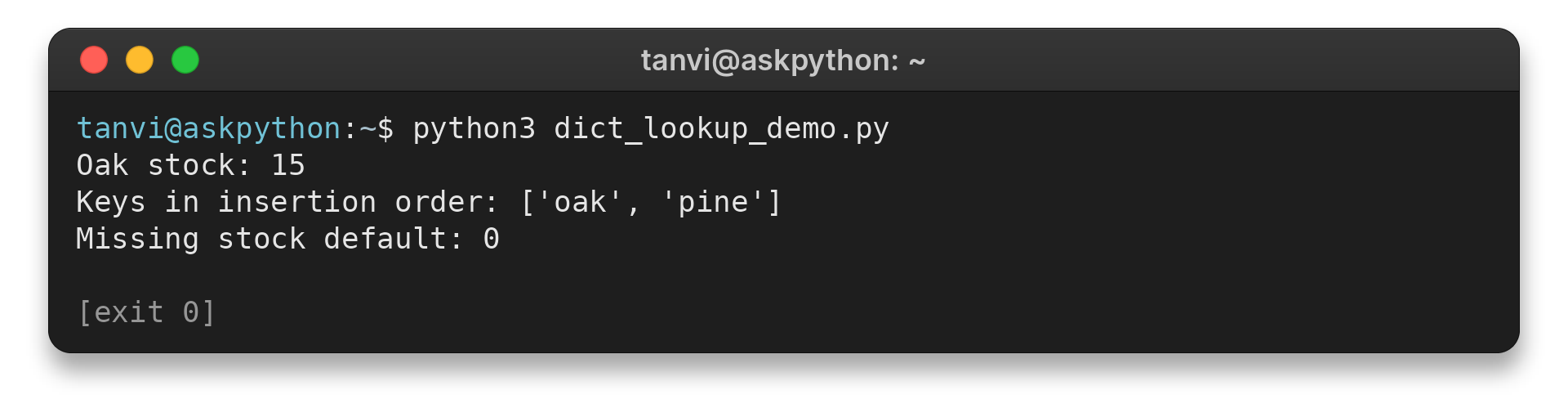
The bracket expression adds three to oak’s value, while get returns 0 for absent maple. Use get when the fallback is meaningful and bracket lookup when a missing key should raise KeyError.
The get call reads the mapping without inserting an absent key.
| Lookup form | Existing key | Missing key |
|---|---|---|
| inventory[“oak”] | Returns the stored value. | Raises KeyError. |
| inventory.get(“maple”) | Returns the stored value. | Returns None. |
| inventory.get(“maple”, 0) | Returns the stored value. | Returns 0. |
The in operator tests dictionary keys rather than stored values. Use inventory.values() to test whether a value appears. If None is a valid value, dict.get(key) returning None cannot distinguish an absent key from one mapped to None, so test key membership when that distinction matters.
Assigning to an existing equal key replaces its stored value rather than creating a second mapping entry. When source records repeat a key, ordinary assignment keeps the last value.
Step 3: Compare values with set operations
The set operation demo finds shared values and a value present only in the store group.
allowed = {"oak", "pine", "birch"}
in_store = {"pine", "maple"}
shared = allowed & in_store
print(f"Shared values: {sorted(shared)}")
print(f"Only in store: {sorted(in_store - allowed)}")
Shared values: ['pine']
Only in store: ['maple']
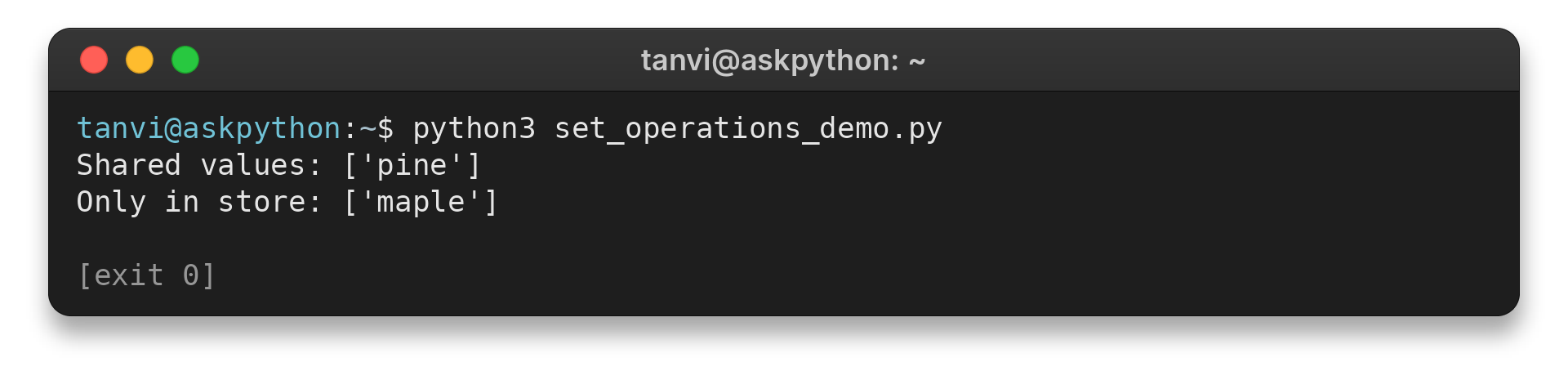
The overlap is pine, and maple appears only in the store group. I chose the operator forms because they keep two-set expressions compact. The named methods express the same operations.
| Operation | Result | Use it for |
|---|---|---|
| Union, A | B | Values in either set | Combining distinct groups. |
| Intersection, A & B | Values shared by both sets | Finding overlap. |
| Difference, A – B | Values in A that are absent from B | Finding what one group has that the other lacks. |
| Symmetric difference, A ^ B | Values in either set, excluding shared values | Finding items unique to each group. |
| Subset test, A <= B | True when every value in A is in B | Checking whether one group is fully contained in another. |
The named union() and intersection() methods accept an iterable as input. Their corresponding | and & operators use set operands, so I keep the examples’ inputs as sets. The ^ operation gives the values present in exactly one group.
| Method | What it does | Missing value behavior |
|---|---|---|
| add(value) | Adds one member. | An existing equal member remains a single entry. |
| update(iterable) | Adds members from an iterable. | Repeated values collapse to one member. |
| remove(value) | Removes a member. | Raises KeyError when the value is absent. |
| discard(value) | Removes a member when present. | Leaves the set unchanged when the value is absent. |
Common Set and Dictionary Edge Cases
The demo contrasts an unhashable list with an integer tuple that works as a set member.
I ran python3 hashability_demo.py to capture the list-member error, check an immutable tuple, and compare equal numeric values.
try:
    members = {[1, 2]}
except TypeError as error:
    print(f"List member: {error}")

fixed_pair = (1, 2)
print(f"Tuple member: {fixed_pair in {fixed_pair}}")
numeric_values = {1, 1.0}
print(f"Equal numeric values: {len(numeric_values)}")
List member: cannot use 'list' as a set element (unhashable type: 'list')
Tuple member: True
Equal numeric values: 1
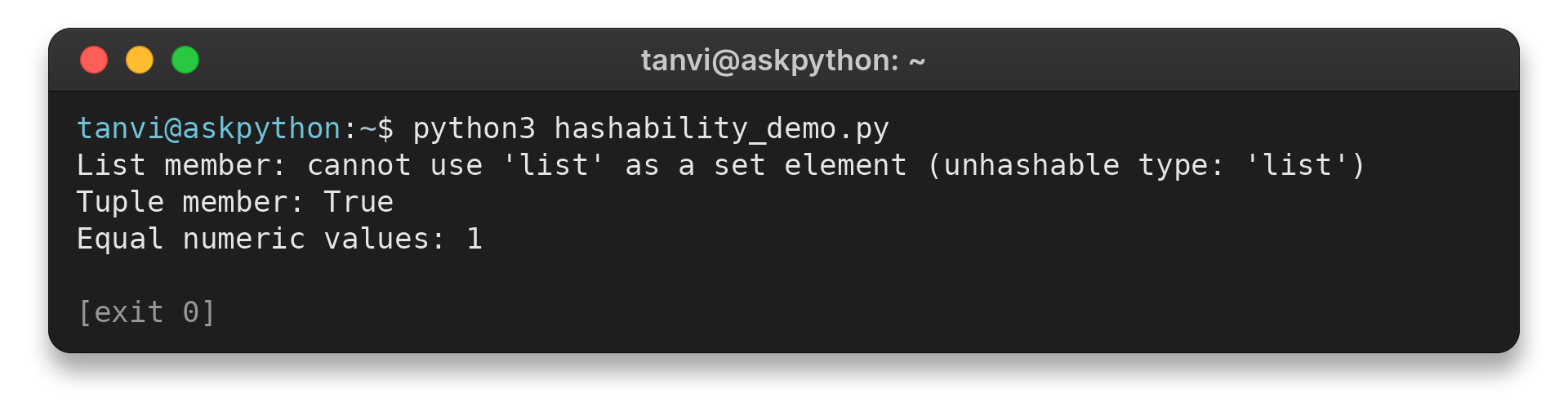
A list cannot be a set member, while an integer tuple works. A tuple containing a list also raises TypeError because the nested list is unhashable.
Python treats 1 and 1.0 as numerically equal, so the output shows a set size of one. Keep custom equality and hash fields stable while their objects are stored.
| Case | What happens | Choice |
|---|---|---|
| Empty set | {} creates an empty dict. | Use set() when no members are present. |
| List or dict used as a member or key | Python raises TypeError because the object is unhashable. | Use an immutable value whose contents are also hashable, such as a tuple. |
| Dictionary value | A mapped value can be a list or another mutable object. | Keep hashability requirements on keys, not on the stored value. |
| Equal values such as 1 and 1.0 | A set keeps one entry. A dict key refers to one mapping entry. | Choose keys and members that represent the equality rule you want. |
| Set iteration | Iteration order may vary with the set contents. | Sort comparable values when the displayed order matters. |
| Mixed values in sorted output | Some unlike values cannot be compared for sorting. | Use a sorting key that returns a common comparable value. |
| Dictionary iteration | Keys appear in insertion order. | Use a dict when insertion order is useful to the task. |
| Missing dict key | Bracket lookup raises KeyError, while get can return a default. | Use the behavior that matches whether absence is expected. |
For a set that must itself appear inside another set, use frozenset, the immutable set type, with hashable values. A dictionary value can be a list because values are retrieved after a key lookup and do not determine that key’s hash.
Conclusion: Choose by the Lookup You Need
Before choosing, write down the item you will search for and the information you need back. That gives you the input shape to compare with the examples above and the Python documentation below.
FAQ
In Python, the built-in set covers unique membership and dict covers key-to-value lookup. These answers distinguish those names from HashSet and Hashtable terminology.
Is HashSet a built-in Python type?
No. Python’s built-in type is set. It stores distinct hashable values and supports membership checks.
Does a Python set allow duplicate values?
A set keeps one member for values that compare equal and have equal hashes. Adding an equal value does not create another member.
Are Python sets ordered?
No. Do not rely on set iteration order. Sort the values when a stable display order is needed and the values can be compared.
When should I use a dict instead of a set?
Use a dict when each unique key must retrieve an associated value. Use a set when you only need distinct values or membership.
Does Python have a built-in Hashtable?
No. Python’s built-in key-to-value type is dict. Use dict for the same general mapping role without looking for a type named Hashtable.
Does the in operator check dictionary values?
No. key in mapping checks keys. Use value in mapping.values() to test whether a value appears.
What happens when two objects share a hash?
Python checks equality after finding hash candidates. Unequal objects can share a hash, so hash() is not a unique identifier.
Can a dictionary store mutable values?
Yes. Values can be lists or other mutable objects; dictionary keys, not values, must be hashable.
