


Prepending the first value keeps np.diff’s output the same length as the input. I notice the leading zero marks the comparison with itself.
At the edge, the prepended value joins the comparisons, while the other positions still come from neighboring input values. Trace an output position to its input pair to see what np.diff computes.
What np.diff computes
NumPy’s diff documentation defines the function as subtracting each array value from its next neighbor along one axis. For a position i, the output is the next value minus the current one, so the output contains one fewer value along that axis after a single difference.
The function belongs to the NumPy module. The array below supplies values for the matrix example.
The last cell is nan, so a difference that uses that cell is nan too. NumPy diff does not skip missing values.
Choose an axis for your array
An axis is one dimension of an array. The default n is 1 and axis is -1, which selects the last dimension. For a one-dimensional array, that is its only dimension.
| Argument | Default | Effect |
|---|---|---|
| n | 1 | Number of successive differences. Each pass shortens the selected axis by one. |
| axis | -1 | Dimension along which adjacent values are compared. In a matrix, 0 compares rows and 1 compares values within each row. |
| prepend or append | No boundary value | Adds values before or after differencing. A scalar is expanded to match the other dimensions. |
Use axis 0 to compare rows at each column. Use axis 1 to compare neighboring columns within a row, so the same subtraction rule follows a different dimension.
Calculate first and higher differences
The example uses one short sequence to show n and a 3×4 array to show axis. It assumes a Python environment with NumPy installed.
Run a one-dimensional example
The first differences increase by three at each position. A second pass differences that output because n applies the operation recursively.
import numpy as np

values = np.array([4, 7, 13, 22, 34])
print("first differences:", np.diff(values))
print("second differences:", np.diff(values, n=2))
print("keep the first position:", np.diff(values, prepend=values[0]))

measurements = np.array(
    [[10, 20, 30, 40], [50, 60, 70, 80], [90, 100, 110, np.nan]],
    dtype=float,
)
print("along axis 1:\n", np.diff(measurements, axis=1))
print("along axis 0:\n", np.diff(measurements, axis=0))

unsigned = np.array([1, 0], dtype=np.uint8)
print("uint8 difference:", np.diff(unsigned))
print("signed difference:", np.diff(unsigned.astype(np.int64)))
Run the saved file from the environment that contains NumPy.
source .venv/bin/activate && python numpy_diff_demo.py
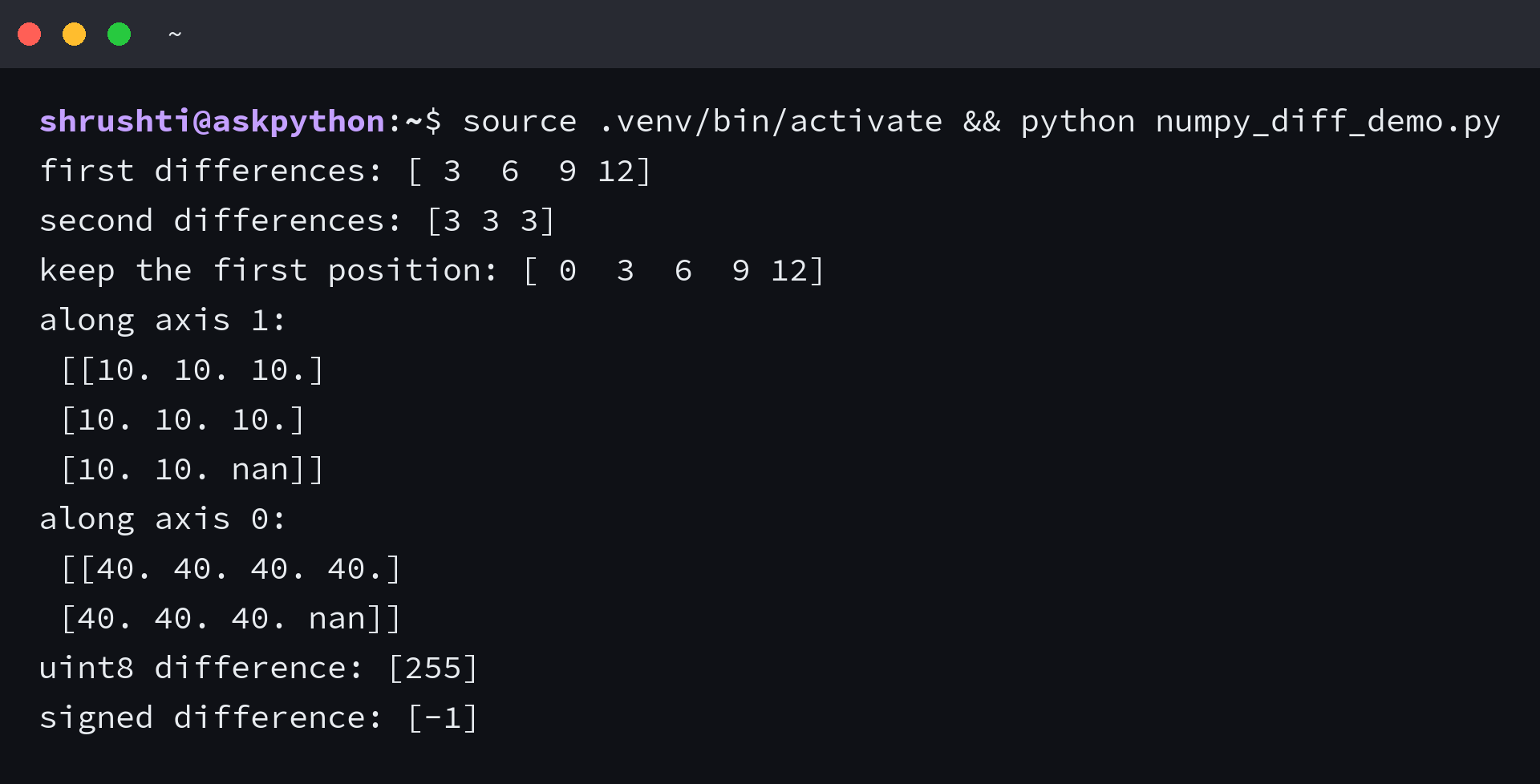
With n equal to 2, NumPy differences the first-difference array again, returning a constant array. The output has two fewer positions than the input because each pass shortens the selected axis.
Read the matrix results by axis
Axis 1 compares values across each row, returning a 3×3 array. Axis 0 compares each row with the next row, returning a 2×4 array.
The nan in the last input row carries into its final axis-1 difference and the last axis-0 difference. The other differences remain numeric because neither subtraction uses that cell.
Add a boundary value with prepend
Prepending the first value creates a zero difference at the beginning because the function subtracts that value from itself. Prepending zero instead makes the first output equal to the first input value, while the output still has the input length.
Check output shape and dtype
Output length follows n, while the result sign follows the array dtype and its arithmetic. Check dtype before treating a value as an axis mistake.
- Each difference reduces the chosen axis by one. The output dimension becomes zero when n exceeds that axis length, while n equal to zero returns the input unchanged.
- A subtraction involving nan returns nan. NumPy diff leaves that value in place rather than omitting the pair.
- Unsigned integer arrays keep an unsigned result type, so a negative subtraction can wrap to a large positive value.
I ran n=4 on a two-value input. NumPy returned an empty array, so n can consume the entire selected axis.
I ran np.diff with uint8 values [1, 0] and got [255]. Casting to int64 first returned [-1], which is the signed difference between those values.
unsigned = np.array([1, 0], dtype=np.uint8)
print("uint8 difference:", np.diff(unsigned))
print("signed difference:", np.diff(unsigned.astype(np.int64)))
Check dtype before treating a sign as a direction problem
If a difference has the wrong sign, inspect the input dtype before changing the axis, because unsigned data keeps its type during subtraction and can turn a negative result into a large positive value. Cast to a signed integer first when decreases need to remain negative.
unsigned = np.array([1, 0], dtype=np.uint8)
print(np.diff(unsigned.astype(np.int64)))
The signed cast changes how subtraction is represented. The axis still determines which neighboring values np.diff compares.
Frequently asked questions
What does n=2 do in NumPy diff?
It applies the adjacent subtraction twice. The second pass differences the first-pass results, and the selected axis loses two positions.
How can I keep the output the same length as the input?
Use prepend with a boundary value. Prepending the first input value gives a zero for the first output position and keeps one result per input value.
How do I reverse the direction of NumPy diff?
Negate the result with -np.diff(a) to compute each previous value minus its next neighbor while keeping the output order.
