


`np.sum(values)` returns `nan`, while `np.nansum(values)` returns `80.0` for the same array. I find that contrast useful because it shows how skipping a missing value changes a reduction.
You’ll be able to decide whether a calculation should keep or skip missing entries. To make that choice, connect `np.nan` with its role as a floating-point value.
What np.nan means
NaN means not a number and is a floating-point value that NumPy uses for an unavailable numeric value. NumPy follows the IEEE Standard for Floating-Point Arithmetic (IEEE 754), so NaN compares unequal to itself.
pandas can represent missing data with different markers according to the dtype. The type of column determines which marker appears and which detector is appropriate.
| Marker | Where you see it | How to detect it |
|---|---|---|
| np.nan | Floating-point arrays and numeric pandas columns | np.isnan for NumPy values, isna for pandas |
| pd.NA | pandas nullable integer, string, boolean and other extension dtypes | pd.isna or the object’s isna method |
| None | Python object values, also recognized as missing by pandas | pd.isna |
| NaT | Missing datetime and timedelta values in pandas | pd.isna |
The text NaN and an empty string are ordinary strings, so pandas does not count them as missing automatically. Convert those spellings during import when the source file uses them to mean missing data.
What the examples need
Run the examples with Python and current NumPy and pandas packages in an isolated environment. The setup below creates one and installs both libraries without pinning a release.
- Python 3 with access to the python3 and python commands
- A terminal opened in the directory where you want the environment
python3 -m venv .venv
source .venv/bin/activate
python -m pip install numpy pandas
Keep the environment active while running the Python examples. The commands use the package releases installed when you create it.
Detect NaN in a NumPy array
NumPy promotes this array to float64 because np.nan is a floating-point value and the other entries are integers. I found equality returns False, so I chose np.isnan for the mask because it marks the missing entry True.
source .venv/bin/activate && python - <<'ARTICLE'
import numpy as np
values = np.array([10, np.nan, 30, 40])
print("values:", values)
print("dtype:", values.dtype)
print("missing:", np.isnan(values))
print("np.nan == np.nan:", np.nan == np.nan)
print("sum:", np.sum(values))
print("NaN-safe sum:", np.nansum(values))
print("NaN-safe mean:", np.nanmean(values))
ARTICLE
The output shows a same-length boolean mask, with True at the NaN position. The ordinary sum returns NaN because the missing value flows through the calculation.
Use the mask to select, replace or count those entries. NumPy documents the same rule in its missing-value guidance, which recommends isnan instead of equality.
Choose how NumPy should handle NaN
NaN propagates through ordinary arithmetic because the result depends on a value that is unknown. NumPy also provides reductions that skip NaN when that matches the calculation you intend.
| Expression | Result for this array | Use it when |
|---|---|---|
| np.nan == np.nan | False | Do not use equality to detect NaN |
| np.sum(values) | nan | The missing value should affect the result |
| np.nansum(values) | 80.0 | Ignoring missing entries is justified |
| np.nanmean(values) | 26.666666666666668 | The mean should use only observed numeric entries |
np.nansum does not fill the array or change its missing entries. It skips them for that calculation, so keep the original mask when you also need to report how much data was absent.
Check and handle missing values in pandas
A pandas DataFrame has a missing-value mask with the same row and column labels as the data. This sample keeps the existing DataFrame with columns a, b, c and d, so each treatment can be compared against the same five missing cells.
import numpy as np
import pandas as pd
df = pd.DataFrame([(0.0, np.nan, -2.0, 2.0), (np.nan, 2.0, np.nan, 1.0), (2.0, 5.0, np.nan, 9.0), (np.nan, 4.0, -3.0, 16.0)], columns=list("abcd"))
print(df)
print(df.isna())
print(df.fillna(0))
values = {"a": 0, "b": 1, "c": 2, "d": 3}
print(df.fillna(value=values))
print(df.isna().sum())
print(df.dropna(subset=["a"]))
pandas isna returns a boolean table with the DataFrame’s row and column labels. True identifies missing cells, and False identifies observed values.

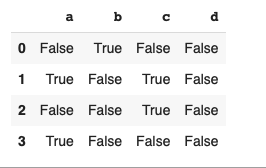
fillna(0) puts zero in every missing cell, while a dictionary can provide a value for each column. Use zero only when absence means zero in the data model, because replacing an unknown measurement with a number changes its meaning.


| Method | Effect | Decision |
|---|---|---|
| df.isna() | Returns a boolean mask | Inspect or count missing entries |
| df.fillna(value) | Returns data with selected missing entries filled | Use a value supported by the meaning of the column |
| df.dropna() | Drops rows containing missing values by default | Use when those rows cannot contribute to the analysis |
| df.dropna(subset=[“a”]) | Drops rows where column a is missing | Limit the decision to the fields required for the task |
The mapping leaves columns absent from the dictionary untouched. For ordered numeric data, interpolation estimates values between observations, which calls for an ordering and a defensible assumption about the values between them.
pandas documents missing values by dtype and provides isna as the common detector for DataFrame and Series values.
Keep integer meaning with pandas nullable dtypes
A NumPy integer array cannot store a floating-point NaN without changing dtype. pandas nullable Int64 can keep integer values and use pd.NA for a missing entry.
import pandas as pd
scores = pd.Series([89, pd.NA, 92], dtype="Int64")
print(scores)
print("Missing:", pd.isna(scores).to_list())
print("Above 90:", (scores > 90).to_list())
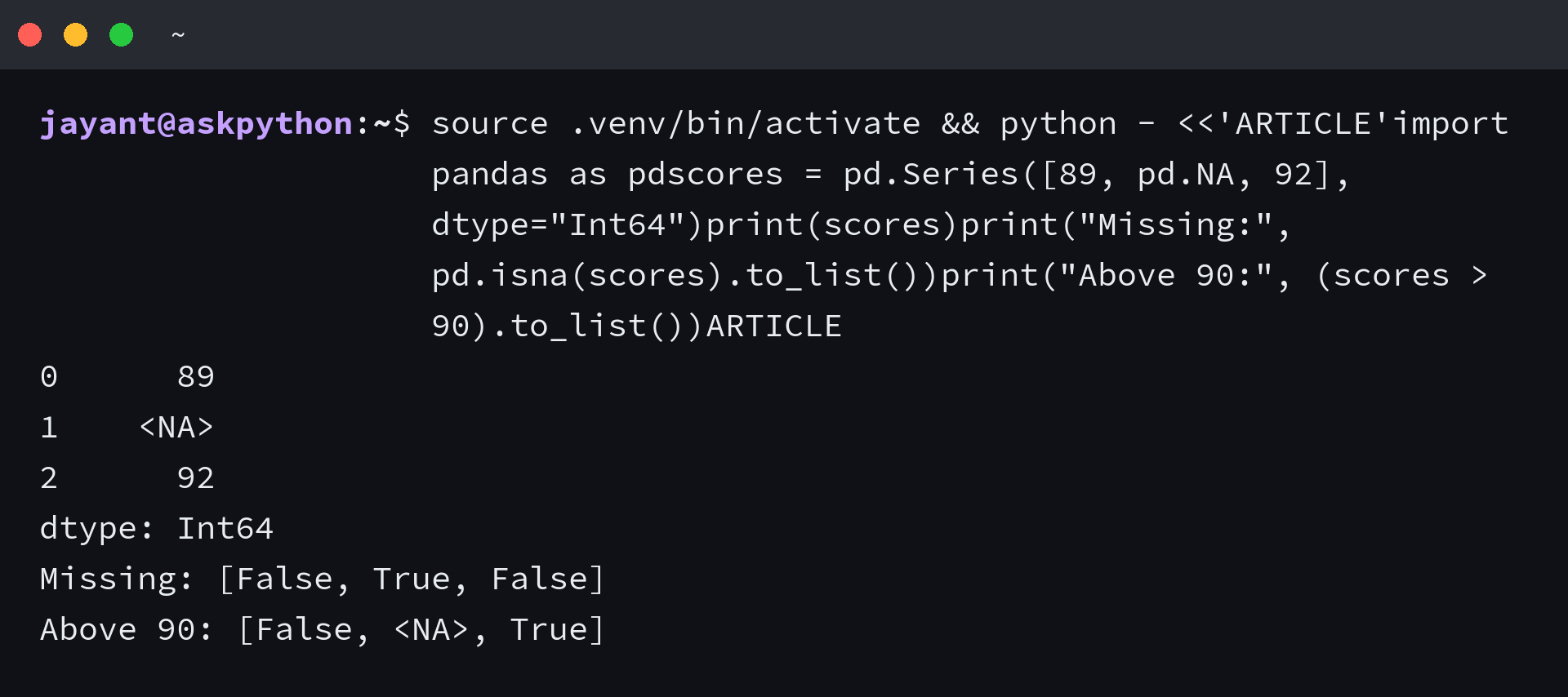
The comparison keeps the unknown result as
When the decision depends on column dtype, check the pandas.isna reference before converting values or choosing a fill operation.
Count missing entries before changing them
Before using a fill or skip-NaN operation, decide what the missing cell means for this calculation. A per-column count shows which fields need attention.
- Use a NaN-skipping reduction only when excluding missing observations matches the statistic.
- Use subset with dropna when a result depends on named columns.
Frequently asked questions about np.nan
These answers cover the type and missing-value questions that come up when NumPy arrays move into pandas.
What does np.nan do?
np.nan is a floating-point NaN value used to mark an unavailable numeric entry. Use np.isnan to detect it in a NumPy array.
Is np.nan a float?
Yes. np.nan is a floating-point value, so including it in a NumPy array of integers causes the array to use a floating-point dtype.
Why does np.nan not equal itself?
IEEE floating-point comparisons define NaN as unequal to every value, including another NaN. Use np.isnan or pandas isna instead of equality.
Should I use np.isnan or pandas isna?
Use np.isnan for numeric NumPy values. Use pandas isna or a Series or DataFrame isna method when the data may contain pandas missing markers, None or NaT.
Can I sum an array that contains np.nan?
Yes, but a regular NumPy sum returns NaN when a NaN participates. Use np.nansum only when ignoring missing entries is valid for the calculation.
