


A requests call that has no timeout can wait on a stalled server until you kill the process, which is the failure the library’s own documentation warns about. This page covers the two call shapes you need, then the four settings that keep a script alive overnight, and I ran every sample here on requests 2.34.2 and urllib3 2.8.0.
What the requests module actually does
The library wraps urllib3 into a small set of functions that return a Response object, so a call is one line and the state you need is on that object. Requests is not part of the standard library, so the version you import depends on the interpreter you installed it into.
import sys

import requests
import urllib3

print("python", sys.version.split()[0])
print("requests", requests.__version__)
print("urllib3", urllib3.__version__)
Printing the versions first saves time later, because the retry machinery underneath comes from urllib3 rather than from requests. On the machine I used, that line reads python 3.14.7, requests 2.34.2 and urllib3 2.8.0.
What you need before the first request
Install the package into the interpreter that will run the script, which in practice means an activated virtual environment. A system-wide pip install often lands in a different interpreter than the one your editor uses, and the import then fails with a message about a missing module.
- Python 3.9 or newer, since the version of requests on PyPI drops older interpreters.
- A virtual environment, so the install lands next to the script that needs it.
- The command python3 -m pip install requests from inside that environment.
- A target you are allowed to call, which matters more than any flag on this page.
Run python3 -m pip show requests to prove the import resolves in the interpreter you are actually using. Reaching for a browser-rendered page with this library is a separate problem, which the last section covers.
Making a request and reading the response
Every shape below returns the same Response object, so the fields you read are identical whether the call was a GET or a POST. What changes between them is the method, the URL and the payload.
A GET with a timeout
import requests

response = requests.get("https://example.com/", timeout=10)
print(response.status_code)
print(response.reason)
print(response.headers["content-type"])
print(len(response.text))
print(response.elapsed.total_seconds())
I ran that call against a small static page and it came back in roughly three hundredths of a second. The status code and reason tell you whether the server accepted the call, the content type tells you what you asked for, and elapsed tells you how long you waited.
Query parameters without building the URL
import requests

response = requests.get(
    "https://httpbingo.org/get",
    params={"search": "python requests", "page": 2},
    timeout=10,
)
print(response.url)
payload = response.json()
print(payload["args"])
The params dictionary is encoded for you, a space becomes a plus sign, and the final URL is available on the response. That last part is what makes this worth using over string formatting, because you can log exactly what the server received.
Headers and a JSON POST
import requests

response = requests.post(
    "https://httpbingo.org/post",
    json={"title": "requests demo", "tags": ["http", "python"]},
    headers={"X-Demo": "askpython"},
    timeout=10,
)
print(response.status_code)
payload = response.json()
print(payload["json"])
print(payload["headers"]["X-Demo"])
The json keyword sets the content type and serialises the body, which is why you do not need to call dumps yourself. The echo service sends both the parsed object and your header back, so the receipt above proves what left the client.
Making a call safe to run unattended
A script that runs on a schedule needs a bounded wait and a decision about bad statuses. A policy for the failures that fix themselves belongs there too, and none of it is on by default.
Bound the wait with a timeout
The documentation states that nearly all production code should pass a timeout in nearly all requests, because a call without one waits indefinitely. The value bounds the idle time between bytes on the socket rather than the whole download, which is why a large file can still take minutes with a ten second timeout.
Turn a bad status into an exception
A 404 is not an error to the library unless you make it one, and the call returns normally with a failed status. Calling raise_for_status is what converts a 4xx or 5xx response into an HTTPError you can catch in one place.
Retry the failures that fix themselves
Connection resets and 503s usually clear when you try again, and requests exposes urllib3’s Retry through an HTTPAdapter mounted on a session. The status_forcelist argument decides which responses count as retryable, and backoff_factor spaces the attempts out.
Keep cookies and connections with a session
import requests

with requests.Session() as session:
    session.headers.update({"X-Session": "askpython"})
    session.get("https://httpbingo.org/cookies/set?plan=pro", timeout=10)
    second = session.get("https://httpbingo.org/cookies", timeout=10)

print(second.json())
The second call arrives with the cookie the first one was given, which is why the printed body reads plan pro. The documentation also notes that a session reuses urllib3’s connection pool, so a loop of calls to one host skips the handshake after the first.
The failures you will actually hit
These four turned up in the same file, and each one needs a different response from you. I printed them together so the message shapes are visible before a log shows them.
import requests
from requests.adapters import HTTPAdapter
from requests.exceptions import HTTPError, ReadTimeout, RetryError
from urllib3.util.retry import Retry

try:
    requests.get("https://httpbingo.org/delay/3", timeout=1)
except ReadTimeout as error:
    print(type(error).__name__, error)

missing = requests.get("https://example.com/does-not-exist", timeout=10)
print(missing.status_code, missing.ok)
try:
    missing.raise_for_status()
except HTTPError as error:
    print(type(error).__name__, error)

retry = Retry(total=2, backoff_factor=0.5, status_forcelist=[500, 502, 503, 504])
session = requests.Session()
session.mount("https://", HTTPAdapter(max_retries=retry))
try:
    session.get("https://httpbingo.org/status/503", timeout=10)
except RetryError as error:
    print(type(error).__name__, error)
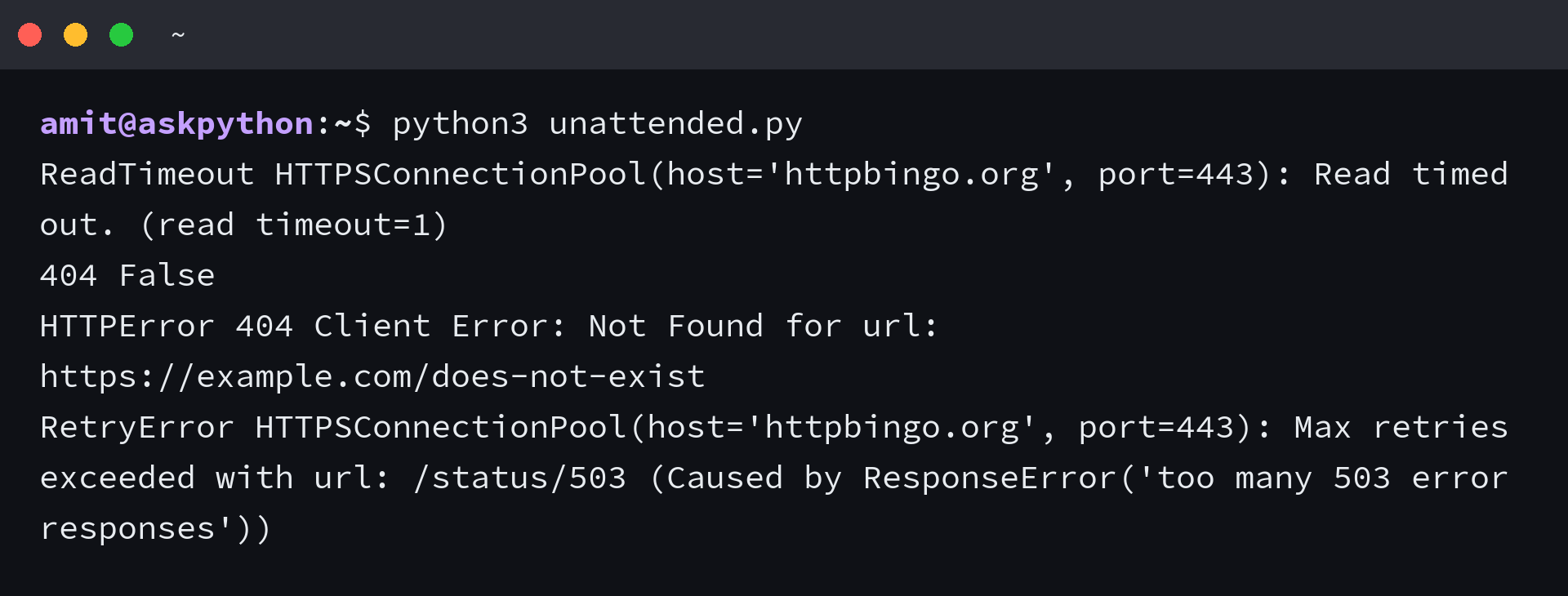
| What happened | Exception or value | What to do |
|---|---|---|
| the server accepted the connection and sent nothing for a second | ReadTimeout | raise the timeout, or shorten the work the endpoint does |
| the URL did not exist on that host | 404 with ok False, then HTTPError from raise_for_status | catch HTTPError once at the call site instead of checking every status inline |
| the endpoint kept returning 503 after the retry budget | RetryError wrapping the urllib3 reason | let the caller decide, since the retries already happened |
| the page declared text or html with no charset | response.encoding of ISO-8859-1 | set response.encoding to utf-8 or use apparent_encoding before reading text |
The encoding row is the quiet one, because the text looks right until a page uses a character outside the default range. A request for plain text returned an encoding of utf-8 with an apparent encoding of ascii, while the same library defaulted a page of ordinary HTML to ISO-8859-1.
Where this library stops being the right tool
There are situations where something else fits better, and each of them looks like a bug in your code until you know the boundary. No extra argument on the same call fixes either one.
- A page that builds its content in JavaScript returns the empty shell, so you need a rendering step rather than a library change.
- Parallel requests at that scale need an async client, since this library blocks the thread for the whole response.
- An endpoint behind a per-minute quota needs the retry policy above rather than more concurrency.
Every call gets a timeout and a status check
A call missing a status check is not finished, which is the rule I keep in review. Both a timeout and a status check belong on the call itself rather than in a wrapper you might forget to use.
import requests
from requests.adapters import HTTPAdapter
from urllib3.util.retry import Retry


def client() -> requests.Session:
    retry = Retry(total=3, backoff_factor=0.5, status_forcelist=[500, 502, 503, 504])
    session = requests.Session()
    session.mount("https://", HTTPAdapter(max_retries=retry))
    session.headers.update({"User-Agent": "askpython-demo/1.0"})
    return session


session = client()
response = session.get("https://example.com/", timeout=10)
response.raise_for_status()
print(response.status_code, len(response.content))
A session built once at module level gives every later call the retry policy, the headers and the pooled connection, so the two rules survive without being retyped. That is also the place to change the user agent, which is the honest way to identify a script that calls someone else’s server.
Frequently asked questions about requests in Python
Is requests built into Python?
Requests is not part of the standard library, so you install it with python3 -m pip install requests. The urllib modules ship with Python and cover basic calls, but they take more code for the same result.
Why do I get No module named requests when pip says it is installed?
pip installed the package into a different interpreter than the one running your script. Install with python3 -m pip inside the same virtual environment and compare python3 -m pip –version against the interpreter your editor reports.
How do I set a timeout on a requests call?
Pass the timeout argument, as in a ten second value, and catch Timeout or one of its subclasses. The value bounds the gap between bytes on the socket rather than the whole download, so a large body can still take longer than the timeout you set.
Does requests retry failed calls automatically?
Retries are off by default, unless you mount an HTTPAdapter with a urllib3 Retry policy on a session. The status_forcelist argument chooses which responses to retry, and total caps the attempts.
How do I check the requests version in Python?
Print requests.__version__ after importing the module, and print urllib3.__version__ alongside it, because the retry behaviour comes from urllib3 rather than from requests.
Can requests read a page that needs JavaScript?
Not on its own, because it returns the HTML the server sent and does not run scripts. The response for a client-rendered page is the empty shell, so that job needs a browser automation tool instead.
