

TL;DR — Key Takeaways
- VS Code 1.135 introduces experimental Rubber Duck, using a complementary AI model to review an agent’s work for missed details and edge cases.
- The new Agent Host and open AHP architecture make agent sessions more persistent and portable across windows, clients and agent implementations.
- Developers also gain external Copilot and Claude session continuity, a streamlined Agents window and per-model token usage visibility.
Anyone who has leaned on an AI coding agent for a few months knows the pattern. The agent writes confident code, the tests pass, and then a reviewer catches an edge case the agent never considered. The model isn’t lying to you. It just doesn’t know what it doesn’t know, and it has no one in the room to push back.
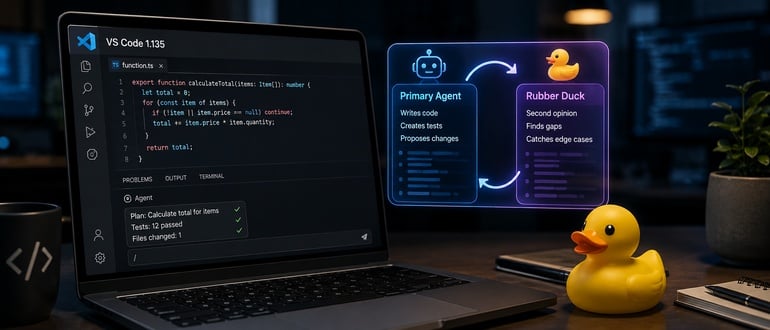
Microsoft’s latest release of Visual Studio Code, version 1.135, takes a direct swing at that problem. The headline addition is an experimental feature called Rubber Duck, a nod to the old programmer’s trick of explaining your code out loud to a literal rubber duck to catch your own mistakes. VS Code’s version replaces the duck with a second AI model.
Rubber Duck runs inside Copilot agent host sessions. Type /rubber-duck and a different model reviews the primary agent’s plans, code, and tests, looking specifically for gaps the first model may have missed. Microsoft describes it as a way to get “a second opinion from a complementary model on the agent’s work,” aimed at surfacing missed details and edge cases before they become production bugs.
The idea behind putting two different models on the same task isn’t new. Engineering teams have used pair programming and code review for the same reason for decades: a second set of eyes, working from different assumptions, finds different mistakes. Rubber Duck applies that same logic to agentic AI, where a single model working alone can develop blind spots that are hard to catch from inside its own reasoning.
The release doesn’t stop at Rubber Duck. VS Code 1.135 also introduces an Agent Host built on what Microsoft calls the Agent Host Protocol, or AHP. It runs agent harnesses in a dedicated process and lets developers connect to the same agent session from multiple VS Code windows. That matters for anyone who bounces between a laptop and a second monitor, or who wants to check in on a long-running agent task without losing context.
Session continuity gets another boost, too. The Sessions list now shows recently updated agent sessions from outside VS Code, including Copilot or Claude sessions started in other applications, so developers can pick up an agent’s work where they left it rather than starting over. That behavior is tunable through the chat.agentSessions.showExternal setting for teams that want to control how much cross-application activity shows up in the editor.
Microsoft also redesigned the Agents window: a single-pane layout is now the default, with simplified session controls and an overflow menu that keeps the interface from getting cluttered. Session details like changes, pull requests, issues, and artifacts now appear as interactive pills above the chat input instead of being buried in a sidebar, and diff visualization has been cleaned up with a more responsive layout.
For teams watching AI spend, there’s a smaller but practical change: hovering over a chat response footer now shows a per-model breakdown of input, cached input, and output tokens used in that turn. Token consumption has been a bit of a black box for teams running multiple models through Copilot, and this gives platform engineers and finance teams a clearer read on where the usage is going.
Mitch Ashley, VP and practice lead for software lifecycle engineering and AI-native software engineering at The Futurum Group., sees the release as part of a longer arc for the editor itself:
“This is a continuation of the IDE paradigm on its path to an agentic work surface. Once agent sessions run in their own process and persist across windows and applications, the editor becomes the surface on which agent work is directed and reviewed. Rubber Duck answers verification pressure with more generation, and that only goes so far. Watch whether these session protocols stay open enough for teams to run agents from more than one vendor.”
— Mitch Ashley, Futurum Group
That’s a useful check on the enthusiasm. A second model reviewing the first one’s work is still generation, not independent verification, and it’s worth remembering that distinction before treating Rubber Duck’s approval as a stamp of correctness. And Ashley’s question about vendor openness is one to watch as the Agent Host Protocol matures: whether it becomes a genuinely open way to run agents from multiple vendors side by side, or a Microsoft-specific layer that happens to support a couple of outside tools today.
Taken together, these changes suggest where agentic coding tools are heading. The first wave of AI coding assistants was about generating code faster. This release is about building structure around that speed: a built-in critic in Rubber Duck, better visibility into what an agent is doing and costing in the redesigned Agents window, and infrastructure in the Agent Host Protocol that treats agent sessions as something durable and portable rather than tied to a single window or app.
None of this replaces human code review, and Microsoft isn’t positioning it that way. Rubber Duck is explicitly experimental, and a second model catching more edge cases doesn’t guarantee it catches the right ones. But the direction is worth watching. As development teams put more of their day-to-day work in the hands of AI agents, the tooling around those agents needs to mature just as fast as the models do.
VS Code 1.135 is available now through the standard update channel.
Frequently Asked Questions
What is Rubber Duck in VS Code 1.135?
Rubber Duck is an experimental feature that gives an AI coding agent a second opinion from a complementary model, helping surface overlooked edge cases, gaps and potential problems.
What does the Agent Host Protocol do?
AHP provides an open, agent-agnostic way for clients to communicate with persistent agent sessions, allowing those sessions to continue independently of a single VS Code window.
Can Rubber Duck replace human code review?
No. A second AI model may catch issues the first misses, but it is still AI-generated analysis. Human review, testing and independent verification remain important.
