


Full, differential and log backups are the three things almost every SQL Server DBA can define, and the three things a surprising number of us get wrong under pressure at two in the morning.
I’ve been answering the same question for twenty years. Somebody has a full backup, a pile of differentials, and a few hundred log backups, and they want to know which ones go back in and in what order.
I wrote it up in July 2009 with a static diagram. That post still gets traffic every single week, which tells you the question never went away.
So this time I’ve animated it, and I’ve split it in two. Full and log backups first, then differentials once the first part makes sense.
Everything here assumes the FULL recovery model. SQL Server does not allow transaction log backups in SIMPLE. Just switched a database from SIMPLE to FULL? Take a full or differential data backup first. That data backup is what starts the log chain.
Start With Just Full and Log
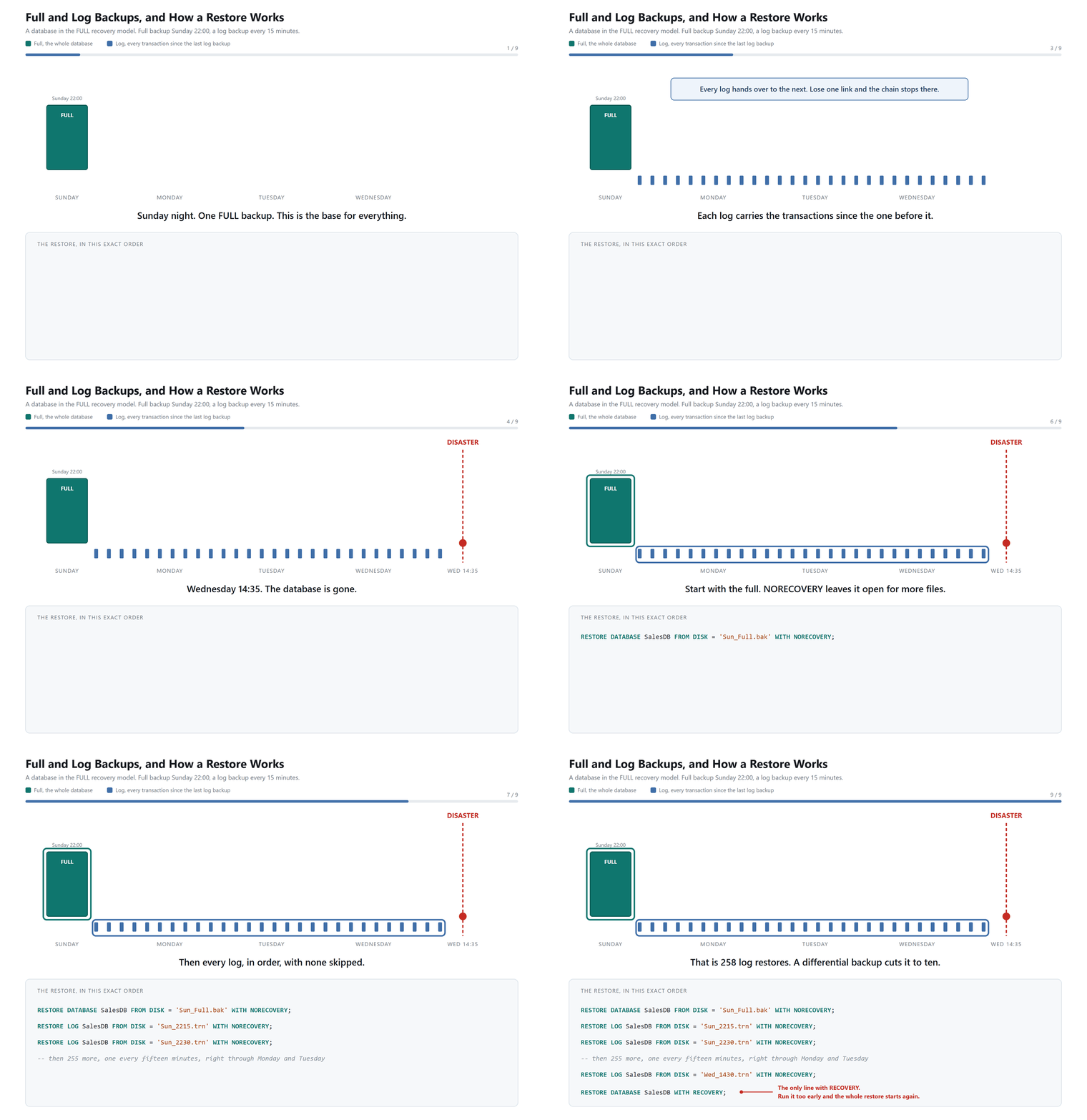
Give it a minute to run all the way through. It loops.
Full and Log Backups, In Plain Words
A full backup gives the restore its starting image of the database. It copies the whole thing. Differentials measure their changes from a full backup, and log backups carry on their own chain straight across any later full backups.
A log backup contains the log records that the previous log backup did not capture. These are links in a chain. Each one hands over to the next. If one goes missing, your restore stops dead at that point and nothing after it can be applied.
The Restore Order Without a Differential
Restore the full backup, then apply every log backup taken after it, in order, with none skipped. That is the whole sequence.
Every statement except the last carries NORECOVERY. That’s the flag telling SQL Server you have more files coming. The final statement carries RECOVERY, and that’s the one that opens the database for use.
Run RECOVERY too early and there’s no undo. The database comes online and you start the sequence again from a data backup. I explained that flag properly in a companion post the following day in 2009, and the behavior hasn’t changed since.
Now Add the Differential
Here’s the part that makes the whole thing click, and it’s the reason for the second animation.
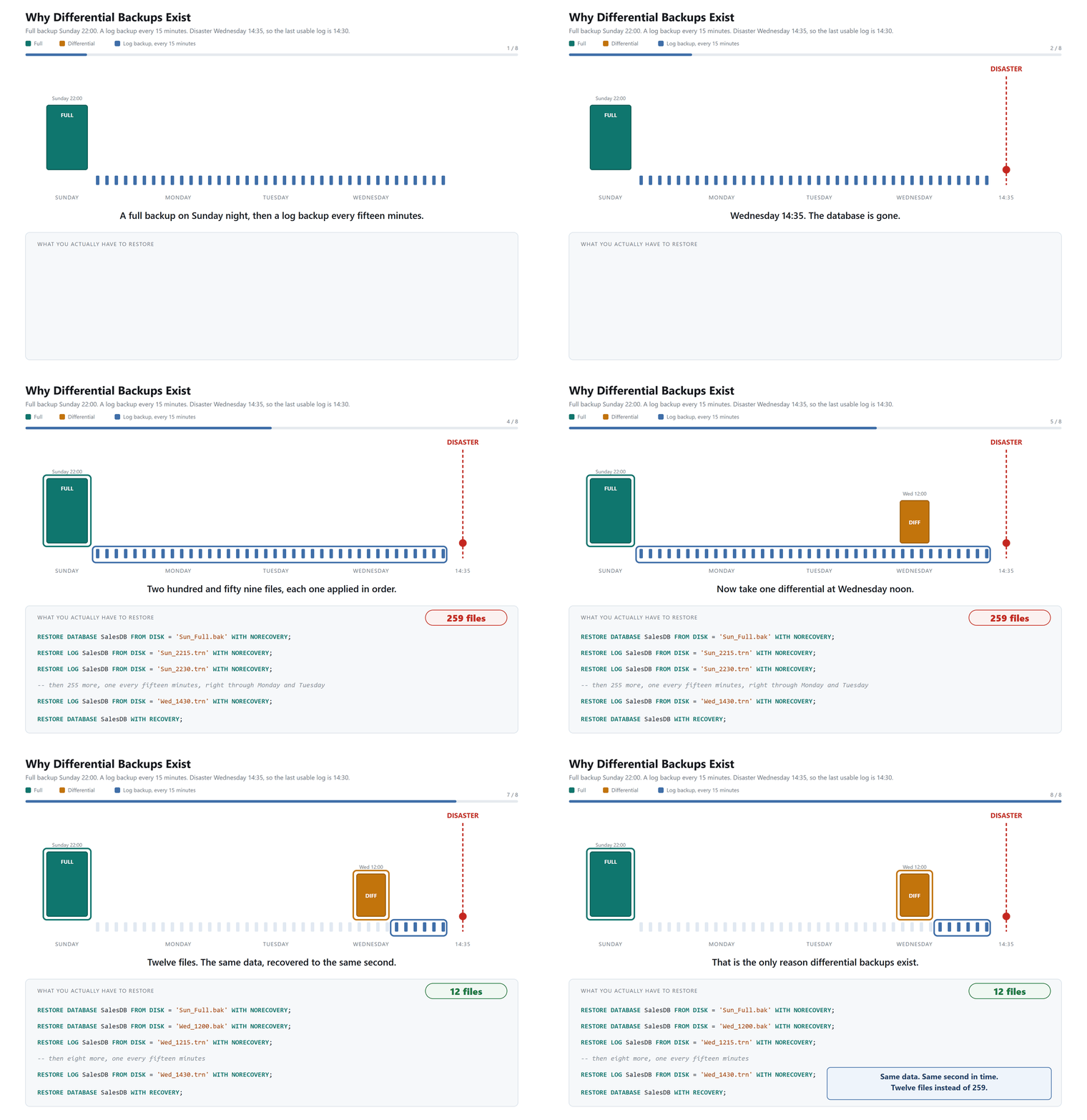
A differential holds everything that changed since the last full. Not since the last differential. Since the last full. That is the single most misunderstood sentence in SQL Server backups. It is also why differentials generally grow as their base gets older, though the size is not guaranteed to rise every single day.
The word people reach for is incremental, and that’s the wrong word. Incremental would mean each one picks up where the previous one stopped. Differentials are cumulative. Each one starts again from the full.
So the sequence gains one step. Restore the full backup you chose. Then restore the newest usable differential that is based on that full. Then apply every log backup taken after it, in order.
That middle sentence matters more than it looks. A differential only applies to the specific full backup it was based on, so “just grab the newest differential” is the wrong instinct if you have restored an older full.
Once a newer usable differential exists, you normally skip the earlier ones. Keep them until the new file has been verified, though. An older differential on the same full is a perfectly good fallback if the newest one turns out to be corrupt.
What the Differential Actually Buys You
The numbers in that animation are worth spelling out, because they’re the entire argument.
Take a full backup at Sunday 22:00, log backups every fifteen minutes, and a disaster on Wednesday at 14:35. The last usable log is 14:30.
Sunday 22:00 to Wednesday 14:30 is 64.5 hours. At four log backups an hour that’s 258 log backups. Add the full and you’re restoring 259 files, every one of them in the correct order, every one of them needing to work.
Now add a single differential at Wednesday noon. You restore the full, then that differential, then the logs from 12:15 to 14:30. Ten of them. Twelve files instead of 259.
Same data. Same second in time. Twelve files to get right while your phone is ringing, instead of two hundred and fifty nine.
In this FULL recovery example, that is what a differential buys you. It replaces hundreds of log restores with one data backup and the handful of logs that follow it.
One thing I have skipped on purpose. This example stops at the 14:30 log backup. In a real failure, if the tail of the log is still readable and you want the latest possible moment, take a tail-log backup before you start restoring, and that becomes the final log in the sequence.
The Strategy Most People Actually Have
Here is what I find on real servers more often than anything else. A full backup every night, log backups every so often, and no differentials at all.
It works. That is the problem. It works right up until the day you need it, and then somebody discovers that recovering to lunchtime means feeding two hundred and fifty eight files through in order while the business waits.
The other version I see is worse. Full backups only, no log backups, and the database sitting in FULL recovery. That setup quietly grows the transaction log until a disk fills up at three in the morning.
Differentials fix the first problem. Log backups fix the second. Most shops need both.
A Starting Point, Not a Prescription
If you have nothing today, start here and adjust.
| Backup | How often | What actually decides it |
|---|---|---|
| Full | Weekly, on your quietest night | Database size and how long a full backup takes |
| Differential | Nightly | How long you can let a restore run |
| Log | Every 15 minutes | How much data you can afford to lose |
That last row is the one worth sitting with. Your log backup interval is your data loss window. Back up every fifteen minutes and you can lose fifteen minutes. Back up hourly and you can lose an hour. Nobody sets that number for you. The business does, whether they realize it or not.
Now the disclaimer, and I mean it. These are starting numbers, not answers. A busy database might need log backups every five minutes. A quiet reporting database might be fine with a nightly full and nothing else. Big databases sometimes cannot finish a weekly full inside the window at all.
Try a schedule, measure it, and change it. What works on my servers may be wrong on yours.
Five Questions I Get Very Frequently
Why does my log file keep growing and never shrink?
Almost always the same answer. The database is in FULL recovery and nobody is taking log backups. SQL Server holds on to every log record until a log backup releases it, so the file grows forever.
Take log backups, or switch to SIMPLE if you genuinely do not need point in time recovery. Shrinking the file without fixing the cause just means you get to do it again next month. I wrote this up properly in How to Stop Growing Log File Too Big, and more recently in Transaction Logs: The Good, The Bad, and The Ugly.
I take a full backup every night. Do I still need log backups?
If the database is in FULL recovery, yes. A full backup does not release the log. That surprises people constantly. You can back up nightly for a year and still run out of disk.
How often should I take a differential?
Ask how long you are willing to sit and watch a restore. Nightly differentials mean you never replay more than a day of logs. Every six hours means you never replay more than six. It costs you a little storage and buys you a much shorter bad afternoon.
Can I skip all this and just use SIMPLE recovery?
You can, and for some databases it is the right call. In SIMPLE there are no log backups, so you recover to your last full or differential and lose everything after it. If that is acceptable for a reporting copy, use it. If it is a system your business runs on, it is not. There is more on choosing in Recovery Models and Selection.
How do I know any of this actually works?
You restore it. There is no other way to know, and there never has been.
Put a restore test in the calendar the way you put a backup job in the scheduler. Once a month, pick a real backup set, restore it somewhere harmless, and run a query against it. That is the whole test.
A backup is not a backup until it has been restored. Until then it is a file you are hoping about.
Three Things That Cost People Their Afternoon
Restoring every differential. You only need the newest one that matches your full. I’ve watched people restore four in a row, waiting through each, before somebody points out that the last one already contained the other three.
Assuming a full backup breaks the log chain. It doesn’t. This one surprises people every time. You can take a full backup in the middle of the day and your log backups carry on chaining exactly as before. What actually breaks the chain is switching the database to the SIMPLE recovery model, and switching back does not repair it. You need a full or differential data backup to start the new chain.
Forgetting that a COPY_ONLY full does not reset the differential base. That’s the whole point of it. Take a copy for a developer with COPY_ONLY and tonight’s differential still measures from your real Sunday full. Take a normal full instead and it quietly becomes the new differential base, so every differential after it depends on a file you never meant to keep.
The Old Post, Seventeen Years On
If you want the original written version with the static diagram, it’s still here: Backup Timeline and Understanding of Database Restore Process in Full Recovery Model, from 14 July 2009.
Reading it back, I wouldn’t change the explanation. I’d just draw it better, which is what I’ve finally done.
The thing I’d add is the practice. Knowing this order and having run it are not the same skill, and the gap between them only shows up on the worst day of your year.
Your backups are not a backup strategy. They’re a restore strategy that hasn’t been tested yet.
This is not a story about which backup types exist, it is a story about the ten minutes on a bad afternoon when you have to remember what order they go back in.
Reference: Pinal Dave (https://blog.sqlauthority.com/), Differential Backup, X
