

While wandering around the documentation looking for some Question of the Day topics, I learned something new about the money data type. This post discusses what I learned.
Another post for me that is simple and hopefully serves as an example for people trying to get blogging as #SQLNewBloggers.
The Money Type
Did you know that you can add a currency symbol to the money data type for assignment? I didn’t. This isn’t in the documentation, but it’s something I need to submit as a PR.
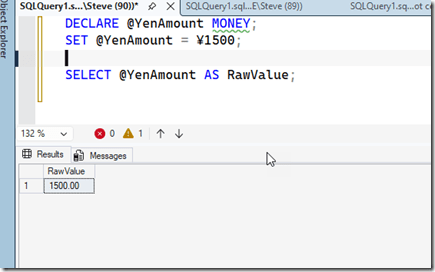
In any case, I can assign money like this:
DECLARE @YenAmount MONEY;
SET @YenAmount = ¥1500;

SELECT @YenAmount AS RawValue;
Note that this isn’t really assigning Yen values. It’s just a number, but since the money type supports certain literals, this works. If I select the amount, I get just a number.
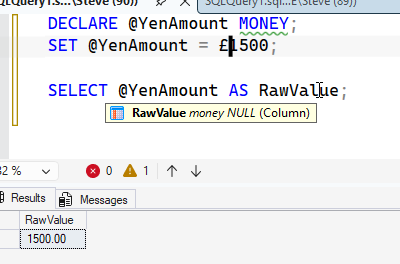
If I change the symbol, it still works because SQL Server doesn’t really interpret the amount and symbol or the variable name. That being said, this is bad code.
The money and smallmoney data type page lists the symbols you can use, but none of them are stored. Where this page fails is that it doesn’t help you get the values back out as the currency.
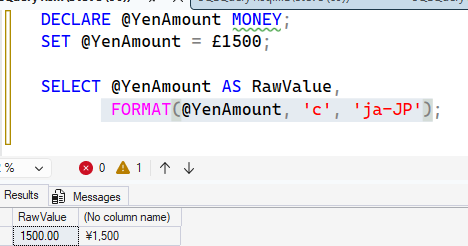
Format helps here. I can use this with some culture to determine what I want to get out. For example, I get Yen with this:
FORMAT(@YenAmount, 'c', 'ja-JP')
You can see the results here:
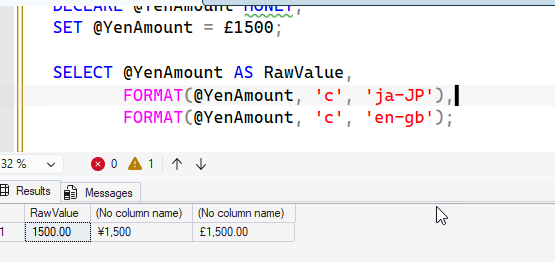
I can also get Pounds.
SQL New Blogger
This post took me about 5 minutes to assemble as I’d already had the code, but it’s an example of a quick thing based on other work I was doing.
You can showcase this and help others see that you are learning and growing.
