

C is one of the most important programming languages and the base for many modern technologies. It is used to build operating systems, compilers, databases, and game engines. Many popular languages like C++, Java, Python, and PHP were also influenced by C.
Whether you are learning your first printf() program or building large C/C++ projects, choosing the right IDE can save you a lot of time and some tools focus on simplicity for beginners, while others offer advanced debugging, Git integration, and powerful code analysis for professional development.
In this list, you’ll find several lightweight editors, full-featured IDEs, and modern AI-powered coding environments that make writing C and C++ on Linux easier and faster.
What is an IDE?
An IDE (Integrated Development Environment) editor is a software application that offers an extensive collection of tools for software development, which includes a text editor, debugging tools, a code compiler, version control, and other features that help software developers to write, debug, and test their code efficiently.
A text editor is generally an IDE but designed to offer a more feature-rich environment that includes syntax highlighting, code folding, auto-indentation, and code completion, which is a useful feature that helps developers to reduce code errors and write code more efficiently.
If this cleared up the IDE vs. editor question you’ve been avoiding for years, who still uses nano for everything.
1. NetBeans for C/C++ Development
NetBeans is a free, open-source, cross-platform IDE maintained under the Apache project. It has solid C/C++ support with project templates, static and dynamic library builds, and the ability to reuse existing code across projects.
The C/C++ editor integrates with the multi-session GNU GDB debugger, supports code assistance and C++11, and lets you create and run tests from inside the IDE.
It handles multiple compilers, including GNU, Clang/LLVM, Cygwin, Oracle Solaris Studio, and MinGW.
Remote development, file navigation, source inspection, Qt toolkit support, and automatic packaging into .tar, .zip, and other archive formats round out a complete environment.
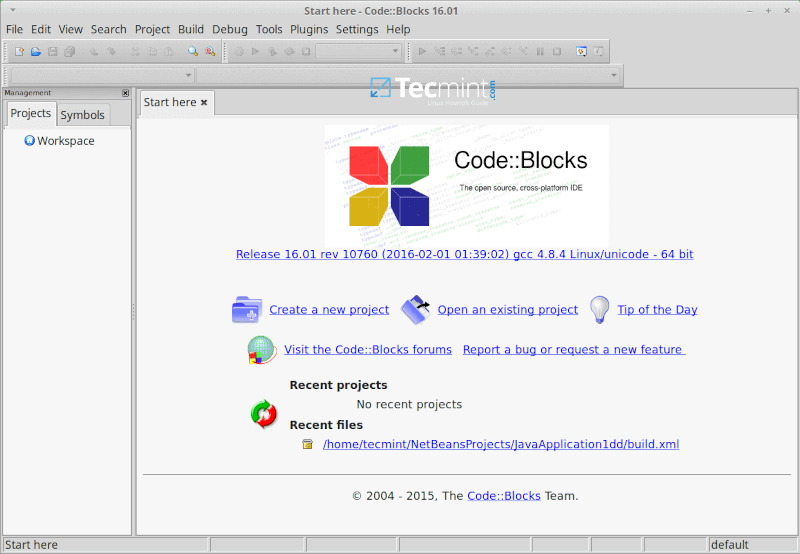
2. Code::Blocks
Code::Blocks is a free, highly extensible, configurable, cross-platform C++ IDE built to offer users the most demanded and ideal features. It delivers a consistent user interface and feel.
And most importantly, you can extend its functionality by using plugins developed by users; some of the plugins are part of the Code::Blocks release, and many are not, written by individual users not part of the Code::Blocks development team.
Its features are categorized into a compiler, debugger, and interface features, and these include:
- Multiple compiler support, including GCC, clang, Borland C++ 5.5, Digital Mars, plus many more
- Very fast, no need for makefiles
- Multi-target projects
- A workspace that supports the combining of projects
- Interfaces GNU GDB
- Support for full breakpoints, including code breakpoints, data breakpoints, breakpoint conditions, plus many more
display local functions, symbols, and arguments - custom memory dump and syntax highlighting
- Customizable and extensible interface, plus many other features, including those added through user-built plugins
If you’ve been putting off setting up a real debugger for your C projects, who’s still adding printf statements to track bugs.
3. Eclipse CDT(C/C++ Development Tooling)
Eclipse is a well-known open-source, cross-platform IDE in the programming arena. It offers users a great GUI with support for drag and drop functionality for easy arrangement of interface elements.
The Eclipse CDT is a project based on the primary Eclipse platform, and it provides a fully functional C/C++ IDE with the following features:
- Supports project creation.
- Managed builds for various toolchains.
- Standard make build.
- Source navigation.
- Several knowledge tools, such as the call graph, type hierarchy, built-in browser, and macro definition browser.
- Code editor with support for syntax highlighting.
- Support for folding and hyperlink navigation.
- Source code refactoring plus code generation.
- Tools for visual debugging, such as memory and registers.
- Disassembly viewers and many more.

4. CodeLite IDE
CodeLite is also a free, open-source, cross-platform IDE designed and built specifically for C/C++, JavaScript (Node.js), and PHP programming.
Some of its main features include:
- Code completion offers two code completion engines.
- Supports several compilers, including GCC, clang/VC++.
- Displays errors as a code glossary.
- Clickable errors via the build tab.
- Support for LLDB next-generation debugger.
- GDB support.
- Support for refactoring.
- Code navigation.
- Remote development using built-in SFTP.
- Source control plugins.
- RAD (Rapid Application Development) tool for developing wxWidgets-based apps, plus many more features.

5. Bluefish Editor
Bluefish sits somewhere between a text editor and a full IDE – lightweight and fast, but with enough features to handle real development work. It runs on Linux, Mac OSX, FreeBSD, OpenBSD, Solaris, and Windows, and supports C/C++ among many other languages.
Key features include multiple document interfaces, recursive file opening based on filename or content patterns, a powerful search and replace, a snippet sidebar, and full-screen editing.
The site uploader and downloader make it useful for web work too. For developers who want something between Vim and Eclipse without the weight of a JVM-backed IDE, Bluefish fills that gap cleanly.

6. Sublime Text Editor
Sublime Text is a multi-platform editor built for code, markup, and prose. Version 4 is current and actively maintained. It handles C/C++ well and is consistently fast, especially on large files where heavier editors start to lag.
Feature highlights: multiple selections, a command palette, Goto Anything navigation, distraction-free mode, split editing, instant project switching, and a Python-based plugin API.
It’s not a full IDE out of the box, but with the right plugins, it gets close enough for most C/C++ work.

Picking the right editor changes how you work every day. If this comparison is helping you decide, before the next project kicks off.
7. JetBrains CLion
CLion is a non-free, powerful, and cross-platform IDE for C/C++ programming. It is a fully integrated C/C++ development environment for programmers, providing Cmake as a project model, an embedded terminal window, and a keyboard-oriented approach to code writing.
It also offers a smart and modern code editor, plus many more exciting features to enable an ideal code-writing environment, and these features include:
- Supports several languages other than C/C++
- Easy navigation to symbol declarations or context usage
- Code generation and refactoring
- Editor customization
- On-the-fly code analysis
- An integrated code debugger
- Supports Git, Subversion, Mercurial, CVS, Perforce(via plugin), and TFS
- Seamlessly integrates with Google test frameworks
- Support for Vim text editor via Vim-emulation plugin

8. Visual Studio Code
Visual Studio is a rich, fully integrated, cross-platform development environment that runs on Linux, Windows, and Mac OS X. It was recently made open-source to Linux users, and it has redefined code editing, offering users every tool needed for building every app for multiple platforms, including Windows, Android, iOS, and the web.
It is feature-full, with features categorized under application development, application lifecycle management, and extending and integrating features. You can read a comprehensive list of features on the Visual Studio website.

9. KDevelop
KDevelop is a free, open-source, cross-platform IDE that works on Linux, Solaris, FreeBSD, Windows, Mac OSX, and other Unix-like systems. It’s built on KDevPlatform, KDE, and Qt libraries and is extensible through plugins.
It includes a Clang-based C/C++ plugin, support for Grep view, a uses widget for exploring symbol references across the codebase, and various line editing modes across views.
For developers already in a KDE environment, KDevelop integrates naturally with the desktop and tooling they’re already using.

10. Geany IDE
Geany is a fast, lightweight, cross-platform IDE that runs with minimal dependencies and doesn’t require GNOME or KDE libraries – just GTK2. That makes it a reliable choice on minimal Linux installs, older hardware, or anywhere you want an IDE that starts instantly.
It covers the basics well: syntax highlighting, code folding, call tips, symbol name auto-completion, symbol lists, and code navigation. The built-in compile-and-run system means you can go from a new file to running code without any project setup. Plugin support adds functionality without bloat.

If you’re new to Linux development and want a solid foundation before picking an IDE, learner and work through it together.
11. 11. GNOME Builder
GNOME Builder is the official IDE for GNOME platform development, replacing Anjuta DevStudio. It’s free, open-source, and actively maintained.
It’s designed primarily for building GNOME applications in C, though it supports other languages and project types. Flatpak integration is built in, which makes building and testing packages against the GNOME runtime straightforward.
For any work on the GNOME desktop or GTK applications, GNOME Builder is the right tool. It’s not a general-purpose C/C++ IDE for all projects, but for its target use case, it’s the best option available.

12. The GNAT Programming Studio
The GNAT Studio (previously GPS) is a free IDE developed by AdaCore for Ada and C/C++ development. It’s designed around source navigation and code comprehension rather than feature volume.
It provides a multi-lingual, multi-platform environment with a flexible MDI, customizable interface, and full extensibility through plugins. It’s a niche tool – most useful if you’re working on Ada projects that include C/C++ components – but it’s free and actively maintained by AdaCore.

13. Qt Creator
Qt Creator is a free, cross-platform IDE built specifically for applications using the Qt framework. It’s the natural choice for C++ GUI development, embedded systems work, or building apps that need to run on multiple platforms from a single codebase.
Features include a sophisticated code editor, version control integration, project and build management tools, and multi-platform switching. It supports mobile and desktop targets alongside connected embedded devices. Qt Creator is free for open-source projects; commercial use requires a Qt license.

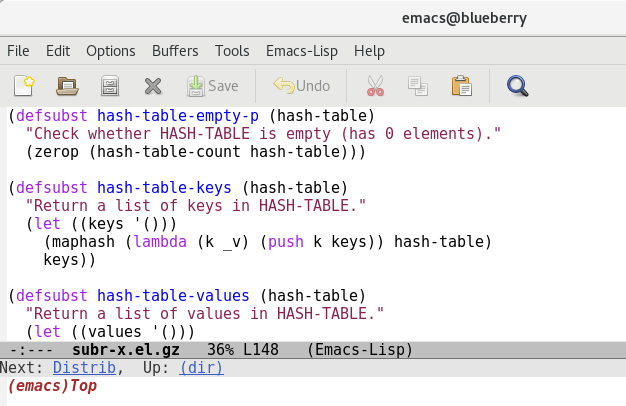
14. Emacs Editor
Emacs is a free, powerful, highly extensible, and customizable, cross-platform text editor you can use on Linux, Solaris, FreeBSD, NetBSD, OpenBSD, Windows, and Mac OS X.
The core of Emacs is also an interpreter for Emacs Lisp, which is a language under the Lisp programming language. As of this writing, the latest release of GNU Emacs is version 27.2, and the fundamental and notable features of Emacs include:
- Content-aware editing modes
- Full Unicode support
- Highly customizable using GUI or Emacs Lisp code
- A packaging system for downloading and installing extensions
- An ecosystem of functionalities beyond normal text editing, including a project planner, mail, calendar, and newsreader, plus many more
- A complete built-in documentation, plus user tutorials and many more
15. SlickEdit
SlickEdit (previously Visual SlickEdit) is an award-winning commercial cross-platform IDE created to enable programmers the ability to code on 7 platforms in 40+ languages. Respected for its feature-rich set of programming tools, SlickEdit allows users to code faster with complete control over their environment.
Its features include:
- Dynamic differencing using DIFFzilla
- Syntax expansion
- Code templates
- Autocomplete
- Custom typing shortcuts with aliases
- Functionality extensions using Slick-C macro language
- Customizable toolbars, mouse operations, menus, and key bindings
- Support for Perl, Python, XML, Ruby, COBOL, Groovy, etc.

Choosing the right IDE is the kind of decision that pays off every single day. If this guide helped you narrow it down, group and save them the research time.
16. Lazarus IDE
Lazarus IDE is a free and open-source Pascal-based cross-platform visual Integrated Development Environment created to provide programmers with a Free Pascal Compiler for rapid application development. It is free for building anything, including e.g. software, games, file browsers, graphics editing software, etc., irrespective of whether they will be free or commercial.
Feature highlights include:
- A graphical form designer
- 100% freedom because it is open source
- Drag & Drop support
- Contains 200+ components
- Support for several frameworks
- A built-in Delphi code converter
- A huge welcoming community of professionals, hobbyists, scientists, students, etc.

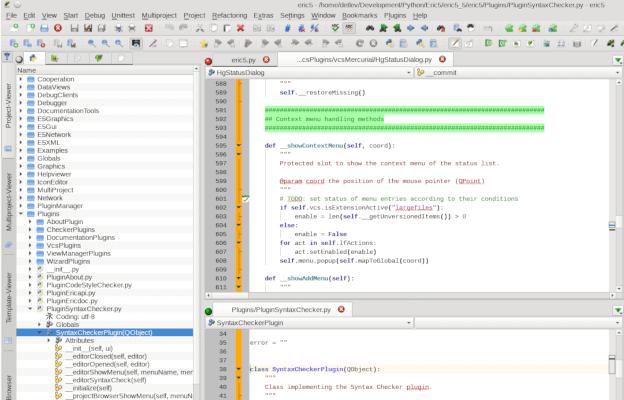
17. The Eric Python IDE
The Eric Python IDE is a full-featured Python IDE written in Python, based on the Qt UI toolkit, to integrate with the Scintilla editor control. It is designed for use by both beginner programmers and professional developers, and it contains a plugin system that enables users to easily extend its functionality.
Its feature highlights include:
- 100% free and open-source
- 2 tutorials for beginners – a Log Parser and Mini Browser application
- An integrated web browser
- A source documentation interface
- A wizard for Python regular expressions
- Graphic module diagram import
- A built-in icon editor, screenshot tool, and difference checker
- A plugin repository
- Code autocomplete, folding
- Configurable syntax highlighting and window layout
- Brace matching
18. MindForger
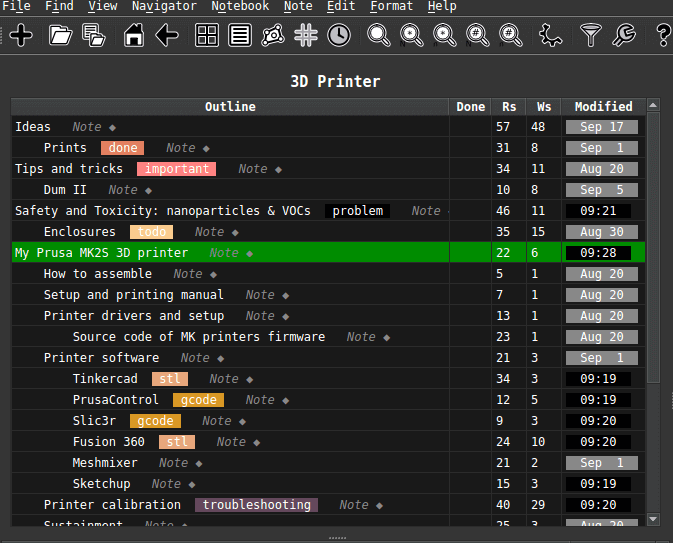
MindForger is a free, open-source Markdown IDE built as a smart note-taker, editor, and organizer. It’s privacy-focused and supports several encryption tools, including ecryptfs.
Features include automatic linking, HTML preview and zooming, import/export, tag support, metadata editing, sorting, and Git and SSH support. It’s a niche tool – more useful as a knowledge management system that also handles code than as a primary C/C++ IDE.
For developers who document heavily alongside their coding, it’s worth looking at.
19. Zed
Zed is a high-performance, open-source code editor built in Rust by the team that previously built Atom and the Electron framework. It launched on Linux in 2024 and has become one of the most talked-about editors in developer communities since.
The performance is noticeably different from Electron-based editors – GPU-accelerated rendering, sub-1-second startup times, and significantly lower memory usage than VS Code.
Real-time collaborative editing is built in, not an add-on.
It has built-in AI features, LSP support for C/C++ via clangd, and a growing extension library that crossed 1,000 extensions in early 2026. For developers who want speed and a clean experience without giving up modern tooling, Zed is the strongest new option on this list.

20. Neovim
Neovim is a fork of Vim that modernized the internals while keeping everything that made Vim fast. It adds async plugin support, a Lua-based configuration system, and a built-in LSP client that gives you full IDE-level code intelligence with any language server – including clangd for C/C++.
Distributions like LazyVim and AstroNvim ship a preconfigured IDE-like experience you can adjust from there, which removes most of the initial setup pain. Neovim stays in the terminal, starts instantly, and handles large codebases without the memory overhead of Electron-based editors.
It remains one of the most popular environments for developers who want full control over their tooling.

21. Helix
Helix is a free, open-source terminal editor written in Rust that has been picking up serious attention in developer communities as a modern alternative to Vim and Neovim.
The key difference is what it ships with by default: built-in LSP support, Tree-sitter syntax highlighting, and multiple cursors work out of the box without any plugin setup or config files.
Unlike Vim or Emacs, you don’t need to spend hours wiring up plugins to get code completion, diagnostics, and accurate syntax highlighting for C/C++.
Point it at a project with clangd installed, and it just works. The editing model takes inspiration from Kakoune – you select first, then act, which keeps the current operation always visible on screen.
That’s a deliberate reversal of Vim’s grammar, and it takes some adjustment, but most developers find it clicks faster than expected. hx --tutor gets you up to speed in about 20 minutes.
It’s not a full IDE and doesn’t try to be, but for terminal-first developers who want Vim-style editing with none of the configuration overhead, Helix is the most practical option on this list.

22. VI/VIM Editor
Vim, an improved version of the VI editor, is a free, powerful, popular, and highly configurable text editor. It is built to enable efficient text editing and offers exciting editor features for Unix/Linux users; therefore, it is also a good option for writing and editing C/C++ code.
To learn how to use the Vim editor in Linux, read the following articles:
If you’re working toward a Linux certification and want to know which tools experienced sysadmins actually use day to day, .
Conclusion
IDEs give you more programming comfort than plain text editors – debugger integration alone changes how fast you can fix a broken build. Every tool on this list works on Linux today and is actively maintained.
For lightweight C work on a minimal install, start with Geany or CodeLite. For professional C++ development, CLion or VS Code with the C/C++ extension are the strongest options.
For raw speed and modern AI features, Zed is the standout new addition. For terminal-only development, Neovim with clangd gives you IDE-level intelligence without leaving the command line and if you want that same terminal experience with zero configuration, Helix is worth trying first..
Try 2 or 3 from this list on your actual machine. The one that gets out of your way fastest is the right one. Which IDE are you currently using for C/C++ on Linux? Drop it in the comments below.
If this article helped, with someone on your team.
