

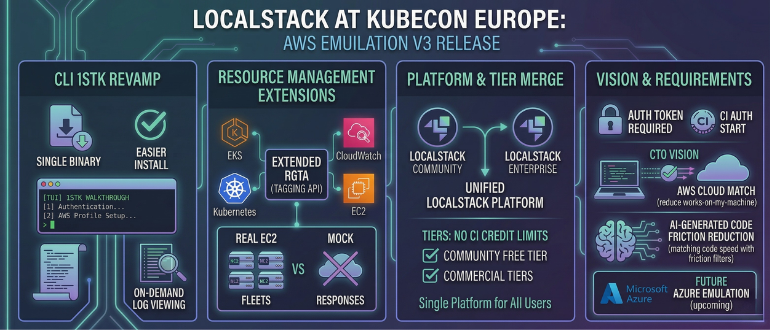

LocalStack at the KubeCon + CloudNativeCon Europe conference this week unveiled a revamped command line interface (CLI), dubbed 1stk, for its framework that enables emulations of Amazon Web Services (AWS) environments to be run on a local machine.
The CLI in version 3 of the AWS 2026 edition of the framework, in addition to providing a single binary that is easier to install, also adds a Terminal UI (TUI) that walks developers through steps such as authentication or setting up an AWS profile. Additionally, it offers better log viewing, which is now also turned off by default.
At the same time, LocalStack has extended its Resource Groups Tagging API (RGTA) to enable developers to query and manage tags across multiple AWS services. Elastic Kubernetes Services (EKS) and CloudWatch resources are now fully integrated with the RGTA, and support for the Elastic Compute Cloud has been extended to provide an API for creating and deleting actual fleets of IT infrastructure resources versus providing a set of mock responses. Support for the libvirt VM manager is planned for a future release.
Finally, LocalStack as previously promised has now consolidated its community and enterprise edition into a single platform and removed continuous integration (CI) credit limitations from all tiers, including the non-commercial free tier. As of now, an auth token or continuous integration (CI) auth token is also required to start LocalStack for AWS.
LocalStack CTO Waldemar Hummer said that, in general, application developers still prefer to build software on a local machine that they have more control over. LocalStack was created to provide a local instance of an AWS environment that enables developers to build software that is destined to run in a cloud environment. That approach reduces the number of instances where code that runs on a local machine doesn’t actually run as intended in the cloud, noted Hummer.
At present, LocalStack supports AWS but the company is also building a set of emulation services for Microsoft Azure that will be made available later this year.
It’s not clear how much code is developed first on a notebook or desktop PC, but in the age of artificial intelligence (AI) the amount of code being generated by individual developers is increasing exponentially. Every time code has to be sent back to be revised only serves to slow the overall pace of application development. DevOps and platform engineering teams will need to streamline workflows in a way that reduces the amount of overall friction that is currently encountered as code moves into a production environment, noted Hummer.
The speed at which DevOps teams make that adjustment will naturally vary from one team to another, but the sooner everyone realizes that a piece of AI generated code might not run as intended in a cloud computing environment the less stress there is likely to be for all concerned. The challenge and the opportunity, of course, is identifying those points of friction before the amount of code being created might soon become too overwhelming to effectively deploy and manage.
