

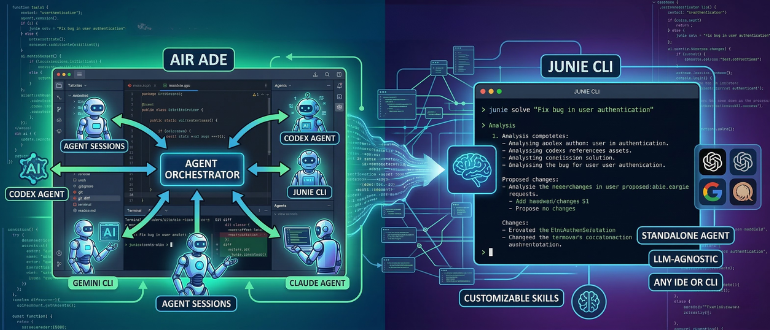

JetBrains has launched a new “agentic” tooling stack that pairs a multi‑agent development environment, Air, with a standalone, LLM‑agnostic coding agent, Junie CLI.
If you know JetBrains, you probably know it for Kotlin, the statically typed Java Virtual Machine (JVM) language used mostly for Android development, or for its well-known integrated development environments (IDEs), such as IntelliJ IDEA for Java, PyCharm for Python, and WebStorm for JavaScript. Going forward, JetBrains hopes you’ll also know it for its AI tools, JetBrains Air and Junie CLI.
The first, Air, is pitched as an “agentic development environment” that lets developers delegate coding tasks to multiple AI agents running concurrently. Rather than bolting chat boxes onto editors, Air “builds tools around the agent,” bundling terminals, Git, previews, and code navigation into a single workspace designed to guide and correct agents rather than just prompt them. JetBrains says it’s using its 26 years of IDE experience to focus Air on orchestrating agents, while leaving day‑to‑day editing and broader workflows to traditional IDEs such as IntelliJ IDEA. It’s a best-of-both-worlds: an old-school IDE and a brand-new AI-agentic approach.
Out of the box, Air supports Codex, Claude Agent, Gemini CLI, and JetBrains’ own Junie. These agents are treated as a normal workflow step rather than a migration. The platform uses JetBrains and the Zed‘s Agent Client Protocol (ACP) to bridge the gap between coding editors and AI agents. Tasks can run locally by default or inside Docker containers and Git worktrees. This enables you to run sandboxed, parallel work while Air manages the process of bringing changes back into the main codebase.
It works, according to Nik Tkachev, Air ADE’s Head of Product, by helping “you navigate your codebase. You can mention a specific line, commit, class, method, or other symbol when defining a task. As a result, the agent gets precise context instead of a blob of pasted text. And when the task is done, your review doesn’t stop at the code diff. Air lets you see the changes in the context of your entire codebase, and you’ll have essential tools like a terminal, Git client, and built-in preview right in front of you.”
To combat “agent sprawl,” a tangle of windows and terminals per task, Air shows one task (one agent session) at a time and notifies developers when another task needs attention. The macOS preview is available to holders of JetBrains AI Pro or AI Ultimate.
The company also supports a bring-your-own model, where you provide your own Anthropic, OpenAI, or Google keys. These are billed first before falling back to JetBrains’ subscription. JetBrains is also testing cloud execution, where agents run in isolated remote sandboxes, and says an enterprise‑focused offering is on the way.
At the same time, JetBrains announced Junie CLI. This is a standalone version of Junie’s coding agent that can run directly from the terminal, in any IDE, in CI/CD pipelines, and on GitHub or GitLab. The company describes Junie CLI as LLM‑agnostic, supporting “top‑performing models” from OpenAI, Anthropic, Google, and Grok, and plans to integrate new models as they arrive. To seed adoption, JetBrains is offering a week of free access to Google’s Gemini 3 Flash, enabled by default for new Junie CLI users before standard pricing kicks in.
Junie CLI is designed to support all major developer workflows with minimal friction. It includes one‑click migration from other agents such as Claude Code and Codex. Junie also exposes extensive customization via guidelines, custom agents and skills, commands, the Model Context Protocol (MCP), and other configuration methods. You can also plug in your own model keys without paying an additional platform markup. JetBrains pitches this as a more transparent pricing structure meant to fit existing governance, compliance, and cost‑management policies inside organizations.
Technically, Junie leans on JetBrains’ project intelligence to combine LLM output with the company’s deep understanding of code structure and workflow state. The agent is intended to handle complex problems, remain context‑aware by default, and operate under “required safeguards” for reliability and security, while maintaining strong benchmark performance even on relatively low‑cost models like Gemini Flash 3. Features such as real‑time prompting let you adjust instructions while a task is running. Junie’s codebase intelligence is meant to move it beyond “AI in a terminal” toward a fully autonomous task executor.
Both approaches underscore JetBrains’ broader strategy to treat AI agents as first‑class development tools rather than add‑on assistants. Air targets the fragmentation that comes from running different agents in different tools across different contexts, with little structural understanding of the code. By allowing multiple agents to work in parallel under a unified interface, JetBrains hopes to normalize agent orchestration as part of everyday development, not an experiment at the margins.
JetBrains has not yet detailed an exact timeline for Windows and Linux versions of Air, only saying they are “coming soon.” The company is also preparing dedicated enterprise offerings for both Air and Junie. But with Air’s public preview and Junie CLI’s beta now available, the company is clearly betting that professional developers are ready for a new layer of tooling built explicitly around AI agents, rather than simply embedding AI into existing tools.
