

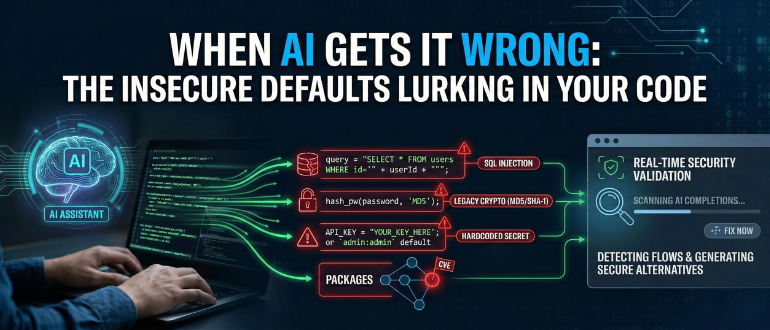

The arrival of generative AI in the software development lifecycle (SDLC) is arguably the biggest shift in coding in decades. For development teams, tools like GitHub, Copilot, and other AI assistants act as a massive force multiplier, automating boilerplate, suggesting complex logic, and significantly accelerating time-to-commit.
But as organizations rush to equip their teams, a quiet crisis is forming in the codebase. While AI helps developers write code faster, it also helps them write insecure code faster.
The problem isn’t that the AI is malicious. It is that today’s models do not understand security context or intent. Generative AI models are trained in vast repositories of public code, billions of lines written over decades. This training data, while containing brilliance, also includes millions of deprecated patterns, insecure configurations, and “quick-fix” tutorials that were never meant for production. Because generative AI is probabilistic, it doesn’t understand security. It only understands patterns. If the training data relies heavily on insecure database connections, the AI will simply default to suggesting those flawed patterns to developersx.
The Most Common AI-Generated Vulnerabilities
At Checkmarx, we observe distinct, persistent categories of flaws that AI assistants are prone to generating. These are fundamental security errors that can easily bypass standard peer reviews because they “look” syntactically correct.
1. SQL Injection. It’s Back!
SQL Injection (SQLi) should be a relic, yet Checkmarx researchers consistently observe it as one of the most frequent flaws surfacing in AI-generated code. Why? Because the internet is full of older tutorials that use simple string concatenation to build queries. When a developer asks an AI to “write a query to find a user by ID,” the model may default to older, insecure examples due to prevalence, ignoring modern parameterization. The result is a functional query that opens the door to database manipulation the moment it hits production.
2. Weak Cryptography and Authentication
When asked to handle authentication or hashing, AI models often retrieve “classic” examples from their training data. This leads to suggestions using algorithms like MD5 or SHA-1, standards that have been broken for years, rather than modern, secure alternatives. The code compiles, the tests pass, and teams unknowingly bake a critical flaw into the application’s identity layer.
3. Secrets in Plain Sight
AI models trained on public repositories have “seen” thousands of API keys, tokens, and credentials accidentally committed by other developers. We frequently see AI assistants suggesting code blocks that include placeholder credentials. They sometimes suggest hardcoding keys for “testing simplicity,” a dangerous habit that often bleeds into production.
4. The Supply Chain Trap
AI assistants are eager to help developers import packages to solve problems, but they rarely vet the health of those packages. An AI might suggest a library that is popular but unmaintained, or one that was recently compromised. This introduces a supply chain risk: a single “quick import” can bring in a web of exploitable transitive dependencies.
Four AI-Generated Code Smells Every Developer Should Catch Early
As engineering teams lean more heavily on AI, developers need to develop a new “muscle memory” for reviewing suggestions. Security cannot just be a tool; it has to be a critical step in the coding process. Here are four specific “AI code smells” examples that should trigger immediate skepticism.
1. Hardcoded Secrets and Credentials
- The Smell: The AI suggests variable names like apiKey or admin:admin defaults.
- The Risk: The AI is mimicking bad practices from training data. This causes an instant breach if the code is promoted to production.
2. Hallucinated Logic and Unsafe Defaults
- The Smell: The AI invents functions that “look right” but do not map to real APIs. It suggests permissive configurations or disabled TLS verification.
- The Risk: The AI prioritizes functionality over security rules. This introduces overbroad regex sanitization or opens security holes that are difficult to spot.
3. Vulnerable or Outdated Package Recommendations
- The Smell: The AI suggests a quick install for a package without providing context on its version history or CVE record.
- The Risk: Developers import a library with known vulnerabilities. This compromises the supply chain with exploitable transitive dependencies.
4. High Blast-Radius Refactors
- The Smell: A developer asks the AI to refactor a single function. The suggestion ripples across multiple files and modules.
- The Risk: The AI lacks application-wide context. These subtle changes break security checks, invalidate unit tests, or downgrade dependency safety. Without Safe Refactor capabilities, the resulting rework can be massive.
Moving from “Scan Later” to “Fix Now”
The only way to capture the velocity AI promises without inheriting the hidden technical debt it leaves behind is to bring security context directly into the AI workflow.
Security as a Real-Time Partner
This is a core philosophy behind Checkmarx Developer Assist. Instead of waiting for a nightly scan, Developer Assist runs inside the IDE, validating AI completions in real time.
Because flagging the problem is only half the battle, development teams need solutions, not just alerts, to truly maintain velocity. This is where Safe Refactor comes in. If an AI suggests a block of code with SQL injection vulnerability, Developer Assist catches it before the developer hits “save” and generates a secure, parameterized version of that code, offering to swap it instantly. Developer Assist also maps the Package Blast Radius before a developer accepts a recommendation, analyzing dependencies and vulnerabilities to show the potential impact that a simple import could have on the entire application’s security posture.
AI acts as a powerful engine for speed, but it lacks judgment for security. It requires a partner to distinguish “working code” from “secure code.”
Ready to see safe coding in action? Watch the Checkmarx Developer Assist demo to see how we catch and fix AI-generated vulnerabilities in the IDE.
