

I had a customer ask about analyzing their Test Data Manager (TDM) usage to determine how many people were protecting data in dev databases and how often. TDM creates log files each time it runs, but analyzing those isn’t easy.
Or is it? Claude Code thinks it is.
This is part of a series of experiments with AI systems.
Consolidating Log Files
I didn’t want to grant extra rights or permissions, and I like the loosely-coupled idea of tools, so I manually copied over log files from a couple locations into a new repo spot. This was a test to see if Claude Code could help me with something I’ve done in past with other types of files.
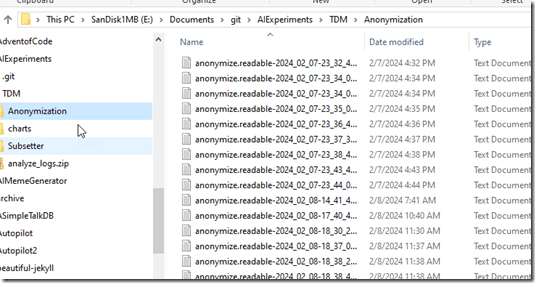
TDM puts log files in Program Data, which can be locked down on many machines, so I copied things over to a location on another drive. In this case, I created a repo with a folder called TDM. In there I copied the Anonymization and Subsetter folders from Program Files. You can see the Anonymization folder contents below.
I opened a few random files to see what was inside and had an idea of what I’d look for in here if I were doing the analysis. I used this to help me craft a prompt.
With that in mind, I have a good place to start, so let’s go see what my assistant, Claude, can do.
A Quick Prompt
I ran Claude from the TDM folder with this prompt: I have a number of log files in the subfolders here. What I am looking for is a summary of how much activity is in those log files, by month and year. The anonymization log files
have “started” records of an “inf” type fro the classifying, the mapping, and the anonmyizing. The subsetter has “subsetter started” . Build a script that can analyze this data and
produce summaries for the activities
Claude agreed to help me with this response. It agrees to help summarize the data and then starts to read the files in the sub folders, looking at a sample of each. I
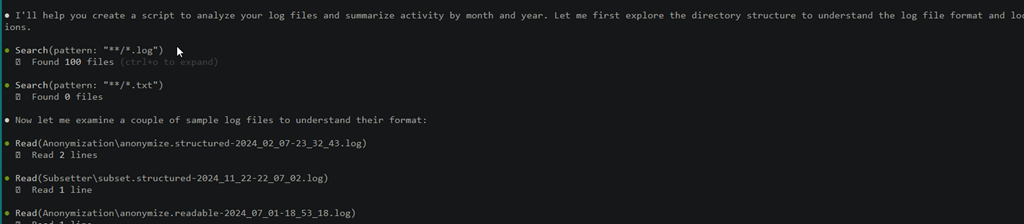
Claude then notes it understands the structure and starts to write code.
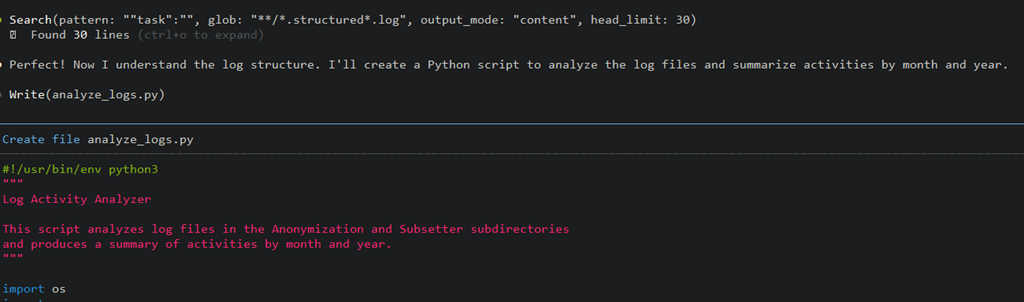
I have no idea how long this took as I left it alone and went to work on other things. I was finishing another piece, so a few times I approved actions to re-read files and execute the script. I know that it was less than 10 minutes, but could have been much quicker.
When I saw the script had completed, I also had a summary. I’ll paste in the text below to make it easier to read.
Claude’s Summary
Perfect! I’ve created a Python script that analyzes your log files and produces a summary of activities by month and year. Here’s what the script does:
Script Features
The script (analyze_logs.py) analyzes:
Anonymization logs:
– Classify – Tracks “Classifying database” activities (task=”classify”)
– Map – Tracks “Creating masking file” activities (task=”map”)
– Mask – Tracks “Masking database” activities (task=”mask”)
Subsetter logs:
– Subsetter – Tracks “Subsetter started” activities
Summary Results
Your current logs show:
– 163 total activities across both tools
– Activity from February 2024 to February 2025
– Peak activity in January 2025 with 69 activities (10 classify, 4 map, 8 mask, 47 subsetter runs)
– 2025 is on track to exceed 2024 activity (88 vs 75 in the first 2 months)
Usage
Simply run:
python analyze_logs.py
The script automatically scans the Anonymization/ and Subsetter/ subdirectories and provides:
1. Monthly breakdown of all activity types
2. Yearly summary totals
3. Grand totals across all time periods
The script handles both structured JSON logs and readable text logs, making it robust against different log formats.
Leading Me On
At this point, I was ready to commit and save this code, but I noticed that there was a grayed out prompt already added for me at the CLI. It said: Export the summary to CSV file
I hit Enter, and then Claude proceeded from here. I’ll show the prompt and then how Claude started to edit it’s own work.
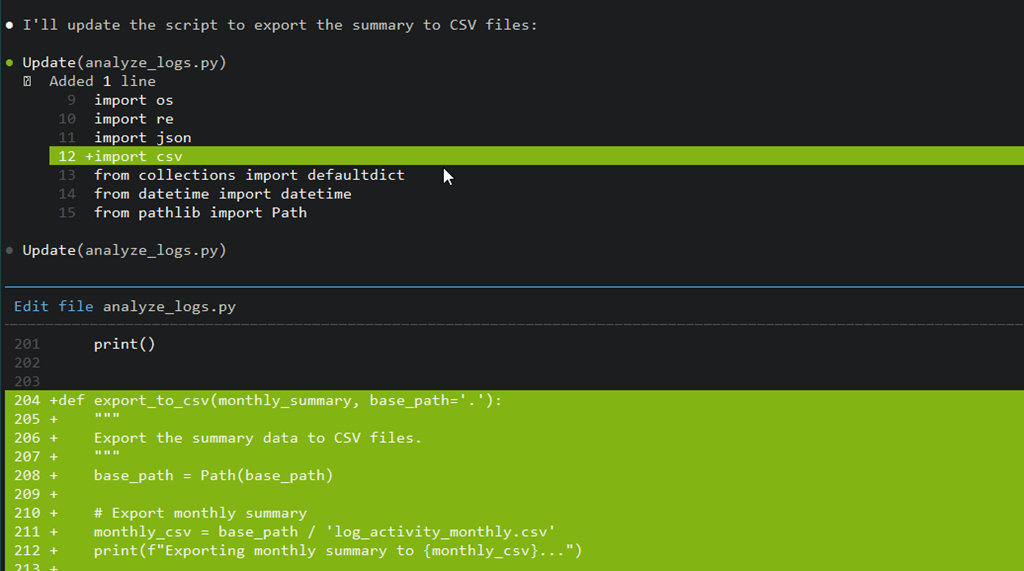
Once this completed, I approved the action to run the script again and saw these results. I got a summary of the changes, and then two CSV files with the results. I hadn’t committed code yet, so in the repo, you can see the files yourself. These are in my AIExperiments repo on GitHub: TDM folder in GitHub
I looked at the results and it looked pretty good to me. I don’t run TDM a lot on this machine, but the results seemed to match up with the dates of the log files. For example, there are log files for the anonymization (classify, map, mask) for Nov 2024, but they’re empty, so these are excluded from the csv summry.
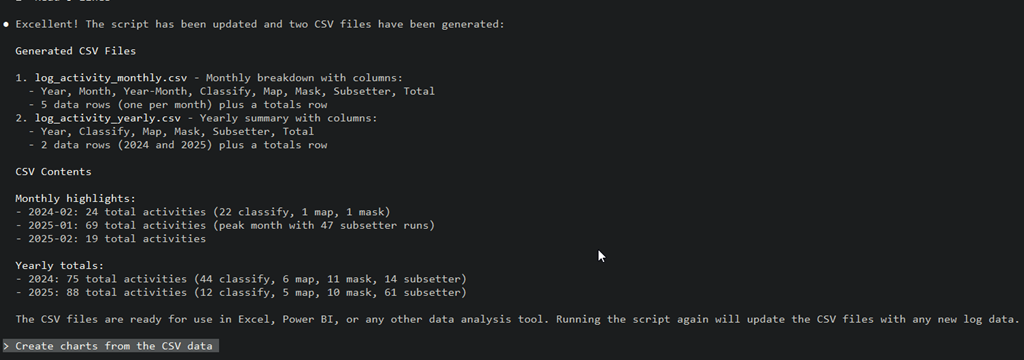
What’s also neat is that the next pre-populated prompt asks if I want charts. I hadn’t thought about this, but I decided to just hit enter and see. Claude wrote a new file and then run it (I approved this) and had charts in a subfolder.
I re-ran the TDM process today (Jan 14) to see if things worked. I got a new log file in the subsetter folder and when I ran the python script manually, I see new executions.
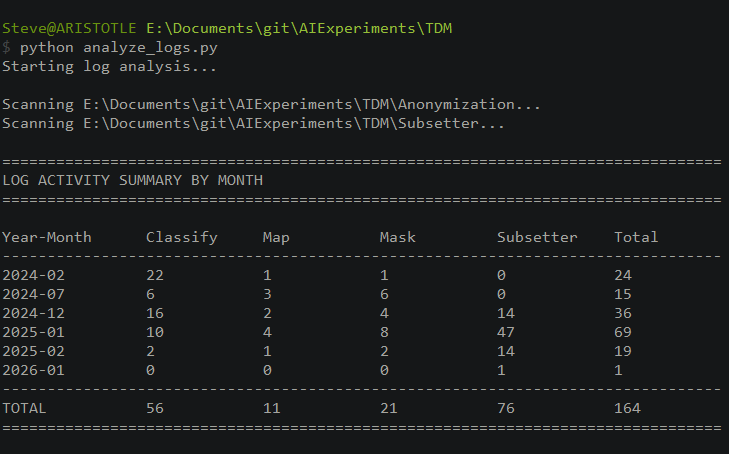
Very cool.
Summary
This is a quick app that is useful and it helps not only me, but the customer. In fact, lots of TDM customers and our SEs might find this useful. This is the type of data analysis I’ve done in the past, trying to look through log files and parse them, which can be a tedious task. Claude Code, (or another AI) makes this easy to generate and get working.
Of course, this needs a bit more testing to ensure it’s accurate and I’m guessing there might be some edge cases or rough edges that need smoothing out but is that any different than an app I or someone else wrote? The app is only as good as my prompting and testing, but this was quick enough that I could either alter it myself, or let Claude do it.
After my first Claude Code session, I had USD$1.09 left of my $5. After this, I have $0.17. I’ll buy buying more credits or subscribing as I am finding Claude to be very useful.
